

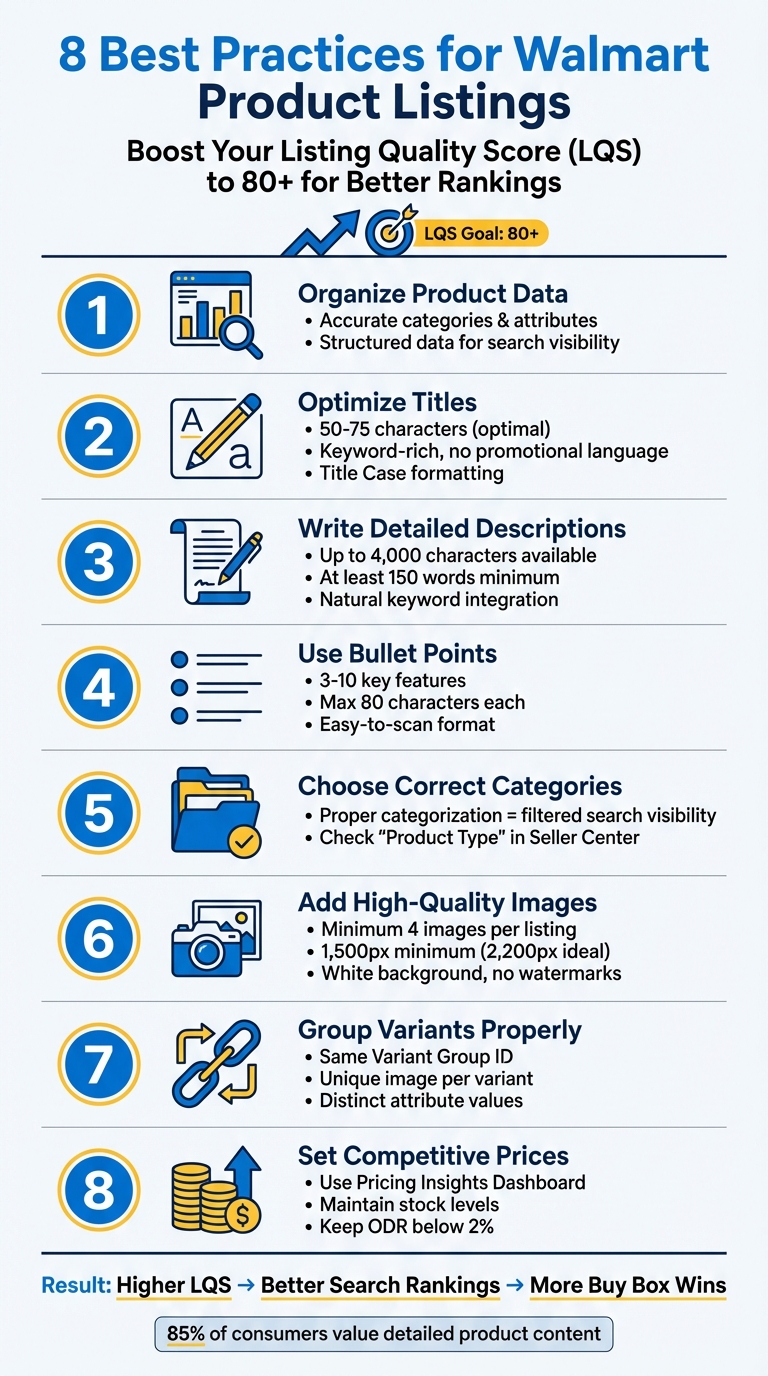
Your Walmart product listings directly impact visibility, sales, and customer trust. To succeed, focus on optimizing your Listing Quality Score (LQS) - a metric that evaluates factors like content quality, pricing, shipping, and reviews. A score of 80+ increases your chances of ranking higher in search and winning the Buy Box. Here’s a breakdown of the eight key strategies to improve your listings:
- Organize Product Data: Ensure accurate categories, attributes (e.g., size, color), and structured data to improve search visibility.
- Optimize Titles: Keep titles clear, concise (50–75 characters), and keyword-rich, avoiding promotional language.
- Write Detailed Descriptions: Use up to 4,000 characters to provide all necessary product details, naturally integrating keywords.
- Use Bullet Points: Highlight key features (3–10 points, max 80 characters each) to make information easy to scan.
- Choose Correct Categories: Proper categorization ensures your product appears in filtered searches.
- Add High-Quality Images: Include at least four images (1,500px minimum), showcasing the product clearly with a white background.
- Group Variants Properly: Organize variants (e.g., size, color) under the same group ID to simplify the shopping experience.
- Set Competitive Prices: Use tools like Walmart’s Pricing Insights Dashboard to stay competitive and maintain stock levels.
These steps help boost your LQS, improve discoverability, and drive conversions. Accurate data, clear content, and competitive pricing are essential for long-term success on Walmart Marketplace.
8 Best Practices for Optimizing Walmart Product Listings
Walmart Listing Optimization Guide
1. Organize Product Data Before Creating Listings
Before creating your listings on Walmart, take the time to organize your product data. Walmart's system relies on structured information - like Product Category, Product Type Group, and Product Type - to ensure your items show up in the right searches. If your product ends up in the wrong category, it could stay hidden from potential buyers.
"The most important part of SEO on Walmart.com is making sure that you are in the right product type." – Carrie Miller, Principal Brand Evangelist, Helium 10
To get it right, check out how competitors categorize similar products. If you spot errors in your product placement, you can report them using the Listing Quality dashboard in Seller Center. Beyond categories, focus on accurate attributes like color, material, and size. These details help power Walmart's navigation filters, which shoppers rely on to narrow their searches. Walmart also updates its attributes regularly, so keep an eye on the "Growth Opportunities" tab to fill in any missing details.
Product Data Accuracy
Walmart has clear standards for listing content. Here’s what you need to know:
- Titles: Keep them under 150 characters and include the brand, item name, and key attributes. Avoid promotional language.
- Descriptions: Write a single paragraph of at least 150 words.
- Bullet Points: Use 3–10 bullet points for key features, each no longer than 80 characters.
- Units of Measure: Ensure you're using the correct units for all attributes.
These elements don’t just meet Walmart's standards - they also impact your Listing Quality Score (LQS). Once your data is accurate, you can focus on integrating the right keywords to make your listing easier to find.
Keyword Optimization
Start by identifying one or two primary keywords and weave them naturally into your title, description, and key features. Avoid overloading your listing with keywords - Walmart's algorithm doesn’t reward that. For long-tail keywords, blend them into your descriptions in a way that feels natural. For instance, if you're selling a cardigan, adding the term "sweater" can help capture related searches.
Keep in mind that Walmart shoppers often use broad terms and filters, so copying keywords from other platforms like Amazon may not work. Use tools like Google Trends or Google Keyword Planner to find high-volume search terms that align with Walmart's search behavior. Don’t forget to optimize image filenames too. For example, naming a file "mp3-player-blue.jpg" can improve visibility in Walmart’s visual search results.
Once your listing is keyword-ready, make sure your pricing and inventory are just as polished.
Pricing and Inventory Management
Walmart's algorithm is highly sensitive to pricing. If your prices aren’t competitive, your listings might not even appear in search results. To stay ahead, consider using dynamic repricing tools to adjust your prices automatically based on market trends.
Stock availability is just as important. Listings that frequently show "out of stock" can hurt your search rankings and damage your LQS. Regularly monitor your pricing and inventory levels through the "Offer" section of the Listing Quality dashboard to keep everything in check. By maintaining competitive prices and a strong in-stock rate, you'll improve your chances of standing out in Walmart's marketplace.
2. Create Clear Titles with Relevant Keywords
Your product title is the first thing shoppers notice in search results, and it plays a huge role in whether they click on your listing. A well-crafted, clear title is key to making your Walmart listing stand out, improving both visibility and click-through rates. Walmart's search algorithm heavily relies on titles to determine product visibility, so nailing this aspect is crucial. Once you have a strong title, you can enhance it further by incorporating targeted keywords and proper formatting.
Product Data Accuracy
Walmart suggests keeping titles between 50 and 75 characters for optimal performance [13]. While you can go up to 150 characters [3], concise titles tend to perform better in search rankings. Stick to Walmart's recommended title structure [12]. For instance, instead of a vague title like "Men's T-Shirt", opt for something more detailed, such as "Hanes Men's Tagless Cotton Crewneck T-Shirt, Black, Size Large, 2-Pack" [12].
Use Title Case for your titles, and avoid using all-caps or special characters like ~, !, *, or $. Include specific details such as size or quantity (e.g., "12 oz" or "4 count") to help shoppers quickly identify the product they need. If you're listing variant groups, skip mentioning colors in the title [13].
Keyword Optimization
Focus on one or two natural search keywords and use each only once [1]. Walmart's algorithm prioritizes clarity and relevance, so tools like Google Trends or Walmart's search bar auto-suggest can help you find high-traffic terms.
"Walmart emphasizes brevity, relevance, and clarity. Unlike Amazon, which allows for longer and more flexible titles, Walmart emphasizes brevity." – Colleen Quattlebaum, Marketing, GoAura [12]
Avoid keyword stuffing - repeating the same keyword or adding irrelevant terms can hurt your Listing Quality Score and drop your search rankings. Stay away from promotional phrases like "Best Seller", "Free Shipping", "Low Price", or "Clearance." Also, avoid including "Walmart" or other retailer names unless they are part of your official brand name [3].
| Element | Allowed/Recommended | Prohibited |
|---|---|---|
| Character Count | 50–75 (Optimal), up to 150 | Over 150 characters |
| Keywords | 1–2 primary keywords; unique words | Repetitive or irrelevant keywords |
| Claims | Factual attributes (size, color, material) | Promotional claims (e.g., "Best Seller") |
| Formatting | Title Case | ALL CAPS or special characters (~, !) |
Your title directly affects your Listing Quality Score and determines how your product appears on Walmart.com and external search engines like Google [2]. Use the Listing Quality Dashboard in Seller Center to evaluate your title's performance and get actionable suggestions for improvement. Once your title is optimized, focus on aligning other listing elements to maximize your overall Listing Quality Score.
3. Write Complete Product Descriptions
A well-crafted product description is what turns casual browsers into confident buyers. While the title grabs attention, the description provides the detailed information shoppers need to make their decision. Walmart allows up to 4,000 characters for product descriptions, giving you ample space to highlight your product’s features and benefits [3][11]. This serves as the backbone for both accurate data and keyword strategy.
Product Data Accuracy
Getting the details right is essential. Your description must align perfectly with the product mentioned in the title - any discrepancies can violate Walmart's policies and risk having your listing removed [3]. Consistency between the title and description builds trust with shoppers. Be specific by including attributes like brand name, model number, material, dimensions, and weight. These details reassure buyers that they’re purchasing exactly what they expect [14][7]. For refurbished items, transparency is key: clearly state "Refurbished" or "Restored" in both the title and description [7].
To keep things clean and readable, stick to Walmart’s formatting rules. Avoid HTML, bullet points, emojis, special characters, and numbered lists [3][14]. Instead, break your content into short paragraphs - each no longer than 150 words - for better readability [14]. Steer clear of promotional phrases like "best-selling", "free shipping", or "clearance." These belong in pricing or inventory settings, not in the product description [3][7].
"Walmart wants sellers to write descriptions that are clear, relevant, useful, and easy for customers to understand. They don't want a lot of fluffy language or use of generalities." – Carrie Miller, Principal Brand Evangelist, Helium 10 [10]
Once you've ensured your description is clear and compliant, it’s time to focus on keyword integration.
Keyword Optimization
Keywords play a big role in boosting your product’s visibility on Walmart and beyond [1][11]. Choose one or two primary keywords and weave them naturally into your description. Avoid overloading your text with the same keyword - this practice, known as keyword stuffing, can hurt both readability and your Listing Quality Score [1][4]. Instead, use long-tail phrases, such as "wireless bluetooth mp3 player", to target shoppers with specific search intentions [11].
Descriptions are also a great place to include synonyms. For example, if you’re selling jeans, use words like "pants" or "trousers" to attract a broader audience without sounding repetitive [14]. Keep the tone clear and conversational - ditch overly salesy language and, where appropriate, incorporate relevant slang naturally [11]. Ultimately, your description contributes to your Content Quality score, which influences how your products rank in search and browse results [2][4].
4. List Key Features in Bullet Points
Bullet points are a powerful tool for making your product's key attributes easy to understand at a glance. Walmart allows between three and 10 key features per listing, with each bullet point limited to 80 characters[3][14]. Since every word matters, prioritize your most important benefits first. These concise points, paired with clear titles and descriptions, make your listing more approachable for shoppers.
Keyword Optimization
Once you've nailed your title and description, focus on optimizing your bullet points for search. Smart keyword placement can improve your product's visibility. Aim to include one or two primary keywords naturally, without repeating them unnecessarily[1]. Think about how your customers search - specific phrases like "wireless Bluetooth MP3 player" often perform better than vague terms. However, avoid reusing keywords from your title or description to keep things fresh.
Product Data Accuracy
Stick to the facts. Use bullet points to present essential details, such as dimensions, materials, age ranges, or technical specifications[14]. Avoid promotional language like "best-selling" or "top-rated", and steer clear of special characters, emojis, or HTML formatting. Keep the style clean with standard capitalization and simple bullet formatting.
"Listing the most important features first, including three to 10 of the most important benefits and features of your item." – Walmart Marketplace[3]
Your bullet points directly influence your Content Quality score, which affects how your product ranks in search results[2][4]. Accurate, relevant, and easy-to-read features help shoppers make quick, confident decisions when choosing your product.
sbb-itb-81460ea
5. Choose the Right Categories and Attributes
Walmart uses a three-tier system to organize products: Product Category, Product Type Group, and Product Type. This structure influences how attributes are assigned and impacts fees associated with listings [9][8]. Getting this categorization right is key to making your products easier to find.
| Categorization Level | Description | Example |
|---|---|---|
| Product Category | Broad grouping of similar products. | Animals |
| Product Type Group | Products sharing common characteristics. | Animal Grooming |
| Product Type | Specific product type with unique attributes. | Animal Shampoos |
Product Data Accuracy
Accurate categorization builds on your product data to improve visibility. Picking the wrong category can lead to missing or irrelevant attribute requirements, which may make your product harder for shoppers to find [9]. To ensure accuracy, check the "Product type" column in the Seller Center Catalog. If it shows "Miscellaneous", head to the Listing Quality dashboard, click on Details, and use the "Report Issue" option to request a correction [9][2].
Filling out all attribute fields is essential for navigation filters on Walmart.com. These filters, found in the left-hand navigation, rely on complete "Discoverability" fields. Missing information could mean your product won't show up when shoppers use those filters [3][13]. Double-check that numeric values align with their units (e.g., "16 oz") [3]. Just like optimized titles and descriptions, proper categorization strengthens your overall Listing Quality Score.
"Categorization and item attribution are integral to determining how your items will appear in search and browse results on Walmart.com and other search engines, like Google." – Walmart Marketplace [9]
To align with Walmart's platform requirements and your business goals, review their Content Standard Guides [9][8]. Strong attribution doesn’t just help on Walmart.com - it also improves your product's visibility on search engines like Google [9].
6. Upload High-Quality Images and Videos
Great visuals can make all the difference when it comes to turning casual browsers into buyers. Along with accurate product data and engaging descriptions, high-quality images play a major role in improving your Listing Quality Score. Walmart recommends including at least four high-quality images per listing to better connect with shoppers [16]. The ideal resolution is 2,200px x 2,200px with a 1:1 square aspect ratio. However, the minimum resolution required to enable zoom functionality is 1,500px x 1,500px [16].
Visual Quality
Your main image should showcase the product clearly on a pure white background. It needs to be sharp, well-lit, and free of distractions like watermarks, logos, or promotional text such as "Clearance" [16]. Avoid including accessories unless they are part of the product. Ensure the image is closely cropped without losing clarity - don’t upscale low-resolution images [16]. Additionally, double-check that your file size and format meet Walmart's guidelines. Finally, confirm that your images match your product data for consistency and accuracy.
Product Data Accuracy
High-quality visuals aren’t just about clarity - they must also represent your product accurately. Any mismatch between images and product details can delay publication [16]. For variant groups, such as different sizes or colors, provide a unique image for each option to help shoppers make informed decisions [17]. Name your image files using the product’s 14-digit GTIN for easier management [16]. If you’re part of Walmart’s Pre-Owned Program, specific images are required to reflect the condition of items labeled as Remanufactured, Like New, Good, Fair, or New with Defects. This ensures customers know exactly what to expect [16].
Strong visuals not only improve your Listing Quality Score but also enhance search rankings on Walmart.com and external platforms like Google [2][5]. Professional photos help build trust with customers, reduce the likelihood of returns, and increase conversions [4][5]. Use additional image slots for lifestyle shots that show the product in use or overlays that highlight dimensions and key features [7][4]. Accurate, high-quality images are a cornerstone of a successful Walmart listing, boosting both visibility and sales.
7. Group Product Variants Properly
Organizing product variants by size, color, or material makes it easier for shoppers to compare options. This approach keeps your listings tidy and helps customers quickly find what they need without navigating through numerous pages.
Product Data Accuracy
Each variant should have a unique identifier, such as a GTIN, UPC, or ISBN, and be grouped under the same Variant Group ID [18]. It's crucial that each variant has distinct attribute values - like "Small", "Medium", and "Large" for sizes. Walmart may unpublish items if duplicate attribute values are detected within a group [18].
Just as precise titles and descriptions improve your Listing Quality Score, clear and accurate variant data boosts individual product performance. These attributes are directly tied to Walmart's search filters, enabling shoppers to refine their searches using the left-hand navigation bar on Walmart.com [8]. Selecting the correct product type ensures access to the right attributes for defining variants [9].
Visual Quality
Include a swatch image for each variant to make visual differentiation easier [18]. For example, if you're selling a jacket in multiple colors, each color should have its own image to showcase its appearance clearly. This reduces confusion and lowers the chance of returns. Ensure that each image is at least 1,000 pixels on one side with a 1:1 ratio for optimal zoom functionality [8].
Accurate images go hand in hand with keeping inventory up to date, which helps maintain strong search performance for each variant.
Pricing and Inventory Management
Keep stock levels updated regularly for all variants. Running out of stock on any variant can negatively impact your "Published and In Stock" score, which is calculated over a seven-day period, and this can hurt your overall Listing Quality ranking [2]. Competitive pricing across all variants is equally important to stay appealing in search rankings [2].
8. Set Competitive Prices and Keep Stock Updated
Pricing and Inventory Management
Keeping your prices competitive and your stock levels steady is crucial for improving your Listing Quality Score and boosting search visibility. If your price competitiveness score falls into the "Poor" range (0–59%), your products are likely to drop in search rankings [2][10]. Similarly, the "Published and in stock" metric, which tracks item availability over the past seven days, can take a hit even from short stockouts, negatively affecting your ranking [2][10].
After organizing your data, the next step is managing your pricing effectively. Walmart's Pricing Insights Dashboard is a valuable tool for this. It helps you track metrics like price competitiveness and Buy Box win rates. The dashboard provides insights into the "Competitive Price" (how your product compares to prices on other e-commerce platforms) and the "Buy Box Price" (the current winning price on Walmart). It also includes details like estimated commission, enabling you to calculate your net margins [19][20].
To safeguard your profit margins, set a "Repricer min price" for each SKU. This prevents Walmart's automated repricing system from lowering your price below a threshold you set. Keep in mind that winning the Buy Box isn’t solely about offering the lowest price. Walmart also factors in shipping speed, shipping cost, and in-stock rates. Offering fast and free shipping (delivery within three days or less) can earn you a 100% Shipping score, which improves your Buy Box eligibility [2][20].
Maintaining updated inventory is equally important. Stockouts can trigger Walmart's Polaris algorithm, lowering your product's ranking. Aim to keep your Order Defect Rate (ODR) below 2% to retain Buy Box eligibility and avoid account suspension. Frequent stockouts can lead to order cancellations, which increase your ODR and may disqualify your items from promotional campaigns [21][22][23][4].
For products with at least 10% savings, using "Reduced Price" or "Clearance" flags can help attract more traffic and increase visibility [20]. Additionally, regularly monitor the Buy Box Report in Seller Center. This report highlights items losing traffic due to uncompetitive pricing or less appealing shipping options, allowing you to make timely adjustments [20].
Conclusion
Optimizing your Walmart product listings isn’t just about ticking boxes - it’s about building trust and achieving tangible results. When your listings are optimized, they not only improve SEO, making your products easier to find, but they also ensure your items appear in filtered searches by correctly assigning categories and attributes. These efforts directly enhance your products' discoverability and set you up for long-term success in the marketplace [1][3][15].
Pairing high-quality visuals with competitive pricing and fast shipping can significantly boost your Listing Quality Score and improve your chances of winning the Buy Box - a key driver of Walmart’s online sales [2][6][24]. With the majority of sales flowing through the Buy Box, its importance cannot be overstated.
Given that 85% of consumers value detailed product content, aiming for an Excellent quality rating is essential [24]. Achieving and maintaining this rating directly impacts your performance, making it crucial to focus on the factors that matter most.
Accuracy in data, compelling images, and pricing that reflects market demands are the foundation of a successful listing. Regularly checking your Listing Quality dashboard can help you spot and address any issues quickly [2]. Keep an eye on key metrics like price competitiveness, shipping performance, and in-stock rates. And remember, keeping your Order Defect Rate (ODR) below 2% is critical - not only for Buy Box eligibility but also to avoid potential penalties [4].
FAQs
What is the Listing Quality Score, and how does it impact my product's visibility on Walmart?
The Listing Quality Score plays a crucial role in how your product ranks in Walmart's search results. A higher score means your product is more visible to shoppers, which can lead to better discoverability and, ultimately, more sales.
This score takes into account several key elements of your listing, including the accuracy of your product information, the inclusion of relevant keywords, the quality of your images, and your pricing strategy. By fine-tuning these aspects, you can improve your Listing Quality Score and increase your product's chances of standing out on Walmart's platform.
What should I include in a Walmart product title to make it effective?
To craft a Walmart product title that works well, aim for clarity, specificity, and searchability. Stick to a length of 50-75 characters - this range keeps the title easy to read while also being optimized for search engines. Use a structure like this: Brand + Product Type + Key Features + Style (if relevant) + Pack Count. For example: "Acme Stainless Steel Water Bottle, 32 oz, Leak-Proof, Blue."
Make sure to include keywords that shoppers are likely to use, such as the product’s size, material, or color. Avoid generic terms or unnecessary words - they can dilute the title’s impact and make it less precise. Following these guidelines not only helps your product rank better in search results but also ensures it accurately represents what you're offering, increasing its appeal to potential buyers.
What are the best practices for creating Walmart product images?
To produce product images that align with Walmart's standards, prioritize clarity and a polished appearance. Use high-resolution images to ensure the product is sharp and free from pixelation or blurriness. Proper lighting is essential, and the product should be presented against a clean, neutral background, like white, to keep the focus entirely on the item.
Make sure to stick to Walmart's specific requirements for image size and aspect ratio. Including multiple photos from various angles or highlighting key features gives shoppers a more comprehensive view of the product, which can boost their confidence in making a purchase. Meeting these guidelines not only enhances the visual appeal of your listing but also ensures it complies with Walmart's policies, helping you avoid any potential setbacks.
