

Amazon payment holds can disrupt your cash flow, making it tough to manage your business. These holds, often tied to performance issues, verification problems, or policy compliance, can delay access to your funds for days - or even months. Here's a quick breakdown of how to address and prevent them:
- Identify the Cause: Check your Seller Central account for notifications, account health metrics, or payment dashboard details.
- Update Your Details: Ensure your bank account, tax forms (W-9/W-8BEN), and business information match Amazon's records.
- Submit an Appeal: If the hold is due to a violation, provide a clear Plan of Action with supporting documents.
- Contact Support: Open a case in Seller Central or escalate via email if the issue persists.
- Prevent Future Holds: Monitor your account health daily, maintain strong performance metrics, and comply with Amazon policies.
Act quickly and stay organized to resolve payment holds and keep your business running smoothly.
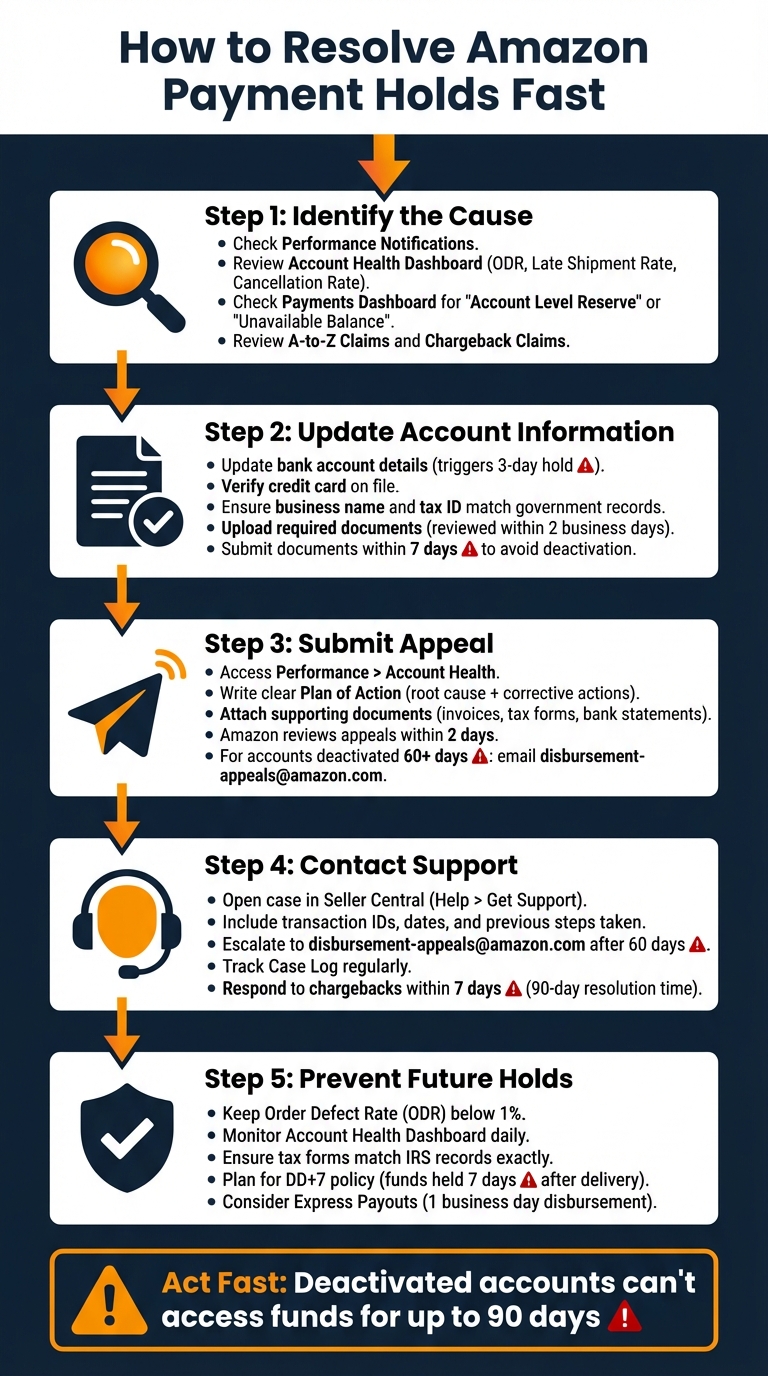
5-Step Process to Resolve Amazon Payment Holds
Amazon Refuses To Pay You? How to Release Withheld Amazon Funds? Money Recovery Process For Sellers
sbb-itb-81460ea
Step 1: Find Out Why Your Payment Is on Hold
Understanding why Amazon is holding your funds is the first step toward resolving the issue. Without identifying the cause, you won’t be able to take the necessary actions. Amazon uses various types of payment holds, and each one requires a specific approach. Start by checking three key areas in Seller Central.
Check Performance Notifications and Account Health
Head to the Performance tab in Seller Central. This is where Amazon communicates important updates, including policy violations, account deactivations, or requests for verification. If your account has been flagged for suspicious activity, you’ll likely find a notification here, often referencing "Section 3 of the Amazon Services Business Solutions Agreement." According to Amazon:
"If we deactivate your account under Section 3 of the Business Solutions Agreement and determine that your actions may result in risks to Amazon or third parties, then we may withhold any funds that may be in your account" [5].
Next, check your Account Health Dashboard. Focus on key metrics like the Order Defect Rate (ODR), Late Shipment Rate, and Pre-fulfillment Cancellation Rate. Metrics highlighted in yellow ("At Risk") or red ("Critical") could be the reason for a performance-based hold. Amazon monitors these metrics closely, as poor performance increases the likelihood of customer complaints and refunds.
Once you’ve reviewed your account’s performance, turn your attention to the payment details and communications.
Review Your Payments Dashboard and Emails
Open the Payments Dashboard and navigate to the Statement View tab. Look for funds labeled as "Account Level Reserve" or "Unavailable Balance." These labels often indicate money held to cover potential A-to-Z claims, chargebacks, or tax liabilities.
Check the Deferred Transactions page for orders subject to the DD+7 policy, where funds are released 8 days after confirmed delivery. For Amazon Business orders, you might notice "Invoiced Orders" held for 30 to 45 days until the buyer pays the invoice [1].
Don’t forget to review your email inbox for messages from Amazon. Look for subject lines like "Account on hold" or "Your payments are currently on hold." These emails, often sent from addresses like compliance-verification@amazon.com, typically include a reference number or instructions to upload necessary documents [8]. If you recently updated your bank account details, note that disbursements may be subject to a one-time, 3-day hold starting from the day the changes were made [3].
Look for Disputes and Claims
Finally, check the A-to-Z Claims and Chargeback Claims sections in Seller Central. Unresolved claims can lead to immediate payment holds, especially if you haven’t responded. Chargeback-related reserves may be held for up to 90 days [7], while some A-to-Z Guarantee claims can take 14 days or more to resolve [7].
Step 2: Verify and Update Your Account Information
Make sure your account details are correct and up to date. Amazon requires identity verification for both your business entity and your bank account ownership before it can release funds [9]. If verification fails or if there’s any unusual payment activity, Amazon may place a hold on your disbursements or even deactivate your account [9][6].
Update Payment Methods and Verify Your Identity
To update your payment information, log in to Seller Central. Go to Settings > Account Info > Deposit Method, then click "Edit" or "Add" to input an ACH-enabled checking account [3]. Be aware that updating your bank account will result in a mandatory 3-day hold on disbursements starting from the date of the change [3].
Next, update your credit card details by navigating to Settings > Account Info > Charge Method and clicking "Edit." A valid credit card on file is required for Amazon to process disbursements to your bank account [3]. If your account has been deactivated due to verification issues, you’ll see a "Reactivate your account" button on the Seller Central homepage or in the Performance section of the Account Health Dashboard [10].
When submitting verification documents, ensure they meet Amazon’s requirements. Use clear, full-page scans (not photos) in formats like .png, .tiff, .jpg, .jpeg, or .pdf, and keep file sizes under 10MB [10]. Avoid using special characters (e.g., $, &, #) in file names [10]. Amazon typically reviews these documents within 2 business days [10].
Once your payment and identity details are updated, double-check that your business information matches Amazon’s records.
Ensure Business Details Match Amazon Records
Amazon cross-checks the information you provide with government agencies and third-party services to prevent fraud. According to Amazon’s Funds Disbursement Eligibility Policy:
"If we find that you have engaged in deceptive, fraudulent, harmful, or illegal activity, have abused our systems, or repeatedly violated our policies, or if we cannot confirm your identity, we may in our sole discretion permanently withhold any payments to you" [5].
Review your business details by going to Settings > Account Info in Seller Central. Check the "Business Information" and "Tax Information" sections [11]. Ensure your legal entity name and tax ID match official government records. Your business address in Seller Central should also match the address on your uploaded utility bills or identity documents [10]. Even small inconsistencies can delay verification.
Once your account details are confirmed, gather the necessary documents for submission.
Upload Required Documents
The documents Amazon needs will depend on your business type. If you operate as an LLC or corporation, you can upload certified articles of incorporation, government-issued business licenses, partnership agreements, or your EIN [10]. Sole proprietors can submit a government ID (like a passport or driver’s license), a business license, or a Schedule C Tax Form [10].
For identity verification, acceptable documents include a driver’s license, passport, state ID, U.S. Green Card, or U.S. Visa [10]. If your address isn’t listed on your primary ID, you’ll need to provide a utility or phone bill dated within the last 60 days [10]. If you’re an authorized representative rather than the owner, you’ll need to submit a Letter of Authorization on business letterhead. This letter must include your full name, signature, title, and government ID number [10].
You can upload these documents via the Account Health Dashboard under the Performance tab by clicking "Reactivate your account." Alternatively, respond directly to the verification request email using the email address registered to your account [10]. Keep in mind, if the requested documents aren’t submitted within 7 days, Amazon may deactivate your account [10].
Step 3: Submit an Appeal or Plan of Action
If updating your account details doesn’t resolve the issue, it’s time to submit an appeal with a clear and detailed Plan of Action. This step is crucial if the hold on your account is due to a policy violation or compliance issue. Amazon usually reviews appeals within two days[13]. Here’s how to proceed effectively.
Access the Performance Section for Appeals
Start by logging into Seller Central and navigating to Performance > Account Health. If your account has been deactivated, click the Reactivate Your Account button. For accounts deactivated for over 60 days, you’ll need to send an email to disbursement-appeals@amazon.com[5][13]. If the hold is linked to a specific policy violation, check under the Product Policy Compliance section to initiate your appeal[13].
Write a Clear Plan of Action
Your Plan of Action should be straightforward and based on facts. Begin by identifying the root cause of the issue - this could be anything from unverifiable suppliers to inventory or quality control problems[12]. Then, outline the corrective actions you’ve taken, including specific dates and updates to your processes[12]. For instance, if supplier issues were the problem, explain how you’ve sourced new, reliable suppliers and implemented stricter vetting procedures. Amazon needs to see that you’ve pinpointed the problem and taken meaningful steps to fix it.
Add Supporting Evidence to Your Appeal
Make your appeal stronger by attaching all necessary documentation. Include invoices from the past 365 days, bank statements, tax forms (like a W-9 for U.S. sellers or W-8BEN for international ones), and relevant confirmation emails for each ASIN or product mentioned in Amazon’s notice[12][14]. To make your evidence easy to review, highlight key details like ASINs, supplier names, or specific clauses in the documents[12]. This extra effort can make a big difference in the outcome of your appeal.
Step 4: Contact Amazon Support the Right Way
If your payment hold isn't resolved through your appeal, reaching out to Amazon Support can help move things along - but only if you approach it correctly. The trick is using the right channels, providing all necessary details upfront, and staying actively engaged with your case.
Open Support Cases Through Seller Central
Start by opening a case in Seller Central under Help > Get Support. Select Payments if the issue involves disbursement delays, or Account Settings > Tax Information for tax-related holds[14]. This ensures your case is routed to the correct team, avoiding unnecessary delays.
Make sure to include:
- Specific transaction IDs
- Relevant dates
- A summary of previous steps you’ve taken to resolve the issue
Attach any supporting documents, such as bank statements or tax forms, right away[5][14]. If the hold is related to unusual account activity, use Amazon’s secure sign-in portal. According to Amazon:
"The fastest way to unlock your account is to submit the requested details yourself through our secure sign-in portal"[6].
If the issue isn't resolved after this, it's time to escalate your case.
Escalate When Cases Aren't Resolved
When your initial case doesn't lead to a resolution, escalate by emailing disbursement-appeals@amazon.com after 60 days from your account deactivation[5]. Be sure to include:
- Your original case ID
- Any updated documentation
- Confirmation that your bank account name matches the name in Seller Central records[14]
Even if your appeal regarding the deactivation itself is unsuccessful - or you decide not to appeal - you can still request withheld funds by contacting the same email address after the 60-day mark[5].
Track Your Case and Follow Up
Once you've escalated, stay on top of your case. Regularly check the Case Log in Seller Central for updates and respond promptly to any requests from Amazon[5][14]. If the hold involves a chargeback, be aware of the tight timeline: you have just seven calendar days from the email date to respond before Amazon automatically refunds the customer[15]. Failing to meet deadlines or provide requested information can result in case closure[15].
Chargeback cases can take up to 90 days to resolve[15]. If you believe a chargeback was processed in error, reply directly to the outcome notification email to provide additional clarification[15]. Staying proactive and organized is key to resolving these issues efficiently.
Step 5: Prevent Future Payment Holds
The smartest way to handle payment holds? Avoid them altogether. This means staying in sync with Amazon's rules, keeping a close eye on your account health, and being ready for situations where holds are unavoidable.
Stay Compliant with Amazon Policies
Following Amazon's policies is your first line of defense against fund freezes. For instance, the Amazon Services Business Solutions Agreement allows Amazon to deactivate accounts and hold funds for up to 90 days if there's suspicion of fraud or concerns about product authenticity [2]. Similarly, the INFORM Consumers Act requires sellers to complete identity and business verification. Skipping this step? It’s a surefire way to get your funds frozen [2].
Tax compliance is another critical area. If you're a U.S. seller, your W-9 form - or W-8BEN for international sellers - needs to match IRS records perfectly. Even small differences, like punctuation or abbreviations, can result in an immediate payment hold [14]. On top of that, keep your Order Defect Rate (ODR) below 1%, avoid late shipments, and minimize pre-fulfillment cancellations to steer clear of performance-related reserves [15].
Monitor Your Account Health and Notifications
Your Account Health Dashboard is your best friend - check it daily. A decline in metrics like ODR, late shipments, or cancellations can trigger a reserve before you even realize there's a problem [2]. Pay close attention to performance notifications; these often highlight A-to-z claims, chargebacks, or verification requests that need immediate action [2][6]. Ignoring these notifications can lead to unresolved claims, which directly result in account-level reserves [1].
If you receive alerts about "unusual payment activity" or security concerns, respond promptly by submitting the required documents through Amazon's secure portal [6]. Additionally, keep an eye on your Deferred Transactions page to track when funds held under the DD+7 policy will be released [1]. Staying proactive not only helps you catch issues early but also equips you to manage unavoidable holds more effectively.
Plan for Reserve Holds
Even with careful planning, reserve holds can happen, so it's wise to be prepared. Under the DD+7 policy, which has been in place globally since 2016, funds for Merchant Fulfilled Network orders are held until seven days after the delivery date (actual or estimated) [1]. To handle this, build a cash flow buffer to cover the gap and anticipate potential reserves tied to performance issues or account-level reviews.
If you're a newer seller - or you've had recent performance hiccups - be ready for an Account Level Reserve, where Amazon holds a portion of your earnings to cover potential refunds [2]. Selling through Amazon Business? Keep in mind that invoiced orders defer payments for 30–45 days until the buyer pays up. You can, however, opt for early payment at a 1.5% processing fee [1]. For faster access to funds, eligible U.S. sellers can enroll in Express Payouts, which reduces the standard 3–5 day disbursement time to just one business day [3].
Conclusion
Dealing with payment holds quickly is crucial to keeping your business running smoothly. Start by pinpointing the issue using tools like the Performance Notifications, Account Health dashboard, and Payments & Payouts dashboard. Double-check that your bank account details, tax forms (such as W-9 or W-8BEN), and business information are accurate and up to date - errors here can lead to holds. These steps form the foundation for resolving payment holds efficiently.
If the hold is tied to performance or policy issues, submit a clear and concise Plan of Action through Seller Central. If that doesn’t resolve the problem, escalate the issue through Amazon Support and keep a close eye on your case progress. Each step - from identifying the cause to working with support - helps you regain access to your funds and keeps your business on track. Quick responses to notifications and timely submission of required documents can significantly speed up the process.
Once the hold is resolved, focus on preventing it from happening again. Beyond fixing immediate issues, long-term compliance is essential. Keep an eye on your performance metrics, regularly review your Account Health dashboard, and follow Amazon’s policies to avoid future disruptions. Building a cash flow buffer and exploring options like Express Payouts (if eligible) can also provide added financial stability.
The bottom line? Act fast. With deactivated accounts unable to access funds for up to 90 days [2] and disputes taking as long as 45 business days [4] to resolve, time is of the essence. Use these strategies to address payment holds effectively, ensure compliance, and keep your Amazon business running without interruptions.
FAQs
Why does Amazon place holds on payments, and what are the common reasons?
Amazon might hold payments for a variety of reasons, often tied to account health or security concerns. For instance, performance issues like a high order defect rate, late shipments, or too many cancellations can trigger a hold. This is because Amazon closely monitors these metrics to ensure buyers have a smooth shopping experience. Additionally, account reserves may come into play, particularly for new sellers or those with recent performance challenges, to safeguard against potential refunds, claims, or chargebacks.
Payment holds can also result from unusual payment activity, which may lead to a security review, or from policy violations, such as failing to comply with Amazon’s seller guidelines. In some instances, unresolved account suspensions can also lead to withheld funds. These actions aim to create a secure and trustworthy marketplace for everyone involved.
What steps can I take to avoid payment holds on my Amazon account?
To keep your Amazon account running smoothly and avoid payment holds, focus on maintaining a solid track record and sticking to Amazon’s policies. Pay close attention to key performance metrics like your order defect rate, late shipment rate, and cancellation rate - keeping these within Amazon’s acceptable range is crucial.
Make it a habit to double-check your account details regularly and address any policy violations or performance concerns as soon as they arise. Stay clear of any unusual payment activities that might raise red flags. If Amazon reaches out with requests or notifications, respond promptly - quick communication can help prevent unnecessary delays.
By consistently meeting Amazon’s expectations and staying transparent in your operations, you can minimize the chances of payment holds and ensure your account functions without interruptions.
What can I do if Amazon denies my appeal for a payment hold?
If Amazon rejects your appeal, the first step is to carefully analyze their response to pinpoint the reason behind the continued payment hold. Common causes include issues with account health, policy violations, or payment method problems. Address the specific concern by taking actions like verifying your account information, fixing any flagged policy breaches, or contacting your bank if the issue involves payment methods.
For holds tied to account health or performance metrics, focus on improving your seller metrics and ensuring your operations align with Amazon’s policies. If the situation is particularly complex, it might be worth consulting with a professional who specializes in resolving Amazon account-related issues. Throughout this process, keep your communication with Amazon support clear and professional to work toward a resolution efficiently.
