

- 90% of shoppers leave product pages if titles and descriptions are unclear, even with great reviews and images.
- 72% of U.S. shoppers say titles and descriptions heavily influence buying decisions.
- Platforms like Amazon and Walmart now prioritize semantic relevance and user intent over basic keywords.
Key Takeaways:
-
Product Titles:
- Start with your main keyword.
- Include essential details like brand, material, size, and color.
- Keep it concise (50–100 characters) and easy to read.
- Avoid keyword stuffing.
-
Product Descriptions:
- Use keywords naturally, focusing on features and benefits.
- Highlight benefits that solve customer needs.
- Make content easy to scan with bold text, bullet points, and short paragraphs.
-
Platform-Specific Tips:
- Follow character limits (e.g., Amazon: 200 characters for titles, Walmart: 150).
- Avoid promotional language and banned symbols.
-
Testing:
- Regularly A/B test titles and descriptions.
- Track metrics like click-through rates and conversions.
Optimizing these elements boosts visibility, clicks, and sales. Start with your best-selling products and refine listings based on data and platform guidelines.
Product Title Optimization Checklist
Put Your Main Keyword First
Start your product title with the primary keyword. Since search results typically display only the first 50–60 characters (sometimes as few as 45 on mobile), placing the keyword upfront ensures it's visible to potential buyers.
Consider what your target audience is searching for. For example, if you're selling a stainless steel water bottle, begin with "Stainless Steel Water Bottle" instead of tucking those words behind your brand name. This approach improves your chances of appearing in relevant searches and grabs attention before the title gets cut off.
"The number one rule for good ecommerce SEO is to write for people first - not for the search engine web crawlers." - Michael Keenan, Growth Strategist, [Shopify [3]](https://e-comfaqs.com/blogs/sellsmarter/shopify)
Include Key Product Details
Your title should clearly outline the basics: brand, product type, material, size, and color. A consistent formula like "Brand | Product Type | Material | Size | Color" works well.
For instance, instead of a vague title like "Men's Running Shoes", go for something specific: "Nike Air Zoom Pegasus 40 Men's Running Shoes | Black | Size 10.5." Detailed titles like this help shoppers quickly identify the exact product they want, reducing confusion and unnecessary clicks. In fact, 91% of customer queries stem from missing product details in titles or descriptions [7].
To make your title concise and clear, use numerals instead of words (e.g., "3" instead of "three") and abbreviations like "oz", "in", or "cm." These small adjustments save space while keeping your title informative and easy to read [2].
Keep Titles Short and Easy to Read
Aim for 75–100 characters to maintain readability across platforms. Use separators like pipes (|) or dashes (–) to organize the information. Avoid using all caps, excessive promotional phrases, or decorative symbols. While platforms like Amazon allow up to 200 characters and Google Shopping permits 150, many platforms truncate titles much earlier. Walmart cuts off at about 50 characters, and eBay enforces an 80-character limit [2].
A well-structured title might look like this: "Brand | Product Type | Key Feature | Size." This format ensures shoppers can quickly find the details they care about without wading through a cluttered title. Stick to Title Case (capitalize the first letter of major words) for a polished, professional look.
Don't Overload with Keywords
Resist the temptation to cram your title with keywords. Instead, focus on one clear and natural phrase that incorporates your main keyword alongside essential details. For instance, instead of a jumbled title like "Water Bottle Stainless Steel Water Bottle Insulated Water Bottle BPA Free Water Bottle", opt for something simpler and more readable.
Overloaded titles not only confuse buyers but also make your listing feel untrustworthy. A good test is to read your title aloud - if it sounds awkward or robotic, simplify it.
"Product titles are more important than you think. Sixty-two percent of German shoppers, 65% of Australian shoppers, 67% of French shoppers, 68% of British shoppers, and 72% of U.S. shoppers cite the quality of product titles and product descriptions as an important factor in their purchasing decisions." - Lizzie Davey, Content Strategist, Salsify [5]
Experiment with different title variations to see which ones perform best. Place your most important details at the beginning and a standout feature at the end. This structure helps ensure your title is both memorable and effective, boosting visibility and conversions.
Stay tuned for tips on optimizing product descriptions to further enhance your listings.
sbb-itb-81460ea
Product Description Optimization Checklist
Add Keywords Naturally
Start your product description with the primary keyword to establish relevance for both shoppers and search engines. For instance, if you're selling "organic cotton baby blankets", you could write: "Our organic cotton baby blanket wraps your little one in breathable, chemical-free softness." This approach integrates the keyword seamlessly while still sounding natural.
In subheadings, switch up keyword phrasing to keep the flow smooth. For example, if your title mentions "stainless steel water bottle", your description might say, "water bottle made from stainless steel." For shorter descriptions (under 300 words), aim to use the focus keyword once or twice - any more can feel forced.
"Use your target keyword naturally throughout the copy. There's no magic number you need to hit." - Kai Cromwell, Founder, New Seas
To uncover natural keyword variations, use tools like Google’s auto-suggest or your platform’s search data. Long-tail keywords, such as "squalane vitamin C rose oil", often align better with buyer intent and are easier to rank for.
Once your keywords are in place, shift to showcasing your product’s features and benefits.
Show Features and Benefits
After laying the groundwork with keywords, focus on the benefits that make your product irresistible. Features explain what your product is; benefits answer why it matters. Ask yourself, "So what?" for each feature to uncover its real value. For example:
- A "coconut-derived surfactant" becomes "gentle enough for your face."
- "Stainless steel construction" turns into "keeps drinks ice-cold for 24 hours on hot days."
Here’s a quick comparison to illustrate the difference:
| Element | Feature-Driven (Weak) | Benefit-Driven (Strong) |
|---|---|---|
| Water Bottle | "Stainless steel construction." | "Keeps drinks ice-cold for 24 hours on hot days." |
| Standing Desk | "Adjustable height from 28 to 48 inches." | "Reduce back pain and stay energized by improving posture." |
| Winter Boots | "Canvas upper and rubber outsole." | "Blocks moisture and ensures toasty warmth in sub-zero temperatures." |
Use bullet points for technical details like dimensions or materials, but balance them with short, engaging paragraphs. These paragraphs should connect emotionally with the shopper. For mobile users, place the most compelling benefit right at the top to grab attention without requiring them to scroll. Replace generic claims like "high-quality" with specific, sensory terms such as "hand-stitched," "velvety," or "triple-tested."
"Features inform. Benefits persuade." - Nicolette V. Beard, Content Writer, BigCommerce
If you’re making bold claims like "fastest" or "most durable", back them up with evidence. Share technical details, customer reviews, or offer a trial period to build trust. Keep in mind that a significant portion of online purchases - 24.5% in the U.S. in 2024, totaling $890 billion - are returned because the product didn’t match the description [8].
Make it Easy to Scan
A scannable layout is just as important as natural keyword placement. Short paragraphs (two to three sentences) are easier to digest, especially for mobile users who dominate online shopping. Highlight key benefits with bold text within paragraphs to help skimmers spot the most important details quickly. Break up the content with subheadings like "How to Use" or "Care Instructions" to guide readers.
Leave plenty of white space between sections to avoid overwhelming the reader, especially on smaller screens. Expandable sections can work well for detailed specs, letting shoppers dive deeper if they choose. Always place your most critical information "above the fold" so it’s immediately visible.
Write in active voice to keep the description engaging. For example, instead of writing, "This product is designed to help you sleep better," say, "Sleep better with our temperature-regulating pillow." This makes the benefit feel immediate and actionable.
"Use multiple H2s [sub-headers] on your product page to break up the content and direct users' eyes exactly where you want them to go." - Kai Cromwell, Founder, New Seas
How to Find the Right Keywords
Find High-Volume Search Terms
To uncover high-volume keywords, start with Google Keyword Planner. This tool provides monthly search volumes and competition levels, but you’ll need a Google Ads account with billing information to access it. Don’t worry - you don’t need to actually run ads to use the data. Simply input a broad term like "yoga mat" and filter results based on search volume [10][14].
Other tools like Semrush, Ahrefs, or Moz can help you evaluate keyword difficulty, scoring terms on a 0–100% scale. For beginners, it’s best to focus on keywords with difficulty scores below 50% [10][13][9]. Keep in mind that only around 20% of searches are for popular, short "fat head" terms, while the remaining 80% are long-tail keywords. These longer phrases may have lower search volume but often lead to higher conversions [11].
"The biggest mistake I see people making with keyword research is simply not doing it... We have to understand how potential customers are searching - and specifically, the intent of their search query."
– Greg Gifford, VP of Search, Search Lab [11]
For Amazon sellers, the platform’s search bar auto-complete is a goldmine for discovering what shoppers are actively searching for. Type in a term like "stainless steel water bottle" and note the suggested phrases. These reflect real customer queries [12]. Advanced tools like Amazon's Product Opportunity Explorer or Brand Analytics provide even deeper insights into category trends and high-performing keywords [12]. Additionally, third-party tools like Helium 10 (Cerebro and Magnet) and Jungle Scout (Keyword Scout) help identify keywords your competitors are ranking for [12].
Check What Competitors Are Using
Analyzing competitors is another effective way to find keywords. Look at their product pages for patterns like "Brand + Product + Attributes" and note details they emphasize, such as size, color, or material [16][17]. On Amazon, where most shoppers don’t go beyond the first page, high-ranking sellers are clearly doing something right [17].
Keyword gap tools in platforms like Semrush or Ahrefs allow you to compare your website to up to five competitors. These tools can highlight "untapped" keywords - terms your competitors rank for but you don’t. Start with keywords that have lower difficulty scores to secure quicker wins [9][18]. You can also mine competitor reviews and Q&A sections for customer language and descriptions [13][12].
"An underrated tactic we find useful is analyzing customer-generated content for keyword ideas. These sources reveal the different languages customers use when describing our products, their uses, or problems."
– Teresha Aird, Director of Search Marketing, Custom Neon [13]
Target Keywords That Match Buyer Intent
Understanding buyer intent is crucial. Transactional keywords (e.g., "buy", "cheap", "price", "online") signal a readiness to purchase, while informational keywords (e.g., "how to", "what is") are better suited for blog posts. For example, "hospital bed" is a broad term, but "best home hospital bed for elderly with arthritis" indicates a specific purchase intent [13].
Kyle Sobko, CEO of SonderCare, shared an example from early 2023. By analyzing customer support transcripts, his team discovered that many customers used the phrase "hospital bed for elderly parents with arthritis" when inquiring about the "Aura Premium Hospital Bed." After adding this long-tail keyword to the product title and description, conversions nearly doubled in just a few weeks [13].
"There's a big difference between someone typing 'hospital bed' and someone searching 'best home hospital bed for elderly with arthritis.' The first could be anyone... The second is almost definitely a caregiver ready to buy."
– Kyle Sobko, CEO, SonderCare [13]
To confirm intent, check what Google displays for your target keyword. If you see shopping ads or product carousels, the intent is transactional - perfect for product pages. If you notice "People Also Ask" boxes or blog posts, the intent is informational [15]. Long-tail keywords with three or more words often lead to better conversions because they address specific buyer needs, even if their search volume is lower [12][13].
Focusing on these targeted keywords can refine your titles and descriptions, improving both your SEO and conversion rates.
Amazon Product Title Optimization: 5 Tips to Write a Perfect Title
Platform-Specific Guidelines for Titles and Descriptions
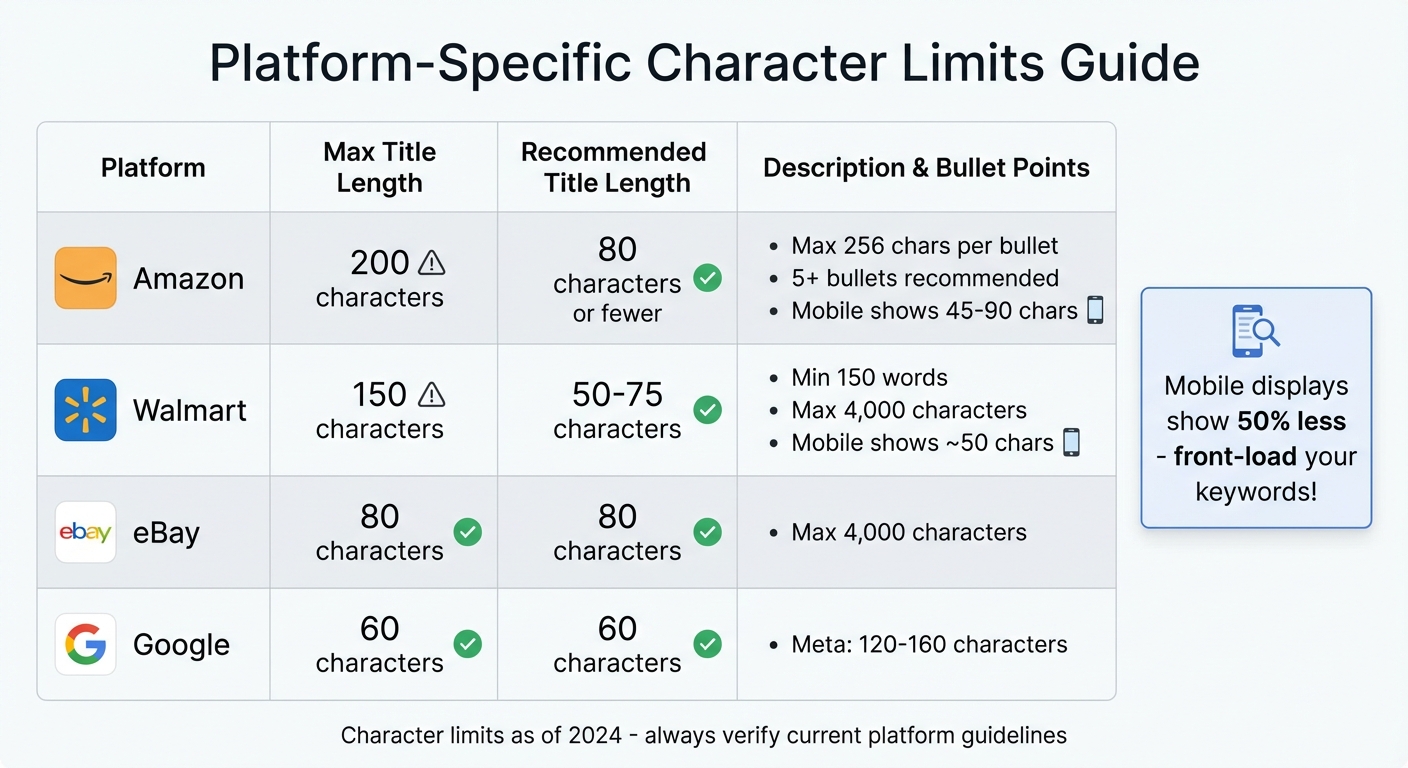
E-commerce Platform Character Limits for Product Titles and Descriptions
To make the most of your e-commerce listings, it's crucial to tailor your titles and descriptions to the specific requirements of each platform. Here's how you can align with their unique standards.
Each platform has its own character limits for titles. For example, Amazon allows up to 200 characters for titles, while Walmart sets the limit at 150 characters, with an ideal range of 50–75 characters. eBay, on the other hand, has the strictest limit at just 80 characters [19][20][21][22]. Following these guidelines ensures your optimized titles and descriptions work effectively within the platform's constraints.
When it comes to mobile displays, brevity becomes even more important. Amazon shows only 45–90 characters, and Walmart displays about 50 characters on mobile [2]. To make the most impact, include your brand name and primary keywords within the first 50 characters - this ensures shoppers see the most critical details before the title gets truncated.
What to Avoid in Titles
Some platforms have strict rules against promotional language and certain symbols. For example:
- Amazon and Walmart ban phrases like "free shipping" or "best seller" [2][21][22].
- Amazon prohibits symbols such as !, $, ?, and several others [21].
- eBay doesn't allow exclamation points or replacing "and" with "+" [2].
As Amazon Seller Central advises, "The ideal title should concisely provide key information about the physical product, without excessive detail or non-essential information." [21]
Writing Descriptions That Work
Descriptions also have platform-specific requirements. Amazon emphasizes bullet points, recommending at least five, with each point capped at 256 characters [2]. Walmart prefers a paragraph-style description with a minimum of 150 words, which helps improve your Listing Quality Score [22][24]. Both platforms allow up to 4,000 characters for descriptions, but Amazon truncates the content after the first 150 characters on product pages [2][20]. Crafting unique descriptions for each platform is key to avoiding SEO penalties [1][2][3].
Character Limit Comparison by Platform
| Platform | Max Title Length | Recommended Title Length | Description and Bullet Point Limits |
|---|---|---|---|
| Amazon | 200 characters [2][21] | 80 characters or fewer [21] | Max 256 characters per bullet; 5+ bullets recommended [2] |
| Walmart | 150 characters [22] | 50–75 characters [2] | Min 150 words; Max 4,000 characters [2][22][23] |
| eBay | 80 characters [2] | 80 characters [2] | Max 4,000 characters [2] |
| Google (Meta) | 60 characters [1] | 60 characters [1] | 120–160 characters (Meta Description) [1][3] |
Testing and Improving Your Listings
Once you've fine-tuned your titles and descriptions, the next step is to test those changes and see if they actually drive clicks and sales. Controlled experiments are the only reliable way to measure whether your updates are making a difference.
A/B Test Different Versions
A/B testing involves showing two variations of your listing to different groups of shoppers to determine which one performs better. To get clear results, focus on testing just one element at a time - like your title or description - so you can pinpoint what’s driving the change [25][28].
If you're an Amazon Brand Registered seller, you can use the free Manage Your Experiments tool to test elements like titles, bullet points, and images [25][27]. For Shopify or Wix stores, you can split your pages into control and variant groups while avoiding SEO complications [26]. Run your tests for 4–8 weeks and aim for 95% statistical confidence before drawing conclusions [25][28].
Real-world examples highlight the impact of A/B testing. A SearchPilot case study revealed that adding "The Best" to title tags resulted in a 10% increase in organic traffic, bringing in 11,000 more organic sessions per month [26]. Another test added the lowest price deal directly into product titles, leading to a 12% boost in organic traffic [26]. For a 14-day experiment on wireless earbuds, lifestyle images outperformed plain white backgrounds, increasing the add-to-cart rate by 35.5% and the overall conversion rate by 35.7% across 5,000 visitors [28].
These examples show how testing can uncover actionable insights to improve performance.
Use Data to Make Changes
Once you’ve gathered data from A/B tests, use those insights to refine your listings further. Focus on key metrics like Click-Through Rate (CTR), conversion rate, units sold, and revenue per visitor to evaluate success [25][28]. Tools like Amazon Business Reports or Shopify Analytics can help you establish a baseline before making changes and measure the impact afterward [31][29].
"A/B testing is a part of a bigger conversion optimization picture. In my opinion, it's 80% about the research and only 20% about testing." - Peep Laja, CXL [31]
Dig deeper into your data by looking at specific segments. For example, compare how mobile shoppers respond versus desktop users, or analyze the behavior of new visitors compared to returning customers [31]. Use search term reports to identify high-performing queries and naturally weave those terms into your titles and bullet points [30]. Keep an archive of your results to avoid re-testing strategies that have already been proven effective [31].
Conclusion
Fine-tuning your product titles and descriptions isn’t a one-and-done task - it’s an ongoing effort that directly influences how many shoppers discover and purchase your products. The strategies outlined here work because they strike a balance between what search engines look for and what customers need: clear, keyword-focused titles that highlight the essentials, paired with descriptions that emphasize the benefits and address customer pain points.
Did you know that about 90% of potential buyers leave a product page if the title and description don’t capture their interest? This happens even when the images and reviews are top-notch [4]. That’s why it’s essential to front-load keywords, steer clear of duplicate content, and stick to platform-specific character limits.
"In ecommerce, your product title and description are more than just text - they're critical components of your sales funnel." - Advon Commerce [32]
Start with your best-selling items and gradually optimize your entire product catalog. Revisit your listings every 6 to 12 months to keep up with shifting search trends and platform guidelines [4]. A/B testing can help you pinpoint which tweaks lead to better click-through and conversion rates. Let the data guide your updates, creating a cycle of continuous improvement that strengthens both visibility and sales.
In today’s AI-driven world, tools like Amazon’s Rufus and Google’s SGE treat product titles as structured data [6]. Your title might be the only thing a shopper sees before making a decision. That’s why every word - and every character - matters. Keep your descriptions mobile-friendly, easy to skim, and focused on solving customer needs rather than cramming in keywords. These small, steady adjustments can increase visibility, earn trust, and ultimately boost sales.
For more tips and in-depth guides on optimizing your e-commerce listings, check out E-Com FAQs at https://e-comfaqs.com.
FAQs
How can I find the best keyword for my product title?
To choose the right keyword for your product title, begin by pinpointing the term that best describes your product and resonates with what people are searching for. Tools like keyword research platforms or search trend analyzers can help you uncover popular phrases that match your product's features and appeal.
Look for keywords your customers would naturally type when searching for a product like yours. Aim for a term that’s detailed enough to connect with your target audience but still broad enough to draw in traffic. Striking this balance can boost your product’s visibility and increase conversions.
How can I make product descriptions easier to read and understand?
To make product descriptions easy to read, focus on clear formatting and concise language. Start with a punchy opening sentence that highlights the product's main benefit, and use short paragraphs to keep the text approachable.
For specifications or features, bullet points work wonders - they make the details quick to scan. Add a touch of sensory language to help readers visualize the product and emphasize key details with bold text. This strategy helps shoppers quickly understand the product's value, especially on mobile, making the buying process smoother and more appealing.
What’s the best way to A/B test product titles and descriptions?
To run an effective A/B test on your product titles and descriptions, start by crafting two or more variations for each. Use an A/B testing tool to evenly split your traffic between these versions. Pay attention to elements like keywords, phrasing, and tone to determine what connects best with your audience.
Track key metrics such as sales, click-through rates, and engagement to gauge performance. Once you identify the version that performs better, make it your primary choice. Revisit this process regularly to keep your product content aligned with evolving customer preferences and trends.
