

Want to boost sales without new customers? Post-purchase upsell apps can help. These tools let you offer additional products right after checkout, increasing revenue and improving the shopping experience. For Shopify, apps like ReConvert, Zipify OCU, AfterSell, and Honeycomb make it easy to create one-click offers on thank-you pages or during checkout. For Amazon, sellers can use built-in tools like Frequently Bought Together or third-party apps to optimize upsells. Here's a quick breakdown:
- Post-purchase upsells convert at 10–15%, compared to 3–8% for in-cart offers.
- Shopify apps like ReConvert start at $4.99/month, while Zipify OCU charges $35/month + 1% of upsell revenue.
- Amazon relies on automated tools like Frequently Bought Together, but sellers can enhance results with strategic pricing and inventory management.
Quick Tip: Start with free trials or entry-level plans to test what works for your store. Upsells can increase total revenue by 10–30% without extra ad spend. Keep reading for app comparisons, pricing, and tips for Shopify and Amazon sellers.
5 Best Shopify POST-PURCHASE UPSELL Apps (2026) | Increase Sales & Customer Satisfaction
sbb-itb-81460ea
Best Post-Purchase Upsell Apps for Shopify
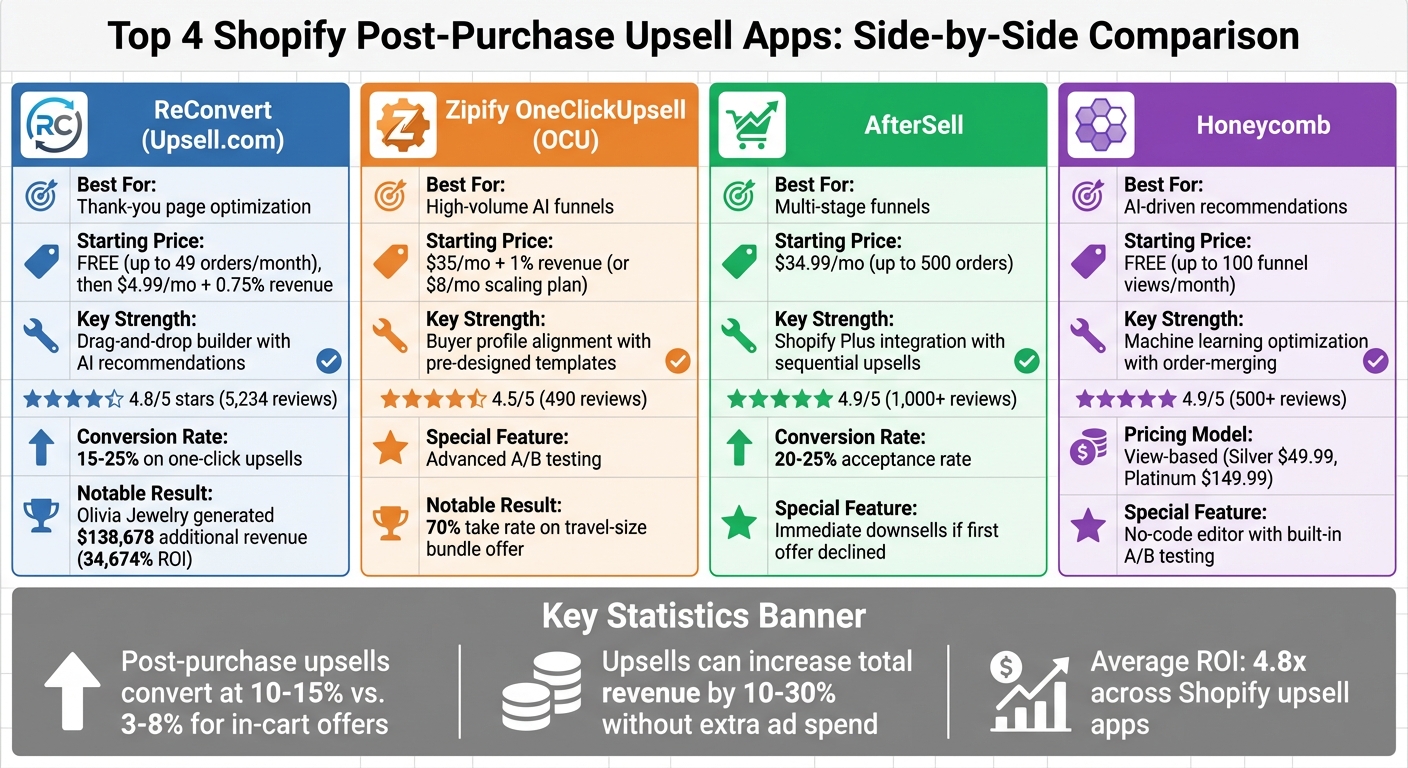
Shopify Post-Purchase Upsell Apps Comparison: Features, Pricing & Ratings
Shopify offers a robust collection of apps designed to help businesses increase revenue after checkout. These tools are tailored to meet the needs of merchants across various industries and sizes. Let’s dive into some of the top post-purchase upsell apps available on Shopify.
ReConvert
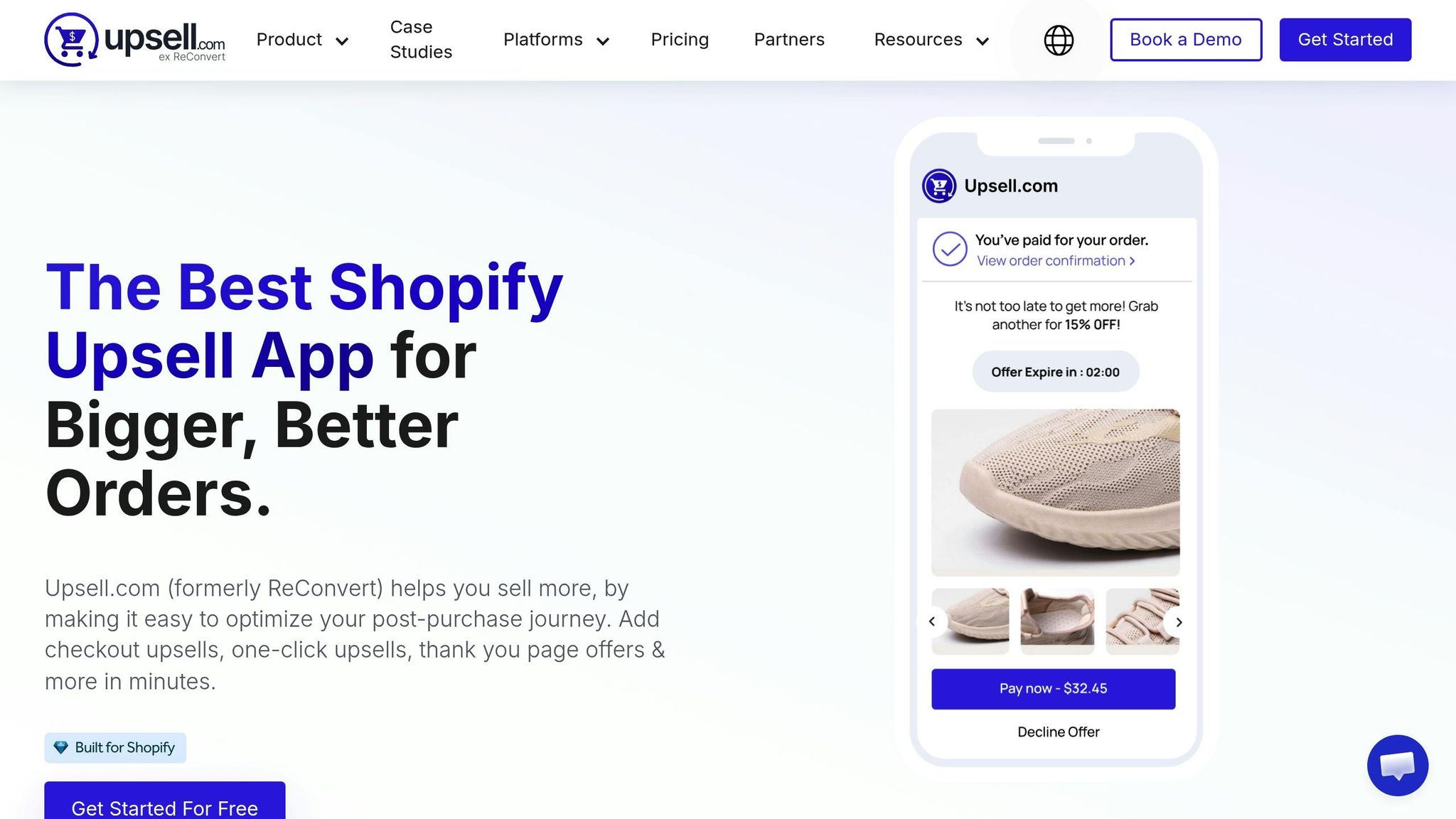
ReConvert, also known as Upsell.com, focuses on customizing the thank-you page to drive additional sales. Its drag-and-drop editor allows merchants to add features like one-click upsells, surveys, and custom videos. The app uses AI to recommend products that align with each customer’s preferences, making upselling more intuitive.
Merchants can start with a free plan for up to 49 orders per month, with paid plans starting at $4.99/month plus 0.75% of upsell revenue [1]. With a stellar 4.8/5 rating from 5,234 reviews, users often praise the app’s responsive support and report up to a 20% increase in average order value [2].
"With Upsell.com, everything is geared towards getting that extra revenue. For merchants, it's pretty much extra sales for no extra work." - Harrison Gross, CEO, Lucyd Smart Eyewear
For example, Olivia Jewelry used ReConvert’s one-click upsells to generate $138,678 in additional revenue from 6,500 extra sales, achieving a 3.68% conversion rate and an impressive 34,674% ROI [4].
Zipify OneClickUpsell
Developed by e-commerce expert Ezra Firestone, Zipify OneClickUpsell (OCU) offers AI-powered product suggestions and logic-driven funnels. Its pre-designed templates and built-in cart drawer make it easy to create and launch upsell campaigns quickly, even for beginners.
Starting at $35/month plus 1% of upsell revenue, the app also offers an $8/month plan that scales with your store’s performance [1]. With a 4.5/5 rating from 490 reviews, it’s particularly popular among high-volume stores for its advanced A/B testing features.
"We offered 2 travel-size sprays + wipes post-purchase - 70% take rate. $10 offer, pure margin." - Ezra Firestone, Founder, Zipify
While Zipify works on all Shopify plans, it’s especially effective for Shopify Plus merchants who can benefit from its native checkout integration.
AfterSell Post Purchase Upsell
AfterSell is designed for creating multi-stage funnels, allowing merchants to offer sequential upsells and immediate downsells if the first offer is declined. It also enables thank-you page customization with elements like FAQs and reviews to build trust.
The app is free for development stores, with paid plans starting at $34.99/month for up to 500 orders [1]. With a 4.9/5 rating from over 1,000 reviews, users frequently highlight its ease of use and compatibility with Shopify Plus. Merchants report acceptance rates of 20–25% for post-purchase offers, thanks to its intuitive no-code visual builder [2].
Honeycomb Upsell & Cross Sell
Honeycomb uses machine learning to optimize upsell offers based on customer behavior. Its no-code editor and built-in A/B testing make it accessible for merchants without technical expertise. A standout feature is its order-merging capability, which combines upsells with the original purchase into a single transaction.
The app operates on a view-based pricing model, offering a free plan for up to 100 funnel views per month. Paid plans range from $49.99/month (Silver) to $149.99/month (Platinum) [1]. With a 4.9/5 rating from over 500 reviews, Honeycomb is a great choice for merchants seeking AI-driven solutions without the complexity of enterprise-level tools.
| App | Best For | Starting Price | Key Strength | Rating |
|---|---|---|---|---|
| ReConvert | Thank-you page optimization | Free (up to 49 orders) | Drag-and-drop builder | 4.8/5 (5,234 reviews) |
| Zipify OCU | High-volume AI funnels | $35/mo + 1% revenue | Buyer profile alignment | 4.5/5 (490 reviews) |
| AfterSell | Multi-stage funnels | $34.99/mo | Shopify Plus integration | 4.9/5 (1,000+ reviews) |
| Honeycomb | AI-driven recommendations | Free (up to 100 views) | Machine learning optimization | 4.9/5 (500+ reviews) |
Next, we’ll look at post-purchase upselling tools tailored specifically for Amazon sellers.
Post-Purchase Upselling for Amazon Sellers

Amazon doesn’t offer a native one-click post-purchase upsell system. Instead, it relies on automated recommendation widgets placed throughout the customer’s shopping experience.
Amazon's Built-In Promotion Tools
One of Amazon’s key upselling features is the Frequently Bought Together (FBT) tool. This feature bundles related products with an “Add All to Cart” button, using data like purchase history, browsing patterns, and category preferences to suggest pairings [5]. However, sellers don’t have control over which products are bundled - the algorithm decides based on customer data.
To make the most of this feature, sellers should focus on strategic pricing and inventory management. For example:
- Implement Product Attribute Targeting (PAT) Ads to guide Amazon’s algorithm toward your desired pairings.
- Use Fulfillment by Amazon (FBA) to improve the chances of your products appearing in organic FBT placements [5].
Pricing is also crucial. Experts recommend keeping bundle prices below $50 or $100. Additionally, the 25% Rule advises that cross-sell offers should not exceed 25% of the original product’s price, as this reduces buyer hesitation [8].
"The 25% Rule of Thumb for Cross-Selling suggests that a cross-sell offer should be no more than 25% of the price of the original product's price." - ePlaybooks [8]
One important tip: keep a close eye on your inventory. If one of your products in an FBT pairing goes out of stock, Amazon will automatically replace it with a competitor’s product [5].
Third-Party Tools for Amazon
While Amazon’s built-in tools cover many upselling needs, some sellers turn to third-party apps for more control. Accessing these apps through the Selling Partner Appstore requires a Professional Selling Account, which costs $39.99/month. However, upsell-specific apps on the platform are limited [6][7].
Mickey Toogood, Sr. Content Marketing Manager at Amazon, notes that sellers using apps from the Selling Partner Appstore often see an average 43% shorter wait time to achieve their first sale and an average 10% increase in sales after adopting these tools [6].
For sellers who also use Shopify, the ZY Amazon Post Purchase Upsell app is a popular option. This app allows upselling of Amazon products on thank-you pages, with pricing starting at $8.99/month for two products or $19/month for up to 12 products [9][11].
| Feature | Amazon Built-In Tools | Third-Party Apps |
|---|---|---|
| Control | Fully automated by algorithm | Manual and AI-driven options |
| Customization | None (Standard Amazon UI) | High (Custom themes, rules) |
| Placement | Product pages, Cart | Post-purchase, Thank-you page |
| Cost | Included in seller fees | Monthly subscription |
Unlike Shopify, Amazon doesn’t allow sellers to customize the post-purchase experience with features like thank-you pages, surveys, or sequential upsell funnels. To succeed, sellers should focus on maximizing Amazon’s built-in tools while using external platforms - like email or SMS - to reconnect with customers after their purchase. This approach lets sellers complement Amazon's offerings with strategies tailored to their business goals.
Feature and Pricing Comparison
When it comes to choosing a post-purchase upsell app, comparing pricing models and features side by side can simplify your decision-making process. The right app will balance costs and functionality while helping you scale your upselling efforts and grow your store revenue. Below, we’ve outlined key Shopify post-purchase upsell apps to help you decide.
ReConvert offers an order-based pricing model starting at $4.99/month for up to 50 orders, increasing to $9.99/month for 100 orders and $19.99/month for 200 orders [13]. With a 4.8/5 rating from 5,234 reviews, it features a drag-and-drop builder and useful widgets [2]. Its one-click upsells boast conversion rates between 15% and 25%, targeting customers when they’re most likely to buy [2].
AfterSell is designed for high-volume stores, with plans starting at $34.99/month for up to 500 orders, $54.99/month for up to 1,000 orders, and $99.99/month for up to 2,000 orders [10]. Known for its post-purchase offer acceptance rates of 20% to 25%, it integrates Rokt AI for personalized recommendations and has a 4.8/5 rating from 765 reviews [10].
Zipify OneClickUpsell (OCU) uses a revenue-based model, beginning at approximately $8/month and scaling with the upsell revenue generated [13]. It has a 4.4/5 star rating from 789 reviews and includes templates crafted by Ezra Firestone, which have been optimized for performance [2].
Honeycomb employs a view-based pricing model, making it free for up to 100 funnel views, $54.99/month for 2,000 views, and $169.99/month for 10,000 views [13]. This app is ideal for stores with consistent traffic and holds a 4.5/5 rating from 567 reviews [2].
Here’s a quick comparison of the four apps:
| App | Pricing Model | AI Capabilities | Shopify Plus Required? | Free Trial/Plan | Rating |
|---|---|---|---|---|---|
| ReConvert | Order-based tiers | Yes | Only for checkout upsells | Free (dev stores) | 4.8/5 (5,234 reviews) [2] |
| AfterSell | Order-based tiers | Yes (Rokt AI) | Only for checkout upsells | Free (dev stores) | 4.8/5 (765 reviews) [10] |
| Zipify OCU | Revenue-based | Yes | No | 30-day trial | 4.4/5 (789 reviews) [2] |
| Honeycomb | View-based | Yes | No | Free (<100 views) | 4.5/5 (567 reviews) [2] |
All these apps feature one-click functionality, which allows customers to complete upsells without re-entering payment or shipping details [12]. However, it’s important to note that checkout upsells require Shopify Plus, while standard Shopify plans only support upsells on post-purchase or thank-you pages [10].
Up next, find out how to pick the best post-purchase upsell app for your store’s needs.
How to Choose a Post-Purchase Upsell App
Picking the right post-purchase upsell app comes down to three key factors: your budget, how well it works with your current tools, and what you want to achieve with your store. Let’s explore each of these to help you make a well-informed choice.
Pricing and Budget
The cost of an app should match how your store operates and your financial goals.
- Revenue-based pricing charges a percentage of your upsell revenue (usually 0.75% to 1%), meaning your costs grow as your store succeeds. For example, Zipify OneClickUpsell starts at $35/month plus 1% of upsell revenue, while ReConvert offers plans starting at $4.99/month with a 0.75% revenue share [1].
- Flat-rate pricing provides predictable monthly costs. For instance, Candy Rack charges $39.99/month, and P-Sell costs $3.99/month [1].
- Order-based tiers are another option. Selleasy, for example, is free for up to 100 orders per month. Beyond that, it costs $8.99/month for up to 500 orders. With Shopify upsell apps delivering an average ROI of 4.8x, these plans can often pay for themselves quickly [1].
Once you’ve figured out your budget, the next step is to ensure the app integrates well with your existing tools.
Integration with Your Tools
Make sure the app works seamlessly with your current marketing and analytics tools. Most apps support GA4 for tracking performance and integrate with platforms like Klaviyo [15]. If you need advanced features like custom reporting or CRM workflows, look for apps that offer CSV export or full API access.
Your Shopify plan also plays a role in determining what features you can access. For instance:
- Standard Shopify plans (Basic, Shopify, Advanced) allow for thank-you page widgets and SMS upsells.
- Native in-checkout upsells, however, are exclusive to Shopify Plus with Checkout Extensibility [1].
Additionally, check if the app is compatible with your store’s theme, especially if you’re using an Online Store 2.0 theme [3]. To maximize conversions, opt for apps with one-click functionality, so customers can accept upsells without having to re-enter their payment details [1].
Business Size and Goals
The size of your store and your objectives should drive your decision.
- Smaller stores can benefit from free or low-cost plans with basic automation. Apps like Selleasy or ReConvert are great for testing post-purchase upselling without a big initial investment [1].
- Larger or high-volume stores often need advanced features like A/B testing, machine learning-based recommendations, and checkout page upsells (available on Shopify Plus). In these cases, revenue-based or premium flat-rate plans make sense, as the potential ROI often outweighs the costs. Post-purchase upsells typically convert at rates of 10–15%, compared to 3–8% for in-cart upsells, making them a powerful tool for increasing revenue [1].
If you’re exploring new product ideas, consider apps like ZY Amazon Post Purchase Upsell. This app allows you to test customer interest in new items via affiliate links without holding inventory. It’s available for $8.99/month with no commissions on affiliate earnings [9].
Take advantage of free trials to test different apps and find the one that aligns best with your store’s needs and goals [15].
Wrapping It Up
We've covered apps, pricing comparisons, and what to look for when choosing the best post-purchase upsell app for your store. The key to success lies in finding the app that aligns perfectly with your store's needs. Whether it's ReConvert's intuitive drag-and-drop editor, AfterSell's one-click post-purchase funnels, or SMS-based tools that re-engage customers after they leave your site, each app brings something valuable to the table.
Start by assessing your Shopify plan, budget, and where you want to place your offers. Here's a compelling stat: post-purchase upsells convert at rates between 10–15%, compared to 3–8% for in-cart offers. This makes them a relatively low-risk way to grow your revenue [1]. By selecting an app that fits your platform and budget, you can take advantage of this opportunity with minimal effort.
A smart way to approach 2026 is to focus on one upsell method first. Run controlled tests over a two-to-four-week period, analyze the results, and only then expand into additional placements. Use free trials and entry-level plans to experiment before committing to a subscription. Since upselling and cross-selling contribute to 10–30% of total e-commerce revenue [1][14], even small tweaks can lead to noticeable gains. Look for apps that prioritize one-click purchasing, mobile-friendly designs, and robust analytics - these features directly influence your conversion rates.
For more detailed guides on upsell strategies and solutions to common e-commerce challenges, check out E-Com FAQs. It's a great resource for Shopify and Amazon sellers looking to refine their approach.
FAQs
What should I upsell after checkout?
After checkout, it's smart to suggest complementary products that go hand-in-hand with what the customer just bought. Think accessories, premium upgrades, or bundles. For example, if someone purchases a camera, you could recommend a protective case or additional lenses. Post-purchase offers, like "Buy One, Get One" deals or exclusive discounts, are also effective. Customers are often more open to these offers right after they've made a commitment, making this a great way to increase revenue without interrupting the shopping flow.
How do I track post-purchase upsell ROI?
To monitor the ROI of post-purchase upsells, leverage analytics tools that focus on revenue, conversion rates, and overall ROI. Apps such as Rebuy, Zipify, CartHook, and ReConvert come with built-in dashboards to track these metrics effectively. For a deeper dive into upsell events, Littledata integrates seamlessly with platforms like Google Analytics (GA4) and Facebook Conversions API, giving you a more comprehensive view. Additionally, the Shopify Partner Dashboard provides valuable insights into app performance, allowing you to assess conversion rates, upsell revenue, and your ROI all in one place.
Do post-purchase upsells affect refunds?
Post-purchase upsells generally don’t affect refunds since they occur only after the initial purchase is finalized. This separation ensures the original transaction remains untouched and intact.
