

Phishing scams targeting Amazon sellers are on the rise. These fake emails often mimic Amazon’s branding to steal credentials or sensitive data. Protect yourself by following these steps:
- Verify emails in Seller Central: If it’s not in your Message Center, it’s likely fake.
-
Check sender addresses: Official Amazon emails end in
@amazon.comor regional domains like@amazon.co.uk. -
Inspect links before clicking: Hover over links to confirm they lead to Amazon’s legitimate domains (e.g.,
sellercentral.amazon.com). - Beware of urgent language: Scammers use threats like "Account Suspension" to pressure you into acting.
- Never share sensitive info via email: Amazon won’t ask for passwords or banking details.
- Enable Two-Step Verification (2SV): Adds an extra layer of security to your account.
If you suspect an email is fake, forward it to stop-spoofing@amazon.com. Staying vigilant and adopting safe email practices can help safeguard your business.
Common Amazon Scams to Avoid
How to Verify the Email Source
How to Identify Legitimate vs Fake Amazon Seller Emails
The Message Center in Seller Central is your go-to tool for confirming whether an email is genuinely from Amazon. Every official email sent by Amazon is logged here. If you can't find the email in your Message Center, it's likely a scam.
"Message Center will have all email communication sent by Amazon. If the email doesn't appear in Message Center, then it wasn't sent by Amazon." - Amazon Customer Service [3]
Here’s how you can verify any suspicious email step by step.
Check the Sender's Email Address
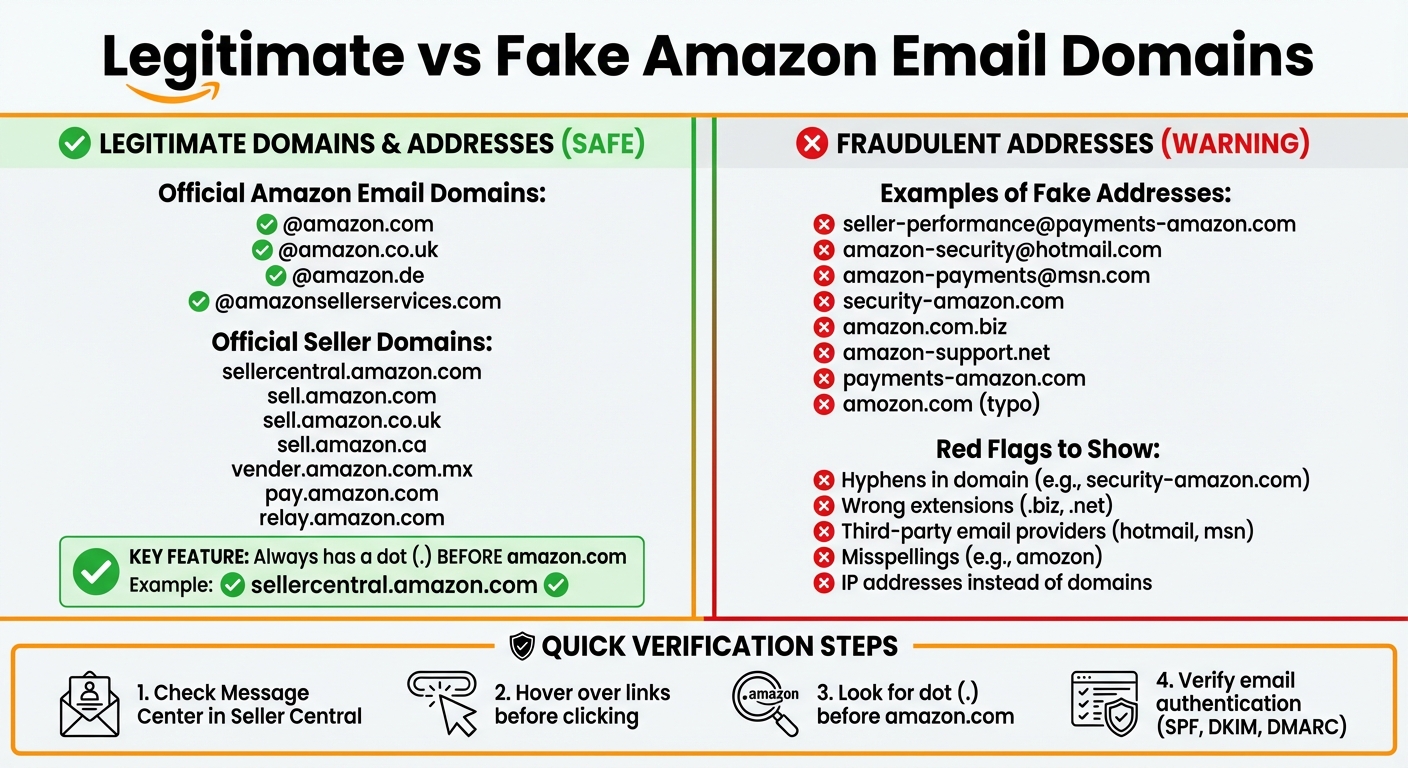
Amazon's legitimate emails always come from addresses ending in @amazon.com or official regional domains like @amazon.co.uk or @sell.amazon.com. Scammers often use fake addresses that look similar, such as "seller-performance@payments-amazon.com" or "amazon-security@hotmail.com."
To confirm authenticity, review the email header fields like "Received from", "Reply to", and "Return Path." If these fields don't align with Amazon's official sources, delete the email immediately. Additionally, check for email authentication protocols like SPF, DKIM, and DMARC. These technical markers should show a "pass" status, indicating the email hasn't been spoofed.
| Official Amazon Email Domains | Official Seller Domains | Examples of Fake Addresses |
|---|---|---|
| @amazon.com | sell.amazon.com | seller-performance@payments-amazon.com |
| @amazon.co.uk | sell.amazon.co.uk | amazon-security@hotmail.com |
| @amazon.de | sell.amazon.ca | amazon-payments@msn.com |
| @amazonsellerservices.com | vender.amazon.com.mx | security-amazon.com |
Cross-Reference with Seller Central
To double-check, log in to Seller Central directly by typing sellercentral.amazon.com into your browser - never click links in the email. Once logged in, check your Message Center. If the email content isn't there, it's a phishing attempt.
If the message mentions an order or account issue, verify it by checking your Order History or Account Health dashboard directly in Seller Central. Avoid using any links provided in the email.
Look for Amazon Verification Indicators
Amazon uses BIMI (Brand Indicators for Message Identification) technology to help users identify legitimate emails. Many email providers show Amazon's official "smile" logo next to verified messages in your inbox. While this is a helpful visual cue, don't depend on it entirely - some email clients don't support BIMI, and advanced scammers may find ways around it.
Additionally, pay attention to the links in the email. Genuine Amazon links always include a dot before "amazon.com" (e.g., sellercentral.amazon.com or pay.amazon.com). If you notice links with IP addresses, misspelled domains like "amozon.com", or strange URL structures, the email is likely fraudulent.
Common Phishing Tactics and Red Flags
Scammers often use deceptive strategies to exploit seller weaknesses. Recognizing these common methods can help you identify fraudulent emails before they lead to trouble. Here's how these tactics typically appear in phishing attempts.
Urgency and Threatening Language
Phishing emails frequently rely on urgent or alarming language to push you into acting quickly. Subject lines like "URGENT: Account Suspension in 24 Hours" or "Immediate Action Required to Avoid Account Deletion" are designed to create panic. These emails may claim your account is at risk of suspension, deletion, or lockout, pressuring you to click on links without thinking.
"Scammers often try to create a sense of urgency to persuade you to do what they're asking." - Amazon [8]
Authentic Amazon messages rarely use intimidating language or demand immediate action. If you receive alarming emails about unauthorized logins, failed Prime renewals, or account suspensions, avoid clicking on links. Instead, go directly to Seller Central by typing the URL into your browser and check your Account Health dashboard for any official notifications.
Now, let’s look at another common red flag: requests for sensitive information.
Requests for Sensitive Information
Amazon does not ask for passwords, banking details, or payment information via email. If you receive such a request, it’s a clear indication of a scam.
"Amazon and AWS never request sensitive information over email." - AWS Official [6]
Be wary of emails asking for gift cards or payments through unauthorized methods. Legitimate account verification is always conducted through secure channels, such as the Account Health Page or Performance Notifications within Seller Central - not through email or Buyer-Seller messaging [9].
Grammatical Errors and Generic Greetings
Phishing emails often contain noticeable typos, grammatical mistakes, or awkward phrasing - errors you wouldn’t expect in legitimate Amazon communications.
"Incorrect grammar or spelling often indicates suspicious sources." - Amazon Web Services [6]
Another clue is the use of generic greetings like "Dear Customer", "Dear User", or "Hello Valued Seller" instead of addressing you by your name or business name [2][1]. Amazon typically personalizes its emails using your registered seller information. If an email lacks personalization or the subject line doesn’t align with the body content, it’s best to delete it immediately [6].
How to Check Email Links and Websites Safely
Once you've verified the sender of an email, the next step is to carefully check any links or web addresses it contains. Malicious links can be used to steal your credentials, so it’s crucial to examine them thoroughly before you click. This step works hand-in-hand with confirming the sender, ensuring all links are secure before you engage with them.
Hover Over Links to Inspect URLs
Always hover over links before clicking. When you do this, most email clients and browsers will show the actual destination URL, typically in the bottom corner of your screen. This lets you compare the visible text of the link with its true destination.
"Always hover over the link before you click and make sure that the hyperlink text matches the link preview text." - Amazon Relay
If the link text claims to be "www.amazon.com", but hovering reveals a different URL, such as "security-amazon.com", that’s a red flag. In such cases, delete the email immediately. Be especially cautious with shortened links, as these can obscure the true destination.
On mobile devices, where hovering isn’t possible, avoid clicking suspicious links. Instead, wait until you can verify them on a desktop. If you’re ever in doubt, skip clicking altogether and manually enter the URL in your browser.
Manually Enter URLs in Your Browser
Typing the URL directly into your browser is the safest option. Open a new tab and manually enter trusted addresses like "sellercentral.amazon.com" or "www.amazon.com." Once logged in, you can check the Message Center in your Seller Central account to confirm whether Amazon actually sent the email.
This method might take a bit more time, but it’s the most effective way to avoid phishing websites that are designed to steal your credentials.
Spotting Fake Domains
Scammers often create domains that closely mimic Amazon’s legitimate websites, making it easy to fall for their tricks. Authentic Amazon domains always include a dot before "amazon.com", such as "sellercentral.amazon.com."
"Legitimate Amazon websites have a dot '.' before 'Amazon.com' such as https://'something'.Amazon.com." - Amazon Customer Service
Here’s how to distinguish real Amazon domains from fake ones:
| Legitimate Amazon Domains | Fraudulent Domain Red Flags |
|---|---|
| sellercentral.amazon.com | security-amazon.com |
| pay.amazon.com | amazon.com.biz |
| www.amazon.co.uk | amazon-support.net |
| relay.amazon.com | payments-amazon.com |
Amazon never uses hyphenated domains like "security-amazon.com" or domains with odd suffixes like "amazon.com.biz." Scammers also use typosquatting - registering domains with slight misspellings like "amozon.com" - or replacing letters with similar-looking characters. In 2024, Amazon reported taking down over 55,000 phishing websites that were impersonating their brand [4].
Additionally, avoid entering credentials on sites that use numerical IP addresses instead of proper domain names. Even though modern phishing sites may display a padlock icon, always ensure the URL starts with "https://" and is a verified Amazon domain.
sbb-itb-81460ea
Reporting and Securing Your Account
Once you've verified the safety of an email, it's time to act quickly to secure your account. Reporting suspicious emails not only helps protect your account but also strengthens the seller community. Amazon's security teams rely on these reports to track scammers and shut down phishing operations. In 2024 alone, Amazon dismantled over 55,000 phishing websites and disconnected 12,000 phone numbers used in impersonation schemes [4].
Report Suspicious Emails to Amazon
Forward suspicious emails directly to stop-spoofing@amazon.com. This is Amazon's main channel for investigating phishing attempts. Before forwarding, check that the email doesn’t appear in your Message Center, as outlined earlier.
"Sending the suspicious communication as an attachment is the best way for us to track it." - Amazon Customer Service [10]
When forwarding, include the email with full headers (such as X-Sender, X-Sender-IP, X-Date, and X-Recipient). This information helps Amazon trace the source [5]. If you’re not an Amazon account holder, send the email to reportascam@amazon.com instead [10].
Never click on links, open attachments, or share personal information. If you’ve already clicked a suspicious link or entered your credentials, take immediate action by changing your Seller Central password and reviewing your account for unauthorized changes [11]. You can also report phone scams to the Federal Trade Commission at https://reportfraud.ftc.gov [10].
After reporting, strengthen your account with additional security measures.
Enable Two-Step Authentication
Reporting phishing attempts is essential, but securing your account requires an extra layer of protection. Enabling Two-Step Verification (2SV) is one of the most effective ways to safeguard your account. Even if scammers obtain your password, they won’t be able to access your account without the verification code sent to your phone [11].
"Set up Two-Step Verification for all of your Amazon accounts. You can reinforce your password security in this way as you are required to enter an additional code from your phones when signing in to your account. This can greatly reduce the risk of unauthorized access if the password is compromised." - Amazon Seller Central Help [11]
With 2SV enabled, you’ll need to enter a code sent to your mobile device each time you log in. This extra step significantly reduces the risk of phishing-based account takeovers, as scammers rarely have access to your physical phone.
Use Antivirus and Anti-Phishing Tools
Install security software to block phishing links and detect malicious attachments. Modern antivirus programs can identify fake websites before they load, while many email providers now feature built-in phishing detection to flag suspicious messages [7].
Consider using an email provider that supports BIMI (Brand Indicators for Message Identification). Services like Gmail and Yahoo! display Amazon’s smile logo next to verified emails, making it easier to identify legitimate communications at a glance [3][4]. When combined with 2SV and careful inspection of links, these tools provide multiple layers of security for your seller account.
Safe Email Habits for Amazon Sellers
Developing strong email habits is key to reinforcing the security measures you've already set up in Seller Central. These habits work hand-in-hand with your existing defenses, helping you spot scams and phishing attempts more easily. By making these practices part of your routine, you add an extra layer of protection to your account.
Avoid Clicking Links in Unsolicited Emails
Always avoid clicking on links in emails claiming to be from Amazon, even if they look legitimate. Instead, manually type the Amazon URL into your browser to confirm the message's authenticity. Once you're logged in, check your Message Center for any notifications or alerts. If the email is genuine, you'll find the same message there [3][12].
This small step can drastically reduce your risk of falling for phishing scams. Scammers often use urgent language to trick you into acting quickly. Taking just a moment to verify the message on your own can save you from accessing fraudulent websites.
Keep Records of Legitimate Communications
Create a dedicated folder to store confirmed Amazon emails for easy reference. Pay close attention to details like the sender's email address, the tone of the message, and how notifications are formatted. Over time, you'll start to notice patterns that can help you distinguish between real and fake emails.
For added security, remember that all genuine Amazon communications will also appear in your Message Center. Use this feature to cross-check any emails you're unsure about [3][12].
Stay Updated on New Scams
Phishing tactics are constantly evolving, so staying informed is critical. For example, Amazon reported a 90% increase in employment-related impersonation scams between January and March 2025 [12]. Scammers often adapt their methods, making it harder to spot their attempts if you're not aware of the latest trends.
To stay ahead, regularly review Amazon's security resources and trusted e-commerce blogs like E-Com FAQs. Another helpful tool is the Better Business Bureau's Scam Tracker, developed in collaboration with Amazon. This resource allows you to search for suspicious email addresses or phone numbers reported by other sellers [4][13]. Spending just a few minutes each month reviewing emerging scams can help you avoid potential pitfalls. For more tips and tools, check out E-Com FAQs for guides and checklists tailored to countering new threats.
Conclusion
Keeping your Amazon seller account secure starts with a simple step: verify every email you receive. Always cross-check messages in your Amazon Message Center - if it’s not there, it’s not from Amazon [3]. Pay close attention to sender addresses for typos, hover over links to examine their URLs before clicking, and be wary of emails that demand urgent action or request sensitive details like passwords or banking information.
"We never ask for your user ID or password in an email." – Emet_Amazon, Moderator, Amazon Seller Forums [5]
For added safety, manually type "sellercentral.amazon.com" into your browser instead of clicking on links in emails. Activate Two-Step Verification for an extra layer of protection, and report suspicious emails directly to stop-spoofing@amazon.com [5][7].
Scammers are always evolving their tactics, so staying informed is essential. Regularly review Amazon’s security updates and track new scam trends through trusted sources like E-Com FAQs.
FAQs
How can I tell if an email claiming to be from Amazon is real?
To figure out if an email claiming to be from Amazon is genuine, start by checking your Amazon Seller Central Message Center. If the email doesn’t appear there, it’s likely a scam.
Take a close look at the sender’s email address. Authentic Amazon emails usually come from addresses ending in @amazon.com or a regional equivalent. Watch out for misspellings, strange characters, or anything that seems off. Also, be wary of emails with poor grammar, generic greetings like "Dear Customer", or links that don’t direct you to Amazon’s official site.
For extra precaution, avoid clicking on any links in the email. Instead, manually open your browser and go to Amazon’s website to check for updates or messages. If you’re still unsure, forward the suspicious email to stop-spoofing@amazon.com to have it reviewed and reported.
What should I do if I clicked on a suspicious link in an email by mistake?
If you’ve clicked on a suspicious link, don’t panic - there are steps you can take right away to secure your account and device. Avoid interacting with any attachments or additional links in the email, as they could carry malware or phishing threats.
Start by reporting the email to Amazon as a suspected scam. Amazon has specific channels to address these issues, and your report helps protect not just you but other sellers too. Then, run a full scan on your device using reliable antivirus software to detect and remove any malware or unauthorized programs that may have been downloaded.
To further secure your account, update your Amazon password and turn on two-factor authentication. These actions add an extra layer of protection and reduce the chances of future breaches.
What is Two-Step Verification, and how does it protect my Amazon seller account?
Two-Step Verification provides an added level of security for your Amazon seller account. It requires two forms of identification to log in: your password and a unique security code. This code is sent directly to your phone or generated by an authenticator app.
By implementing this process, even if someone manages to get hold of your password, they won’t be able to access your account without the second authentication step. It’s an effective way to protect your sensitive data and keep your business safe from potential risks.
