

E-commerce account suspensions can halt your business, freeze funds for up to 90 days, and damage your reputation. To avoid this, follow these steps:
- Monitor account health daily: Review metrics like Order Defect Rate (ODR), Late Shipment Rate, and notifications to catch issues early.
- Stay policy-compliant: Ensure accurate listings, maintain legal documentation, and avoid intellectual property violations.
- Respond quickly: Address customer inquiries within platform-specific deadlines (e.g., 24 hours for Amazon).
- Secure your account: Enable Two-Factor Authentication (2FA) and limit admin access.
- Manage inventory effectively: Use real-time tools to prevent overselling and maintain accurate stock levels.
- Prepare for emergencies: Keep detailed records, conduct regular audits, and have a response plan ready for sudden suspensions.
How to Avoid Amazon Seller Account Suspension | Learn from Seller with 400k+ Seller Reviews
sbb-itb-81460ea
Daily Account Health Monitoring
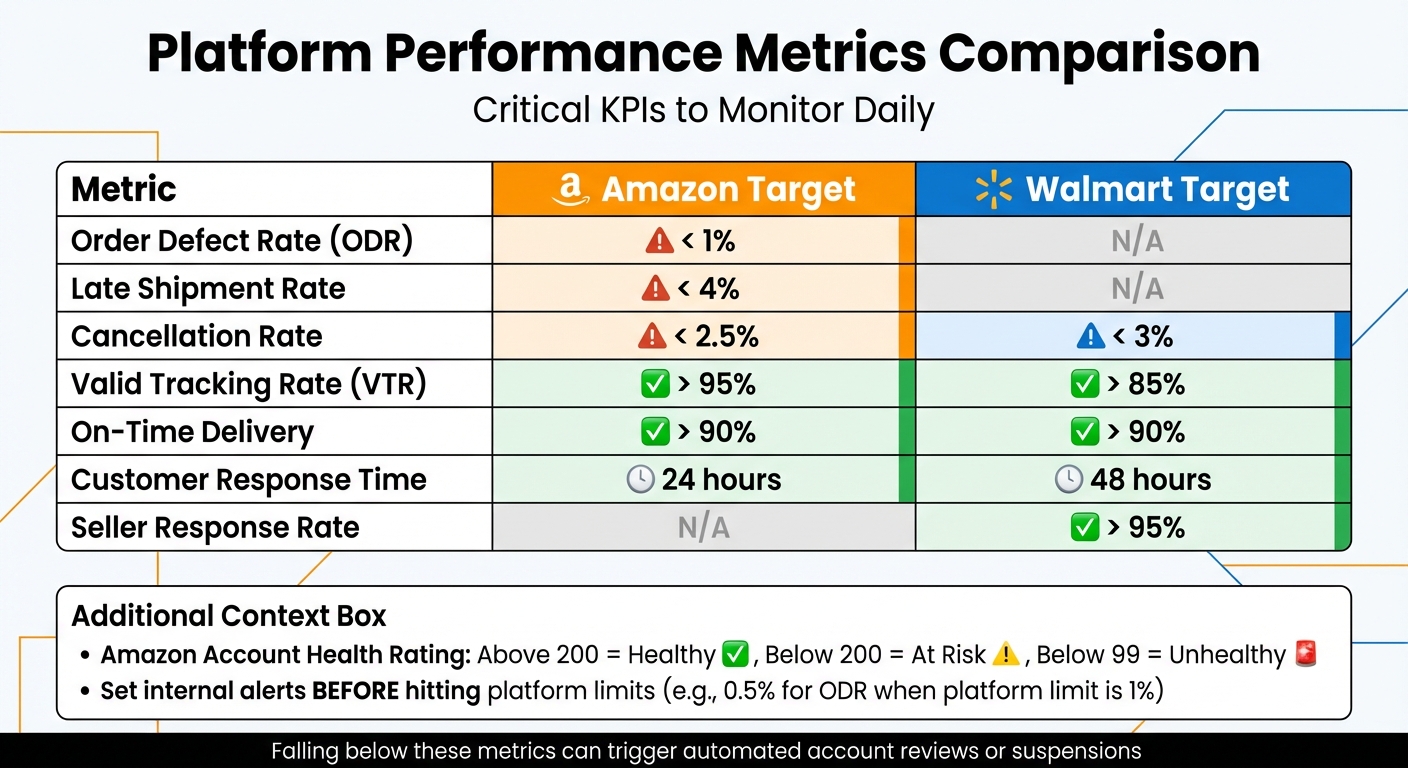
E-Commerce Platform Performance Metrics Comparison: Amazon vs Walmart Requirements
Catching problems early can help you avoid account suspensions. Automated systems on platforms like Amazon can flag and suspend accounts when performance metrics dip below acceptable levels [12][15]. By monitoring your account daily, you can address small issues before they spiral into bigger problems.
To stay ahead, make daily account health reviews part of your Standard Operating Procedure (SOP). Amazon's Account Health Rating (AHR) updates in real time, reflecting unresolved policy violations and fulfillment performance [11][14]. Waiting until the end of the week to check could leave you vulnerable to suspension notices.
By reviewing metrics and notifications daily, you can ensure your compliance practices align with platform policies.
Review Key Performance Indicators (KPIs)
Once you've established a routine for daily monitoring, focus on the metrics that matter most. These indicators act as triggers for automated enforcement if they cross specific thresholds.
Set internal alerts to warn you before hitting platform limits. For instance, while Amazon's cutoff for Order Defect Rate (ODR) is 1%, you could set an internal alert at 0.5% [12]. Similarly, keep a close eye on your Voice of the Customer (VoC) score. A shift to "Fair" or "Poor" can lead to listing suppression, even before negative reviews start piling up [12].
Leah McHugh, a Listing Compliance Investigator at ecommerceChris, explains:
"The good news is, suspensions due to poor seller metrics can be a lot easier to appeal than other suspension types. You don't have to go searching for the reasons for the suspension - something simply went wrong operationally." [10]
| Metric | Amazon Target | Walmart Target |
|---|---|---|
| Order Defect Rate (ODR) | < 1% | N/A |
| Late Shipment Rate | < 4% | N/A |
| Cancellation Rate | < 2.5% | < 3% |
| Valid Tracking Rate (VTR) | > 95% | > 85% |
| On-Time Delivery | > 90% | > 90% |
Check for Policy Notifications
In addition to KPI reviews, make it a habit to check for platform notifications. Log into your Account Health Dashboard daily to look for warnings, "soft blocks", or required actions [9][12]. Amazon's Account Health Rating ranges from 0 to 1,000, with scores above 200 considered "Healthy." Scores below 200 indicate risk, and anything under 99 is classified as "Unhealthy", putting your account in danger of suspension [11][14].
Always respond to notifications promptly. Addressing flagged issues and submitting an approved Plan of Action (POA) can help secure an "account annotation", demonstrating your proactive approach [14].
Respond to Customer Feedback
Maintaining a good reputation means staying on top of customer interactions. Aim to respond to customer messages within 24 hours on Amazon. Walmart, on the other hand, requires responses within 48 hours and expects a Seller Response Rate above 80%. Falling below 70% could lead to an urgent review of your account [13]. Slow responses not only frustrate customers but can also lead to negative feedback or A-to-z claims, which directly impact your ODR [9][11].
Use the FBA Customer Returns report to identify trends in buyer complaints [9]. For example, if "Defective" or "Item not as described" complaints start increasing, investigate your products immediately. Rachel Seiton from MerchantSpring advises:
"If 'Defective' starts trending for a product, investigate immediately. By using these data points, you can spot and fix product or listing issues before Amazon flags them." [16]
Quick action can prevent issues from escalating into formal claims or long-lasting negative feedback. When appropriate, consider offering partial refunds or incentives to dissatisfied customers to maintain their trust and avoid adverse reviews [3].
Ensure Policy Compliance
Keeping your account compliant is essential for maintaining its health and avoiding sudden disruptions. Platforms like Amazon enforce strict policies, where even a minor violation can lead to listing suppression or account suspension. These infractions are visible on your Account Health Dashboard for up to 180 days [18]. Amazon's expectation? Zero policy violations.
As the Seller Assistant Blog emphasizes:
"Amazon considers that it's your responsibility to comply with their policies and your local state and federal laws." [18]
To stay in good standing, focus on three key areas: maintaining accurate product listings, keeping legal documentation up to date, and proactively managing intellectual property rights. Consistent compliance efforts can prevent costly interruptions.
Accurate Product Listings and Documentation
Your product listings must be precise and reflect exactly what the customer will receive. For example, variations should only cover differences like size or color - combining unrelated items violates platform policies [18][19]. Assign unique SKUs to differentiate conditions like "New" versus "Used" to avoid customer complaints about mismatched expectations [18].
Craft listings with clear titles, high-quality images, and accurate details. Avoid using terms like "best" or "cheapest", as these can trigger policy violations [7]. If a product already exists on the platform, add your offer to the existing page rather than creating a duplicate [18].
Documentation is another cornerstone of compliance. Confirm the authenticity of your products and ensure you have the rights to sell items with trademarks, logos, or patents [7][18]. Vet suppliers thoroughly to confirm they can provide safety certificates and authentic invoices [17][18]. Tools like "Restrictions Checkers" or "IP Alerts" can help you identify high-risk products before sourcing [18].
Stay Updated on Legal Requirements
Beyond accurate listings, meeting legal obligations is critical. High-volume sellers (those with 200+ sales and $5,000+ in gross revenue over 12 months) must verify their identity. This includes providing a verified bank account, tax ID (EIN or SSN), government-issued ID, and valid contact information [20][22]. Marketplaces typically review this information within 10 days, and sellers must respond to update requests within the same timeframe to avoid suspension [20][22][24].
Sellers in this category must also certify their information annually [20][23]. If your annual revenue exceeds $20,000 on a single platform, your full name and physical address must be visible to consumers on product listings or order confirmations [20][21]. Conduct quarterly checks to ensure your business address, bank accounts, and contact details align with your legal and tax documents [23].
Another critical point: your customer service phone number must be able to receive one-time passcodes (OTPs). VoIP numbers and landlines often fail this requirement, which can block your verification process [25]. Regularly review the "Account Health" or "Seller Certification" sections in marketplace portals for updates or compliance alerts [23][25].
Avoid Intellectual Property (IP) Violations
IP violations are categorized into Copyright (original creative works), Trademarks (brand names and logos), and Patents (inventions and designs) [26][27]. Amazon's automated systems have become highly effective, preventing 99% of suspected infringements in 2024 before brands even needed to report them [26].
To avoid issues, source products only from reputable distributors and keep detailed invoices and authorization letters as proof [27][29]. Always create your own product images and descriptions - never use photos from other websites without explicit permission from the copyright owner [27][28]. For licensed products, secure a signed or stamped Letter of Authorization (LOA) in a non-editable format like PDF or JPG [29].
When listing compatible products, follow strict formatting rules: include your brand name, product name, and the phrase "compatible with" followed by the main product's brand and name [27]. Avoid phrases like "inspired by" or "similar to", especially for non-original products like fragrances [27]. Enrolling in programs like Amazon Brand Registry (free for trademark owners) can help you manage IP rights and report infringements more efficiently [30].
Maintain Customer Service and Inventory Management
Once your policies are in place, keeping your customer service and inventory management running smoothly is the next step to avoid account suspensions. Both areas directly impact seller ratings, and even a single bad experience can take several positive ones to offset. Missing response deadlines or overselling can lead to account reviews, so it's critical to focus on quick responses to inquiries, accurate inventory tracking, and efficient handling of returns.
Respond to Customer Inquiries Quickly
Marketplaces often enforce strict response times. For example, Amazon requires sellers to respond within 24 hours [33], Walmart allows 48 hours [31], and Ozon sets a 4-hour window during business hours (9 am–9 pm MSK) [32]. Missing these deadlines can lower your seller rating and even trigger account reviews. Walmart sellers, for instance, must maintain a Seller Response Rate above 95% [31], while Ozon monitors response times as part of its Seller Performance Index (SPI) - falling below a score of 72/100 can result in suspension reviews [32].
To stay on top of inquiries, whitelist marketplace emails and check your spam folder daily [31]. High-priority Walmart complaints need responses within one hour [31]. Using chatbots can also help manage routine questions, such as order statuses or business hours, giving your team more time to handle complex issues.
Maintain Accurate Inventory Levels
Overselling can lead to canceled orders, negative feedback, and policy violations, all of which harm your account health. To avoid this, consider using a perpetual inventory system that updates sales and restocking data in real time across all platforms [34]. If you're selling on multiple platforms like Amazon, Shopify, and eBay, multichannel inventory management tools can help you merge SKUs and manage a single stock pool [35].
Setting inventory thresholds (or safety buffers) ensures that once stock reaches a minimum level, it automatically shows as "out of stock", preventing overselling [35]. Sync your inventory feeds every 15 minutes to keep listings accurate [33]. On Ozon, discrepancies of more than 5% between listed and actual stock can lead to immediate de-listing [32]. Use this formula to calculate safety stock: (Maximum daily usage × Maximum lead time) – (Average daily usage × Average lead time) [34]. During regular periods, aim for 30–60 days of safety stock, but increase this to 90–120 days for peak times like Q4 or Prime Day [36].
Handle Returns and Refunds Promptly
A smooth return process is key to maintaining good metrics and reducing disputes. Offering full refunds within a standard 30-day period is a good way to meet buyer expectations [33]. On Ozon, keeping your return rate at 1.2% or lower over 30 days unlocks "Standard Access" privileges [32]. Make your return policies clear and easy to find to streamline the process.
When customers request returns, respond quickly with actionable steps instead of generic replies like "we received your message." Automated responses can help by immediately providing details such as tracking numbers or confirmations [32]. Ensure your back-end systems are synced across all sales channels so inventory levels and return data update in real time [33]. On Ozon, unresolved return issues within 72 hours can place your account in "Restricted Mode", preventing new listings [32].
Secure Your Account and Access Controls
Once you've nailed down operational efficiency and customer service, the next step is locking in your account's security. This is crucial to avoid unauthorized access and potential suspensions.
Platforms are constantly on the lookout for unusual activity, like sudden IP changes or shared credentials. If flagged, your account could face a review or even a suspension. To stay secure, focus on adding extra protection and tightly managing access.
Enable Two-Factor Authentication (2FA)
Two-Factor Authentication (2FA), also called Two-Step Verification (2SV), is non-negotiable for platforms like Amazon Seller Central, Shopify (when using Shopify Payments), and Sellercloud admin accounts [37][38][39]. This feature adds an extra hurdle for anyone trying to access your account without permission - even if they somehow get your password.
There are several ways to receive your verification code: SMS, voice calls, authenticator apps (like Google Authenticator or Microsoft Authenticator), or email [38][39][40]. Authenticator apps are the best choice for added safety. These apps generate a fresh six-digit code every 30 seconds [40], with codes expiring after about 10 minutes [40][41]. Most platforms let you set up both a primary and backup method for added peace of mind [38].
Here’s how to enable 2FA on some key platforms:
- Amazon Seller Central: Go to Settings > Login Settings > Two-Step Verification (2SV) Settings > Edit > Get Started [39].
- Shopify: Activate 2SA in your account settings and download recovery codes for offline use in case you lose access to your device [37].
- Walmart Seller Center: Admins enable 2FA globally under Settings > 2-step verification. Individual users can then pick their preferred method (App, Email, or Text) at their next login [40].
Restrict Admin Access
Keep account access limited to only those who truly need it. This approach, known as the Principle of Least Privilege (PoLP), ensures users only have permissions necessary to perform their specific tasks [43][44]. Avoid shared, generic, or default logins - assign unique credentials to each user instead [43][44].
Implement Role-Based Access Control (RBAC) to assign permissions based on roles, such as Admin, Finance, Support, or Catalog Manager [44]. Conduct quarterly reviews of user access and immediately disable credentials for team members who leave - ideally within 24 hours [43][44]. Rotate API keys and third-party app credentials every 90 days [44], and enable administrative logging to track changes made to your account [45].
"Ensure that you regularly review secondary users who have access to your account and revoke access to users who no longer need access." - Amazon Seller Central [42]
For Amazon accounts, each team member should have their own linked account instead of sharing the root login [42]. Additionally, set up real-time alerts for important changes, like updates to bank account details or permissions [44].
Maintain Consistent Login Practices
Sticking to consistent login habits can help avoid security flags. Platforms monitor login patterns closely, and actions like using the same IP address, device, or payment method across multiple accounts can trigger "linked-account" alerts, potentially leading to suspensions [47]. If you manage multiple accounts, assign each one a unique IP address and login environment [47]. Avoid frequent VPN changes or logging in from different countries within short timeframes.
Use strong passwords - at least 12 characters long, mixing upper-case, lower-case, numbers, and symbols - and update them annually [43][46].
"Choosing the same password for each of your online accounts is like using the same key to lock your home, car, and office – if a criminal gains access to one, all of them are compromised." - Amazon Seller Central [42]
If you suspect a breach, immediately use the "force logout all sessions" feature to cut off unauthorized access [44]. Many platforms also lock accounts after 10 or fewer failed login attempts to block brute-force attacks [46]. And remember, never click on links in emails asking for sensitive information - always go directly to the official site [42].
Conduct Regular Audits and Use Monitoring Tools
Staying on top of daily monitoring and maintaining strong security practices are essential, but regular audits and real-time alerts take it a step further. These measures help you spot potential problems early, ensuring compliance and minimizing risks.
Schedule Monthly Compliance Audits
Make it a habit to conduct monthly audits using a clear and concise checklist [9]. Start by reviewing your Account Health Dashboard for any performance notifications, policy warnings, or product compliance requests [48][7]. Ensure that your daily metrics align with the goals you've set for your monthly audits.
Keep recent itemized invoices (no older than 365 days) from authorized suppliers, and ensure they match your business name and address [9][4]. Double-check product titles, images, and descriptions for accuracy and ensure they meet "retail readiness" standards [48][9]. Pay attention to FBA Customer Returns, especially for ASINs with high defect or transit damage rates, as these might need packaging improvements [9]. Additionally, clean up your listings by removing inactive or out-of-stock items to avoid compliance issues down the line [2].
"Review your WHOLE account, not just vanity metrics. Having good metrics is great, but if you're ignoring performance notifications, you'll miss potential threats to account health." - Chris McCabe, Founder, ecommerceChris, LLC [9]
Use Account Monitoring Tools
Third-party tools can be game-changers when it comes to real-time alerts. Helium 10 Alerts keeps tabs on critical changes like Buy Box loss, listing suppression, unauthorized content edits (titles, bullets, or images), product recategorization (e.g., flagged as "Adult"), and price or dimension adjustments [49][50]. Set up email and SMS notifications to act quickly when issues arise [49].
For broader tracking, SellerApp monitors brand presence, share of voice, and even offers a PPC Audit tool to help you identify wasted ad spend [48]. Profit Bandit from SellerEngine can flag restricted items or those needing approval before listing [14]. On the financial side, tools like QuickBooks, Xero, and Finaloop integrate seamlessly with Amazon to track fees and expenses, reducing the risk of manual errors during financial audits [48].
Amazon’s Account Health Rating (AHR) is another key metric to watch. Scores range from 0 to 1,000, with anything above 200 considered healthy. Falling below 200 puts you at risk of account deactivation [14]. Check your dashboard weekly to address low-severity violations before they snowball [14].
Being proactive also means having a plan in place for emergencies.
Prepare for Emergency Scenarios
Just like quick action can reduce daily risks, having a solid emergency plan can soften the blow of unexpected suspensions. Prepare for scenarios like system outages, unavailable staff, or sudden account suspensions [1]. Assign specific roles to team members for investigating issues, contacting platform support, and executing corrective actions before problems escalate [51]. Maintain a centralized database of platform policies and internal SOPs for tasks like listing creation and order fulfillment [51][9].
Keep a one-year archive of itemized invoices, supplier contact details, and authorization letters [4][53]. For platforms like Walmart, invoices may need to be less than two months old for certain appeals [53]. It’s also smart to identify consultants or intellectual property attorneys in advance. Since Amazon's Seller Performance Team primarily communicates via email, having a pre-written Plan of Action can save valuable time [4]. Keep in mind that if your account is deactivated, Amazon may hold your funds for 90 days unless you successfully appeal [50][52].
"A suspension response plan is only effective if a competent team is in place to execute it." - Amazon Appeal Pro [51]
Conclusion
Staying on top of your Amazon account's health requires daily discipline. Start each morning by reviewing your Account Health Dashboard to quickly spot any policy violations and address them right away [16]. Make it a priority to respond to all customer inquiries within 24 hours. Keep key metrics in check: maintain an Order Defect Rate below 1%, a Late Shipment Rate under 4%, and a Pre-fulfillment Cancel Rate below 2.5% [3][6]. These numbers are not just guidelines - they can make or break your business.
Integrating compliance into your everyday workflow is just as important [16]. Schedule monthly audits of your listings, keep well-organized invoices from authorized suppliers, and regularly check the Voice of the Customer dashboard. This helps you catch product issues before they escalate into automated suspensions [16]. As Leah McHugh, an Amazon Compliance Expert, advises:
"Every policy warning matters. Treat each as a serious strike and resolve it promptly – your 100% focus should be on preventing a second strike for the same issue" [16].
These proactive steps are the backbone of protecting your account from unnecessary risks.
With marketplaces increasingly relying on AI-driven enforcement, suspensions can happen instantly [8]. The moment an issue arises, act fast [1][5]. Keep your Account Health Rating above 200, and aim for 250 or higher to qualify for Account Health Assurance - this extra buffer can be a lifesaver if problems occur [16].
FAQs
What steps should I take daily to monitor the health of my e-commerce account?
To keep your e-commerce account running smoothly, make it a daily habit to check essential metrics and compliance indicators. For sellers on platforms like Amazon, the Account Health dashboard in Seller Central is your go-to tool. It helps you track crucial metrics like order defect rate, policy compliance, shipping performance, and customer feedback.
Stay on top of performance notifications, unshipped orders, return requests, buyer messages, and stranded inventory. These checks allow you to spot and resolve potential issues before they grow into bigger problems. Consistently reviewing for warnings, policy violations, or negative feedback ensures you're addressing concerns early. A proactive approach like this not only helps maintain compliance but also boosts customer satisfaction and minimizes the chance of account suspensions.
How can I avoid account suspensions by staying compliant with e-commerce platform policies?
To keep your e-commerce account in good standing and avoid suspensions, start by carefully reviewing the platform's policies and guidelines. This includes understanding rules about product listings, prohibited items, and how to communicate with customers.
Keep a close eye on performance metrics like Order Defect Rate (ODR), late shipment rate, and cancellation rate. These numbers play a big role in meeting the platform's standards and keeping your account active.
Another key step is staying informed about any updates to policies, especially those involving product safety, intellectual property, and authenticity. Platforms often revise their rules, so staying up-to-date is essential. Regularly check your account health dashboard and address any issues as soon as they arise to ensure you remain compliant.
What steps can I take to protect my e-commerce account from unauthorized access?
To keep your e-commerce account safe, start with the basics: use strong and unique passwords for every platform. This means avoiding easily guessed combinations like "password123" or reusing the same password across multiple accounts. Adding two-factor authentication (2FA) is another must. It provides an extra barrier, making it harder for anyone but you to access your account.
Keep an eye on your account by regularly checking for unusual activity or changes to permissions. Spotting something off early can prevent bigger issues down the road.
Don’t forget about the security of your email and devices. Install reliable antivirus software, steer clear of public Wi-Fi when handling sensitive information, and be on the lookout for phishing scams. These steps work together to shield your account and personal data from potential threats.
