

Amazon Brand Registry helps protect your brand and gives you control over how your products appear on the platform. Here's what you need to know:
- Eligibility: You'll need a registered or pending trademark from a supported office (e.g., USPTO, EUIPO).
- Trademark Requirements: Your brand name must match your trademark exactly. Logos or names must be permanently affixed to your products or packaging.
- Account Requirements: An active Seller or Vendor Central account is mandatory.
- Benefits: Gain tools to block counterfeiters, improve product listings, and increase sales. Features like A+ Content and Brand Stores can boost sales by up to 20%.
Steps to Enroll:
- Log in to Amazon's Brand Registry portal.
- Submit your trademark and brand information.
- Upload required documents (e.g., product images showing your brand name/logo).
- Complete verification via a code sent to your trademark correspondent.
- Wait for approval (2–10 days).
Once approved, you can access tools for brand protection, marketing, and analytics. Early enrollment is recommended, especially with Amazon's upcoming 2026 requirements for FBA sellers.
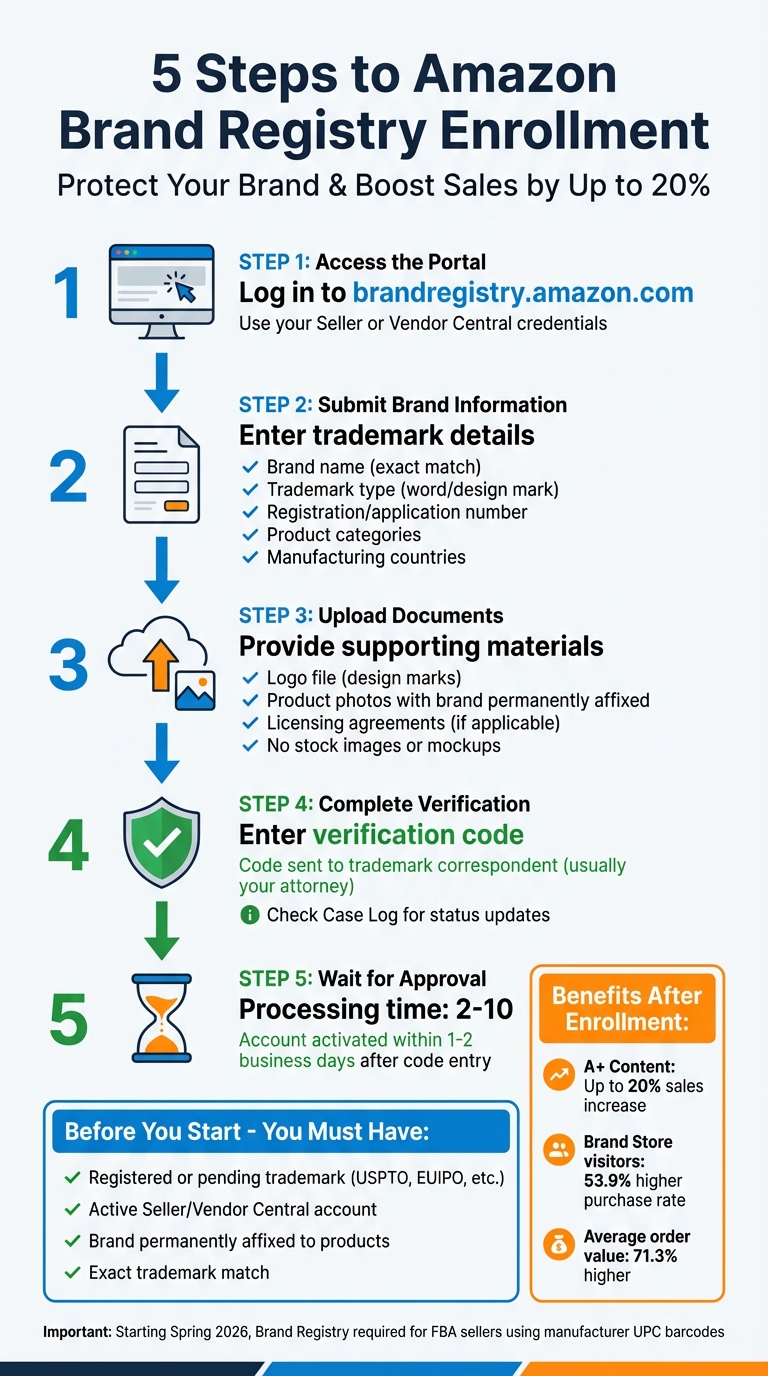
Amazon Brand Registry Enrollment Process: 5 Steps to Protect Your Brand
Enroll your brand in Amazon Brand Registry
sbb-itb-81460ea
Requirements for Amazon Brand Registry
To enroll in Amazon Brand Registry, you must meet specific eligibility criteria. These requirements are divided into two main areas: trademark ownership and account status. Both are non-negotiable - missing either will stop your application in its tracks. Here's what you need to know to prepare.
Trademark Requirements
Owning a trademark is a must. You’ll need either a registered trademark or a pending application from a recognized trademark office. Amazon accepts trademarks from several offices, including the USPTO (United States), EUIPO (European Union), UKIPO (United Kingdom), and others in Canada, Mexico, Australia, India, Japan, and more.
Your trademark can be either:
- A text-based mark (word mark)
- An image-based mark (design mark) that includes words, letters, or numbers
However, purely graphical logos without text don’t qualify. The brand name you submit must match your trademark exactly - down to spaces, symbols, and punctuation. For instance, "Brand Name" isn’t the same as "BrandName", and mismatches could lead to automatic rejection.
Additionally, your brand name or logo must appear permanently on your products or packaging. This means it should be printed, engraved, laser-etched, or sewn directly onto the item. Methods like stickers, stamps, or removable tags won’t cut it and are a frequent cause of application denials. Accuracy in your trademark details is critical for the verification process.
Account Requirements
You’ll also need an active Seller Central or Vendor Central account in good standing. The person submitting the application must be the legal owner of the trademark. If you’re an authorized agent or representative, the trademark owner must complete the initial registration and then grant you access as an authorized user.
Make sure to use the same login credentials as your Seller or Vendor Central account. This ensures smooth integration with Amazon’s brand tools.
Registered vs. Pending Trademarks
Amazon accommodates both registered and pending trademarks, but the process and benefits differ slightly. Here's a quick comparison:
| Feature | Registered Trademark | Pending Trademark |
|---|---|---|
| Eligibility | Accepted universally by Amazon Brand Registry | Accepted only from specific offices or via IP Accelerator |
| Required Info | Registration number and/or certificate | Application number |
| Protection Level | Full legal ownership and enforcement rights | Limited enforcement until registration is complete |
| Access to Tools | Immediate access to all tools | Early access to most tools during processing |
If you’re working with a pending trademark, expect limited protections until the registration is finalized. However, Amazon does provide early access to many tools, especially if the application is processed through their IP Accelerator program.
Before you begin your enrollment, ensure you’ve gathered all the necessary documentation and double-checked your trademark details to avoid delays.
What to Prepare Before Enrollment
Getting organized ahead of time can save you a lot of hassle during the enrollment process. Here's what you need to have ready.
Trademark Details
Start with your trademark information. If your mark is registered, you'll need the registration number. For pending marks, provide the serial or application number assigned by your local government IP office, like the USPTO in the United States. This step is non-negotiable.
Make sure your brand name matches the trademark record exactly - down to every space, symbol, and punctuation mark. You’ll also need to specify whether your trademark is a word mark (just text) or a design mark (text combined with an image). If it’s a design mark, have a digital copy of your logo that perfectly aligns with the trademark record. In some cases, you might also need to upload your trademark registration certificate for verification.
Amazon will send a verification code to the trademark correspondent listed on your IP record, which is often your attorney. Double-check that this contact information is accurate before you start the process.
Once your trademark details are sorted, gather visual assets that showcase your registered mark.
Visual Assets
You’ll need to submit a high-resolution photo showing your brand name or logo permanently applied to your product or its packaging. This could include methods like engraving, laser etching, printing, or sewing.
"Permanently affixed brand names are typically applied during production using methods like printing, sewing, laser etching, or engraving. Stickers, labels, stamps, and tags are not considered permanent since they can be easily added or removed after production." - Lisienne Intumu, Program Manager, Amazon [3]
Avoid using stock images, digitally edited pictures, or mockups. Amazon insists on actual photographs of physical products. If your trademark is a design mark, you’ll also need a standalone logo image that matches the trademark record. Additionally, prepare a professional brand website URL that showcases your products and branding in line with your application. This helps Amazon connect your brand to your products.
Next, focus on compiling product and market details to round out your preparation.
Product and Market Information
Accuracy and consistency across all materials are key to a smooth verification process.
Start by listing the product categories you sell in and the regions you target. If you’re already selling on Amazon, have your ASINs (Amazon Standard Identification Numbers) handy. Also, clarify whether you use Seller Central or Vendor Central to manage your operations.
Provide details about your manufacturing and distribution setup. If you produce items yourself, state that clearly. If you rely on third parties, you’ll need to submit a licensing agreement or authorization letter. Additionally, gather manufacturing invoices from the past six months that list at least one branded product. These invoices must display your brand name exactly as it appears on your trademark. While you can redact pricing information, the product names and quantities should remain visible. Lastly, have contact details for your manufacturers and distributors, as well as the country of origin for your products, ready to go.
How to Enroll in Amazon Brand Registry
Getting started with Amazon Brand Registry is a straightforward process once you have all your materials ready. Here's a step-by-step guide to help you through the registration process.
Step 1: Access the Brand Registry Portal
Start by heading to brandregistry.amazon.com. Log in using your Seller or Vendor account credentials, then click on "Enroll a new brand." Amazon operates with a single global account, so you can add trademarks from other countries later if needed.
Step 2: Submit Brand Information
Enter your brand name exactly as it appears in your trademark record. Select the type of trademark you have - either a word mark (text only) or a design mark (text with an image). You'll need to provide your trademark registration or application number and identify the government trademark office, such as the USPTO. Additionally, list the product categories your brand covers, specify the countries where your products are manufactured, and include your distribution details.
Step 3: Upload Supporting Documents
For design marks, upload a separate image file of your logo. Include high-resolution photos of your product or packaging that clearly display your brand name or logo permanently affixed. Avoid using stock images, mockups, or digitally altered photos. If third-party manufacturers are involved, be ready to upload any required licensing agreements or authorization letters.
Step 4: Complete Verification
After submitting your application, Amazon will send a verification code to the trademark correspondent listed in your official trademark record - usually your attorney or legal representative. Once you receive the code, enter it into the Brand Registry portal to finalize the verification. You can check the status of your application anytime in the portal's "Case Log" section.
Step 5: Wait for Approval
Processing typically takes 2–10 days, though it can extend up to 2 weeks in some cases. After entering the verification code, your account is usually activated within 1–2 business days. Once approved, your products will receive a unique identifier in Amazon's system, and you'll gain access to features like A+ Content tools and enhanced brand protection. If you’re using Amazon’s IP Accelerator program, you may enjoy quicker access to Brand Registry benefits even if your trademark application is still pending.
Tips for After Enrollment
Once you're enrolled in Amazon Brand Registry, it's time to take full advantage of the tools and safeguards it offers. Here's how you can make the most of your enrollment and keep your brand secure.
Use Enhanced Brand Tools
With enrollment, you gain access to features designed to boost your sales and strengthen your brand presence. For example, A+ Content allows you to replace standard product descriptions with high-quality images, comparison charts, and storytelling elements. Adding Basic A+ Content can increase sales by up to 8%, while Premium A+ Content - featuring interactive elements like video modules and mobile-friendly layouts - can boost sales by as much as 20% [5][4].
Start by creating a Brand Story module in the "From the Brand" section. This step is essential for unlocking Premium A+ Content features. Once your content is live, use the "Manage Your Experiments" tool to A/B test different versions over 4–10 weeks. Adjusting your content based on these results can lead to sales increases of up to 25% [4]. Additionally, shoppers who visit a Brand Store tend to purchase 53.9% more often and have a 71.3% higher average order value [4].
Monitor and Protect Your Brand
Keeping your brand safe from counterfeiters and unauthorized sellers is crucial. The Report a Violation tool lets you search for potential infringements using images, keywords, or ASINs, and report them directly to Amazon. For even greater control, consider enrolling in Project Zero, which empowers you to remove counterfeit listings yourself. Amazon’s Transparency program adds another layer of protection, using unique 2D codes to verify the authenticity of over 2.5 billion product units [1].
To streamline monitoring, assign roles like "Registered Agent" for legal teams and "Rights Owner" for internal staff using the User Permissions feature [6]. Regularly review your Brand Registry portal for updates on protection metrics and reporting history. Also, ensure your trademark records are current and accurate to maintain consistent protection.
Keep Trademark Information Updated
Amazon requires your trademark records, product packaging, and listings to align perfectly. Any mismatches can result in compliance issues or loss of brand protections. If you expand to other countries, remember to register trademarks for each Amazon marketplace to safeguard your brand globally [4][2].
Looking ahead, starting in Spring 2026, Amazon will require sellers using manufacturer UPC barcodes with FBA to be enrolled in Brand Registry. Sellers without this must switch to Amazon barcodes (FNSKUs) [2]. To add new trademarks, go to "Manage" in the Brand Registry menu, select "Manage intellectual property", and then click "Connect a trademark" [4]. It's also wise to assign multiple Administrators to ensure seamless access, even if team members change [6].
Conclusion
Taking the steps outlined in this guide - from organizing your trademark information to completing the verification process - sets you on the path to securing and expanding your brand's presence on Amazon. Each phase moves you closer to accessing tools that safeguard your brand, boost marketing efforts, and provide valuable insights.
Once enrolled in Brand Registry, you'll gain protection against counterfeit products and enjoy premium features like A+ Content and Brand Stores, which can help drive noticeable sales growth. Plus, with Amazon's upcoming Spring 2026 requirement for Brand Registry enrollment to use manufacturer UPC barcodes with FBA [2], now is an ideal time to get started. Whether your trademark is registered or pending, the program offers benefits and protections that can elevate your brand.
With your documents and assets ready, you're prepared to begin the enrollment process. Collect your trademark details, organize your visual assets, and follow the steps outlined here. Your brand deserves strong protection and the opportunity to grow, and with careful preparation, enrollment can be a smooth and rewarding experience.
FAQs
What if my brand name doesn’t exactly match my trademark?
If your brand name doesn’t perfectly align with your trademark, it could lead to problems when enrolling in Amazon Brand Registry. The name you submit must match your trademark record exactly - this includes capitalization, spacing, and any special characters. Even a small mismatch can result in delays or even rejection of your application. To fix this, either update your trademark to reflect the correct details or ensure the brand name matches precisely before reapplying.
How do I enroll if the verification code goes to my attorney?
If your verification code is sent to your attorney, reach out to them promptly and ensure you submit the code within the specified timeframe, typically 10 days. If the code ends up with the wrong contact or you encounter any problems, you can get help by contacting Amazon support through the Brand Registry contact page. Make sure your attorney's contact details are correct, and if necessary, share the code through Amazon's support channels to resolve the issue.
Can I get Brand Registry with a pending trademark in the U.S.?
Yes, you can join the Amazon Brand Registry even if your trademark is still pending in the U.S. To qualify, you need either an active trademark application or a registered trademark that aligns with your brand name. Make sure you also meet all other program requirements to be eligible.
