

Optimizing backend keywords is a powerful way to increase your product's visibility on platforms like Amazon and Shopify. These hidden search terms allow you to target synonyms, long-tail keywords, and variations that improve search rankings without cluttering your product listing. When done right, this strategy can significantly boost impressions, conversions, and revenue.
Key Takeaways:
- Why It Matters: Backend keywords can increase visibility by 43% in three weeks and improve conversions by 27%.
- Research: Use tools like search term reports and reverse ASIN lookups to find high-intent, long-tail keywords.
- Avoid Mistakes: Stay within Amazon's 249-byte limit, avoid duplicate keywords, and exclude prohibited terms like competitor names.
- Audit and Test: Regularly track performance, remove underperforming keywords, and verify indexing with tools like Helium 10.
- Update Regularly: Refresh keywords quarterly to align with trends and customer behavior.
Backend keyword optimization is not a one-time task - it’s a continuous process that requires research, testing, and updates. By following these steps, you can maximize your product’s discoverability and sales potential.
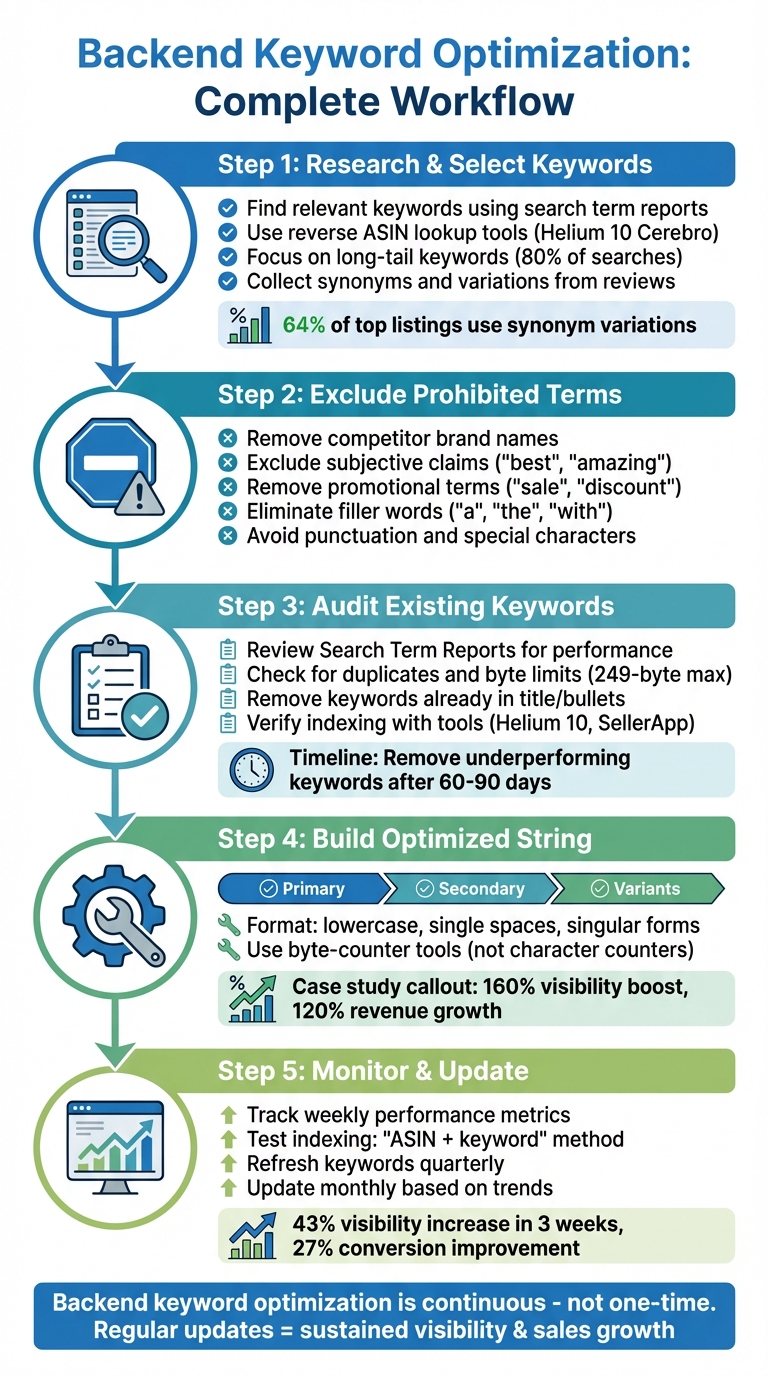
Backend Keyword Optimization Process: 5-Step Workflow for Amazon Sellers
Amazon Backend Keywords Done RIGHT: Maximize Rankings and Sales Without Shortcuts!
sbb-itb-81460ea
Research and Select Backend Keywords
Laying the groundwork with effective backend keyword research is crucial for boosting your listing's visibility and ensuring smooth audits down the line.
Find Relevant Keywords
Start with your seller dashboard’s search term reports to identify keywords already driving traffic. Next, use tools like a reverse ASIN lookup (such as Helium 10's Cerebro) to uncover competitor keywords. Focus on phrases with clear purchase intent. For instance, a shopper searching for "waterproof hiking boots for women" is likely closer to making a purchase than someone searching for just "shoes" [6][7].
"There's a big difference between someone typing 'hospital bed' and someone searching 'best home hospital bed for elderly with arthritis.' The first could be anyone... The second is almost definitely a caregiver ready to buy." – Kyle Sobko, CEO, SonderCare [7]
Look for keywords that strike a balance between high search volume and moderate competition. Keep in mind that only about 20% of searches are for high-volume, broad terms (often called "fat head" keywords). The remaining 80% are long-tail keywords, which often lead to better conversions [8]. Also, avoid duplicating keywords that already appear in your title or bullet points since these sections are automatically indexed.
Collect Synonyms and Variations
Dive into reviews, Q&A sections, and support tickets to uncover how buyers naturally describe your product. This includes common misspellings and regional variations in spelling (e.g., "jewelry" vs. "jewellery"). For example, Teresha Aird from Custom Neon discovered high-intent phrases like "custom neon sign for gaming room" simply by analyzing customer feedback [7]. These types of phrases might not show up in standard keyword tools but can still attract highly relevant traffic.
Include these variations in your backend keywords to keep the visible part of your listing clean. Research shows that 64% of top-performing Amazon listings utilize a variety of synonyms in their backend fields, and listings with carefully chosen long-tail keywords experience a 27% increase in conversions [2]. Additionally, since over 70% of Amazon shoppers use mobile devices, shorter queries and typos are common, making these variations even more valuable [4].
Exclude Prohibited or Irrelevant Keywords
Avoid using competitor brand names like "Nike" or "Apple", as doing so can lead to listing suppression or account penalties. Similarly, steer clear of subjective claims (e.g., "best", "amazing"), promotional terms (e.g., "sale", "discount", "free shipping"), and filler words (e.g., "a", "the", "with") that waste valuable space and may violate Amazon's policies.
Punctuation marks such as commas or periods also take up space without adding any SEO value. Don't include product identifiers like ASINs or URLs. Keep your backend keyword string within the 249-byte limit to ensure compliance.
| Category | Exclude Keywords | Reason |
|---|---|---|
| Brand/Legal | Competitor names, trademarks | Policy violation; risk of suspension |
| Redundancy | Words in title, bullets, or description | Wastes byte space; already indexed |
| Subjective | "Best", "cheapest", "top-rated" | Prohibited subjective claims |
| Promotional | "Sale", "discount", "free shipping" | Temporary terms; against platform rules |
| Technical | Commas, periods, ASINs, URLs | Wastes space; non-searchable data |
Once you've finalized your keyword list, the next step is to audit your existing backend keywords to ensure they’re performing well and staying compliant with platform guidelines.
Audit Existing Backend Keywords
After compiling your keyword list during the research phase, the next step is to ensure your backend keywords are working effectively. Reviewing these fields not only helps you fine-tune your strategy but also ensures you're adhering to Amazon's indexing rules.
Review Keyword Performance
Start by pulling your Search Term Reports from Amazon Seller Central. These reports show which backend keywords are driving clicks and sales. Tools like Helium 10's Cerebro and Amazon's Search Query Performance dashboard can further highlight which terms are converting and which aren't pulling their weight. You can also perform a reverse ASIN lookup to see where your product ranks and uncover any gaps in your keyword strategy.
This process helps you identify high-performing keywords while flagging those that aren't contributing to traffic or conversions. If a keyword shows no results after 60–90 days, it might be time to swap it out for something new.
Check for Duplicates and Byte Limits
Amazon automatically indexes your title, bullet points, and description, so duplicating these in your backend keywords is a waste of space. Go through your backend string to remove any repeated terms and unnecessary filler words. Every byte matters, so avoid punctuation and words that don't add value.
Keep in mind that exceeding Amazon's byte limit - even by one byte - can cause the entire search term field to be ignored. Standard English letters and numbers count as 1 byte each, but special characters (like é, ü, or ™) can take up 2 to 4 bytes. Use a tool like Helium 10's Frankenstein to calculate byte usage, eliminate redundancies, and format your string with single spaces between keywords.
Once your string is optimized, verify that everything is properly indexed.
Verify Indexing with Tools
After updating your backend keywords, it's crucial to confirm they're being indexed by Amazon. Wait 24–48 hours, then manually search using the format "ASIN + [keyword]" to ensure your product shows up for the term.
For bulk checks, tools like the Helium 10 Index Checker or SellerApp Index Checker Chrome extension can quickly verify multiple keywords at once. These tools help you spot any terms that Amazon failed to index.
"Indexing for a keyword gets you on to the racetrack. Ranking for a keyword is how you win the race."
A real-world example from Bradley Sutton of Helium 10 highlights how impactful backend keywords can be. On May 24th, a product already ranking for a specific keyword saw a ranking boost within hours of adding that keyword to its backend search terms. This demonstrates how a well-optimized backend can deliver immediate results.
Build an Optimized Backend Keyword String
Once you've audited your keywords, the next step is to craft a backend keyword string that makes the most of Amazon's 249-byte limit. Using your research, structure this string to include impactful keywords that aren't already part of your front-end content. This approach can significantly enhance your product's visibility.
Organize Keywords by Priority
Your keyword audit lays the groundwork for an effective backend string, but prioritization is key. Divide your keywords into three tiers:
- Primary keywords: High-volume terms that should appear in both your front-end content and backend.
- Secondary keywords: Niche or long-tail phrases with lower competition but strong buyer intent.
- Variants: Misspellings, synonyms, and alternative phrasings that are best suited for the backend.
Digital marketing expert Ian Lurie emphasizes the importance of targeting what he calls "unoccupied keyword opportunities." He explains:
"Pick phrases that have available real estate, where ranking in the top 5 means people might actually see you" [9].
In other words, prioritize keywords that strike a balance between search demand and competition. For example, in 2025, Ecomclips helped a Home & Living client selling ergonomic folding chairs. They categorized backend keywords into tiers, adding terms like "portable folding seat" and "camping stool" that didn’t fit into the title. Over 60 days, this strategy boosted organic visibility by 160%, increased monthly revenue from $12,800 to $28,200 (a 120% growth), and improved their primary keyword ranking from #38 to #7 [3]. This demonstrates how choosing the right backend keywords can directly impact performance.
Format According to Best Practices
Once you've prioritized your keywords, formatting them correctly is just as important. Amazon's algorithm has strict rules, and following these ensures every byte counts:
- Use single spaces only: Avoid commas, periods, or other punctuation, as they waste space [1][2].
- Stick to lowercase: Amazon's algorithm is case-insensitive, and lowercase saves bytes [5].
- Use singular forms: Plurals are automatically matched, so singular forms are sufficient [10][11].
- Avoid repetition: Don’t include words already in your title, bullets, or description, as Amazon indexes those sections automatically [1][10].
- Watch special characters: Characters like é, ™, or © can take up 2-4 bytes each, so avoid them [4].
To ensure your string fits within the 249-byte limit, always use a byte-counter tool instead of a character counter. Exceeding the limit - even by one byte - can result in Amazon de-indexing your entire backend field [4][5].
Here’s a quick summary of best practices for formatting your backend keyword string:
| Formatting Element | Best Practice | Why It Matters |
|---|---|---|
| Separators | Single spaces only | Punctuation wastes byte space [1][2] |
| Capitalization | All lowercase | Case-insensitive; lowercase saves bytes [5] |
| Word Forms | Singular only | Plurals are matched automatically [10][11] |
| Repetition | Exclude front-end terms | Already indexed by Amazon [1][10] |
| Special Characters | Avoid (é, ™, ©) | Consume 2-4 bytes each [4] |
Implement and Test Backend Keywords
Once you've crafted your optimized keyword string, the next step is to integrate it into your Amazon listing and ensure it's working as intended.
Add Keywords in Platform Fields
To add backend keywords, log in to Amazon Seller Central and navigate to Inventory > Manage Inventory. Find your product, click Edit, and go to the Keywords tab. In the main field labeled Search Terms (sometimes referred to as "Generic Keywords"), paste your carefully formatted keyword string.
Amazon provides additional fields that many sellers tend to miss. Use all available fields - like Subject Matter, Other Attributes, Intended Use, and Target Audience - to include extra niche-specific terms. Once you've entered your keywords, hit Save and Finish, and allow 24–48 hours for Amazon's algorithm to process your updates.
After this processing window, it's time to test how well your keywords are performing.
Test Indexing and Visibility
To confirm your keywords are indexed, start by entering "ASIN + keyword" into Amazon's search bar. If your product appears in the results, the keyword is active. However, if you see a "Use fewer keywords" message or no results, something might be off.
For a faster approach, tools like SellerApp or Helium 10 Index Checkers can help you test keyword indexing in bulk. These tools can verify whether your optimized keyword string is functioning properly.
If some keywords fail to index, investigate potential issues like duplicate terms already used in front-end content or restricted words (e.g., competitor brand names or phrases like "best" or "on sale"). Remove problematic terms one by one and retest. Misspellings can also cause problems, so double-check for errors and make adjustments as needed.
If issues persist, try a keyword rotation debugging method: remove one suspicious word at a time, wait 24 hours, and retest. This process helps pinpoint the problematic term. Even small errors can disrupt keyword indexing, so thorough testing and adjustments are crucial.
Monitor and Update Backend Keywords
Once your keywords are in place and performing, it's essential to keep an eye on them and make updates as needed. Optimizing backend keywords isn't a one-and-done task - it requires consistent monitoring and adjustments to stay ahead in the game. After confirming your keywords are indexed, track their performance and refresh them regularly to maintain your competitive edge.
Track Performance Metrics
Check how your keywords are performing at least weekly. A great starting point is Google Search Console, which is free and provides data on your average position, impressions, and click-through rate (CTR) for each keyword. Don’t stress over minor daily changes - focus on long-term trends instead.
For more detailed insights, consider paid tools like Semrush ($130–$500/month), Ahrefs ($100–$1,000/month), or Moz Pro ($99–$599/month) [12]. These platforms allow you to track specific keywords, analyze competitor visibility, and even spot keyword cannibalization - when multiple pages on your site compete for the same term [13].
"Keyword tracking is the process of monitoring where your webpages appear in search engine results for specific keywords and how those positions change over time." – Cecilia Meis, Senior Editor, Semrush [13]
Don’t just track traffic - focus on conversion rates. A keyword that brings in 1,000 visitors but leads to no sales is far less valuable than one that attracts 100 visitors who make purchases. For example, in September 2025, Barber Depot experienced a one-position drop for the keyword "hair clippers for men." With a 7.28% conversion rate and an average order value of $162.96, this small drop cost them an estimated $3,096 in lost revenue in just one day [13][16].
Set up automated alerts through your tracking tools to get notified of significant drops in high-priority keywords. This allows you to quickly identify and address issues before they negatively impact your revenue [13]. These insights are key to shaping your backend keyword strategy.
Refresh Keywords Regularly
Use performance data to keep your keyword strategy fresh and effective. Aim to audit your keywords quarterly and adjust them monthly based on real-time trends [7][15]. For instance, incorporate seasonal keywords like "Black Friday deals" or "back to school" when appropriate, and remove them after the season ends [7].
Leverage your PPC campaigns to identify top-performing keywords. If a term drives conversions in paid ads, include it in your backend keyword list to boost organic performance [13]. Additionally, analyze customer reviews, Q&A sections, and support tickets to uncover the exact phrases your audience uses. In early 2023, SonderCare CEO Kyle Sobko discovered that customers were searching for "hospital bed for elderly parents with arthritis." Adding this long-tail keyword to their metadata resulted in nearly double the conversions within weeks [7].
"I use Google Ads to test which terms and landing pages bring in the best conversion rates, so I don't waste time optimizing for keywords that might bring visitors but don't drive sales." – Victor André Enselmann, Founder and SEO Strategist, Modeva [7]
Remove underperforming keywords that show no results after 60–90 days and replace them with fresh ones. Tools like Google Autocomplete, People Also Ask, and Related Searches at the bottom of search result pages can help you find new terms [7][14]. Organize your keywords by priority, tagging them as "High Conversion" or "Seasonal", so you can focus your updates on the ones that matter most [13].
Conclusion
Optimizing backend keywords isn't a "set it and forget it" task - it’s a continuous process that plays a big role in your product’s visibility and sales. When done right, these hidden terms work quietly in the background, amplifying your listing's reach and effectiveness. Staying on top of this ensures your listing remains competitive in an ever-changing marketplace.
Make it a habit to revisit and update your backend search terms every 2–3 months. This helps you keep pace with evolving search trends and seasonal shifts [1]. Use performance data as your guide - swap out poorly performing keywords for new, relevant ones based on real insights.
"SEO is about consistency. Keep doing it, make it part of your routine, and over time it can increase organic search engine traffic to your website and produce great results without having to pay for online ads." – Kevin Bates, Marketing Expert, WooCommerce [17]
FAQs
How often should I review and update my backend keywords for better performance?
To keep your listings performing well and in step with changing search trends, it's smart to review and refresh your backend keywords every three to six months. This way, you can make sure you're targeting terms that match what customers are actually searching for and what the market currently demands.
Updating regularly also keeps you ahead of the competition, especially when new products or trends pop up in your niche. Keep an eye on how your keywords are performing and tweak them as needed to maintain strong visibility.
What are the best tools for finding long-tail keywords?
To find strong long-tail keywords, you can rely on specialized keyword research tools. Well-known platforms like Ahrefs, SEMrush, and Moz offer detailed insights into search volume, competition levels, and keyword suggestions. If you're using an e-commerce platform like Shopify, you'll find built-in SEO tools specifically designed to help sellers identify niche keywords. These keywords can help attract more targeted traffic to your store.
For a straightforward approach, choose tools that are easy to navigate and deliver useful, actionable data. With these resources, you can fine-tune your backend keywords and boost your store's search visibility.
Why should you avoid using competitor names in backend keywords?
Using competitor names in backend keywords is a direct violation of Amazon's policies and can lead to severe consequences, like listing suppression or even account penalties. Amazon explicitly forbids including brand names - especially those of competitors - in backend keyword fields.
Instead, concentrate on relevant, non-branded keywords. This approach not only keeps you compliant with Amazon's rules but also helps you connect with your target audience effectively, all while safeguarding your account's reputation.
