

Struggling with Amazon PPC campaigns? If your ad spend is climbing but sales aren't, you're not alone. Common issues like low conversion rates, high ACoS, and wasted budgets can derail your efforts. But there are practical fixes. Here's how to turn things around:
- Refine Keyword Targeting: Use automatic campaigns to discover high-performing keywords, then shift them to manual campaigns for better control. Add negative keywords to cut irrelevant clicks.
- Adjust Bidding Strategies: Start with "Dynamic Bidding – Down Only" to control costs. Use multipliers for high-performing placements like "Top of Search."
- Optimize Product Listings: Ensure your titles, images, and bullet points are clear and compelling. Backend keywords can boost visibility.
- Build a Full-Funnel Strategy: Combine Sponsored Products, Brands, and Display Ads to target shoppers at all stages of the buying journey.
- Automate Campaign Management: Use tools to handle repetitive tasks like bid adjustments and keyword harvesting. This saves time and improves efficiency.
- Analyze Campaign Data: Regularly review reports to identify underperforming keywords, placements, or products. Segment campaigns for better targeting.
Amazon PPC Campaign Optimization (for Profit) - 2026 Step by Step Walkthrough
Solution 1: Refine Your Keyword Targeting
Wasting money on clicks that don’t lead to sales? It’s often a sign of poor keyword targeting. The fix starts with understanding what your customers are searching for - and cutting out the terms that don’t drive results.
Use Manual and Automatic Campaigns to Discover Keywords
Think of automatic campaigns as a testing ground. Amazon’s algorithm can identify relevant search terms over a two-week period. After that, review the Search Term Report to pinpoint high-performing keywords. Focus on terms with conversion rates above 10% and an ACoS (Advertising Cost of Sales) below your target threshold - these are your winners.
Once identified, move these high-performing keywords into Exact Match settings in manual campaigns. Doing this gives you more control over bidding and ensures your ads appear for the most relevant searches. Don’t forget to add these same terms as negative keywords in your automatic campaigns. This step avoids internal competition where your ads could cannibalize each other.
Want to go a step further? Use reverse ASIN tools to analyze your competitors. Filter the results to find keywords where at least 8 out of 10 competitors are ranking. This narrows down the core phrases driving sales in your niche while filtering out irrelevant terms.
Now, let’s talk about blocking the searches that waste your budget.
Add Negative Keywords to Eliminate Irrelevant Traffic
Negative keywords are your best tool for stopping unproductive clicks. For example, if you’re selling high-end leather wallets, terms like "cheap", "wholesale", or "free" could attract bargain hunters who won’t buy your product. Adding these as negative keywords right away can save your budget from being drained.
Check your Search Term Report weekly. If a term spends over $100 but generates less than $20 in sales, it’s time to pause it or mark it as a negative keyword. These irrelevant clicks not only waste money but also hurt your ad’s performance metrics. Amazon could interpret this as low ad quality, leading to higher costs for even relevant searches - sometimes by 20–40%.
Use the right type of negative keywords for the job:
- Negative Exact: Blocks specific phrases.
- Negative Phrase: Stops searches with that exact word order.
- Negative Broad: Filters out any search containing the term.
A strong negative keyword strategy can reduce your ACoS by up to 30% within a month. It’s all about refining your targeting to focus on the clicks that actually matter.
Solution 2: Adjust Your Bidding Strategy
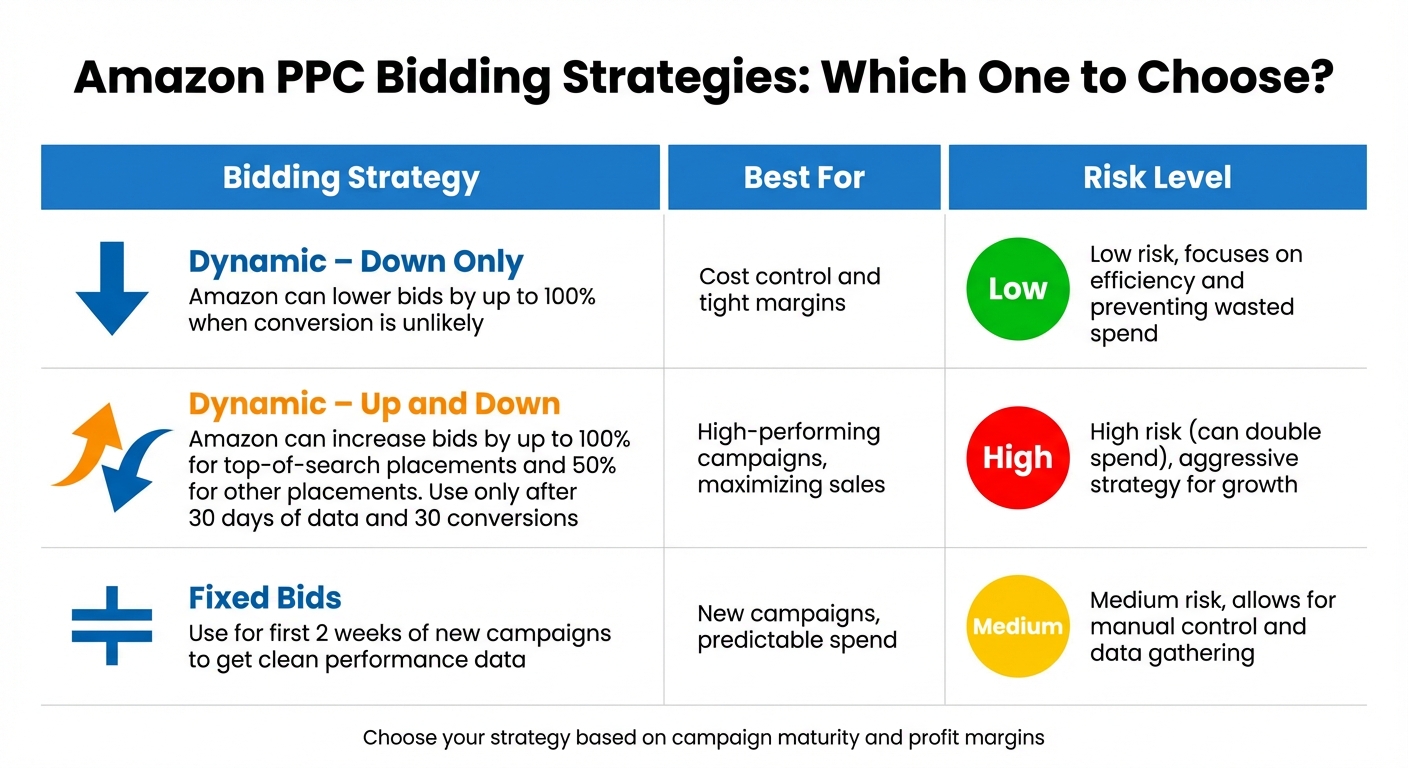
Amazon PPC Bidding Strategies Comparison: Dynamic vs Fixed Bids
Throwing money at unplanned bids is a quick way to drain your budget. Amazon provides three bidding strategies, and picking the right one is key to aligning with your campaign’s stage and objectives.
Use Dynamic Bidding to Control Costs
Once you've refined your keyword list, fine-tune your bids to safeguard your profit margins while targeting high-conversion opportunities.
For most campaigns, start with Dynamic Bidding – Down Only. This setting lets Amazon lower your bids - by up to 100% - when it predicts a click is unlikely to convert [8]. It’s a smart way to avoid wasting money on low-probability clicks and protect your bottom line.
Switch to Dynamic Bidding – Up and Down only when your campaign is well-established, with an ACoS comfortably below your target. This strategy allows Amazon to increase your bid by up to 100% for top-of-search placements and 50% for other placements when it identifies a strong conversion opportunity [8]. For instance, if your base bid is $1.00, Amazon could raise it to $2.00 to secure a prime spot. However, this approach works best after gathering at least 30 days of data and achieving 30 conversions. Stick to one dynamic strategy per campaign to keep things manageable [8].
For brand-new campaigns, use Fixed Bids for the first two weeks. This method gives you clean, unaltered performance data, free from Amazon’s algorithmic adjustments. Once you’ve identified what works, you can transition to Down Only bidding [8].
Set Placement Multipliers and Dayparting Rules
Fine-tuning your ad placements and timing can stretch your budget even further.
Not all placements deliver the same results. For example, top-of-search placements often generate click-through rates that are 50 to 100 times higher than product page ads [9]. Check your Placement Report every two weeks to see where your ads perform best. If top-of-search spots are driving sales at an acceptable ACoS, applying a 100% to 200% bid multiplier can help you secure those high-performing placements [9].
Another tactic is dayparting, which involves adjusting bids based on the time of day. Increase bids during peak conversion hours and lower them during slower periods. This approach can reduce wasted clicks by as much as 70% [10]. Use reliable tools to track performance by the hour and device to ensure your adjustments are backed by solid data [1].
Here’s a quick example: If your base bid is $1.00 and you apply a 50% multiplier for top-of-search, your bid becomes $1.50. Combine that with Dynamic Bidding – Up and Down, and Amazon could double it to $3.00 [7]. Keep an eye on your ad spend to avoid overshooting your budget.
| Bidding Strategy | Best For | Risk Level |
|---|---|---|
| Dynamic – Down Only | Cost control and tight margins [7][1] | Low |
| Dynamic – Up and Down | High-performing campaigns, maximizing sales [7] | High (can double spend) |
| Fixed Bids | New campaigns, predictable spend [11] | Medium |
Solution 3: Improve Your Product Listing Quality
Once you've fine-tuned your PPC settings, it's time to focus on converting those clicks into sales. PPC ads can bring in traffic, but if your product listing doesn't close the deal, you're throwing money away. If your click-through rates are solid but your conversion rate is under 5%, it's a clear sign your listing needs attention [1].
Optimize Titles, Bullets, and Images
Start with your product title. Keep it concise - around 60 characters - to ensure it displays fully on mobile devices. Include key details like the brand, primary feature, product type, color, size, and quantity. Make sure the most important information is at the beginning [12][1].
For images, use a main photo with a pure white background, ensuring the product takes up at least 85% of the frame. Add at least four high-quality images (minimum 1,000 pixels) to enable the zoom feature. Why? Sellers who enabled zoom saw an average 64% increase in sales, while adding four or more images boosted sales by 59% in just a week [12][13].
Bullet points are another critical area. Use three clear and concise bullets to highlight dimensions, uses, and benefits. Start each with a capital letter, skip the period at the end, and focus on answering common shopper questions. Sellers who optimized their listings this way often saw a 25–40% lift in conversions, a 31% increase in conversion rate (CVR), and an 18% drop in advertising cost of sales (ACoS) [13]. By pairing optimized listings with your improved keywords and bidding strategies, you give every click a greater chance to convert.
Use Backend Keywords to Increase Visibility
Backend keywords are a hidden gem for improving your product's visibility. Amazon allows up to 250 bytes for these terms, which can include synonyms, abbreviations, or alternate names. Use single spaces to separate words - avoid commas, semicolons, or repeating keywords already visible in your listing [12][14].
"Researching Amazon keywords can help you figure out what words people search for when looking for products like yours, so you can improve your listings and, ultimately, help boost sales." - Mickey Toogood, Sr. Content Marketing Manager, Amazon [14]
Leverage your Search Term Report to identify high-performing queries. Add these to your backend keywords or weave them into your listing copy. This approach helps you capture long-tail search traffic without cluttering your product page [12][4].
sbb-itb-81460ea
Solution 4: Build a Full-Funnel Campaign Structure
Once you've fine-tuned your PPC settings and product listings, it’s time to expand your strategy with a full-funnel approach. Relying solely on Sponsored Products can limit your reach. In fact, 48% of brands report that Sponsored Brands ads deliver the highest return on ad spend, while 44% say Sponsored Products yield the best results [15]. A blended strategy ensures you’re covering all bases.
Combine Sponsored Products, Brands, and Display Ads
At the top of the funnel, Sponsored Brands and Streaming TV ads are ideal for building awareness. These ads appear prominently at the top of search results and on platforms like Prime Video and Twitch, helping you introduce your brand to new audiences [5]. To gauge success, track New-to-Brand metrics, which show how many first-time customers you’re attracting.
In the middle of the funnel, shoppers are actively evaluating their options. Sponsored Brands that direct traffic to your Brand Store and Sponsored Display retargeting ads play a key role here. Sponsored Display ads allow you to reach shoppers who visited your product page but didn’t make a purchase, showing your ads both on Amazon and across partner websites and apps [5][1].
Finally, at the bottom of the funnel, Sponsored Products seal the deal. These ads place your product listings directly in search results and - through strategic product targeting - on competitor detail pages, where buyers are often ready to click "Add to Cart" [5].
"A complete strategy uses multiple types for different funnel stages." - PPC Ninja [6]
Protect your brand. Run ads targeting your own brand name and ASINs to prevent competitors from intercepting clicks when shoppers are specifically searching for you [1]. Additionally, use product targeting to position your ads on competitor detail pages, particularly on items that are either similar to or more expensive than yours [1].
This layered strategy naturally paves the way for off-Amazon advertising efforts.
Use Amazon DSP for Off-Amazon Advertising
Take your strategy beyond Amazon with programmatic advertising via Amazon DSP. The Demand-Side Platform (DSP) helps you extend your reach outside Amazon’s ecosystem through programmatic display ads. While Sponsored Products focus on shoppers actively searching on Amazon, DSP targets potential buyers as they browse other websites, apps, and even streaming platforms [5][6]. This approach excels at driving awareness early in the purchase journey [17].
DSP is particularly effective for retargeting. For example, if someone visits your product page but doesn’t buy, DSP ensures your product stays visible as they browse elsewhere online, keeping it top-of-mind until they’re ready to purchase [1][6]. Amazon’s advertising business saw 24% growth between 2022 and 2023, jumping from $38 billion to $47 billion - a surge largely fueled by these off-platform capabilities [2]. To maximize DSP effectiveness, make sure your ad creative - images and headlines - aligns with your product detail page. This consistency avoids shopper confusion and reinforces brand recognition [16].
| Ad Type | Primary Funnel Stage | Main Objective | Where It Appears |
|---|---|---|---|
| Sponsored Products | Bottom (Purchase) | Drive direct sales to specific products | Search results and product pages |
| Sponsored Brands | Top/Middle (Awareness) | Build brand recognition across your catalog | Top of search results, Brand Store |
| Sponsored Display | Middle/Bottom (Retargeting) | Re-engage past viewers | On and off Amazon (partner websites and apps) |
| Amazon DSP | Top (Awareness) | Broad reach and programmatic targeting | Amazon-owned sites and third-party platforms |
Solution 5: Automate Your Campaign Management
Balancing manual PPC optimizations with automation tools can significantly improve campaign performance. Managing multiple campaigns across various products can quickly become overwhelming, especially when it involves repetitive tasks like bid monitoring and keyword adjustments. Automation tools are designed to handle this heavy lifting, acting as 24/7 campaign monitors that adjust bids and budgets even when you're offline [18][19].
The results are hard to ignore. For example, using dayparting rules - adjusting bids based on the time of day - can reduce wasted clicks by 70% [18]. Tools with "ACoS Reducer" capabilities have shown to decrease advertising cost of sales (ACoS) by 40%, while "ROI Maximizer" templates have achieved 2.7X RoAS by prioritizing high-performing targets [18]. SellerApp's platform alone has optimized over $1 billion in global ad spend, showcasing the power of automation [18].
"Increased automation has reduced the need for constant hands-on tweaking, such as bid management." - Tim Jensen, Sr. Search Marketing Specialist, M&T Bank [19]
That said, automation isn’t a "set it and forget it" solution. Regular reviews - weekly or bi-weekly - are essential to ensure your automation rules align with your business goals [18][19]. By automating data-heavy tasks, you free up time to focus on strategy and creative planning. Let’s take a closer look at how automated keyword harvesting and bid adjustments can streamline campaign management.
Automate Keyword Harvesting and Bid Adjustments
Keyword harvesting is a game-changing workflow for automation. Here’s how it works: automation tools analyze your automatic campaigns, identify high-performing search terms, and transfer (or "harvest") them into manual campaigns where you can fine-tune bids with greater precision [18][19]. To prevent internal competition, the harvested keywords are automatically added as negatives in the original automatic campaign [18].
When it comes to adjusting bids, automation tools can help you optimize performance by increasing bids on low-ACoS keywords, reducing bids on high-ACoS keywords, and pausing keywords that generate clicks without resulting in sales [18]. Before making any bid changes, wait until you’ve gathered enough data - this is typically the average number of clicks needed to generate one sale, calculated by dividing 100 by your conversion rate [20]. For impactful results, apply 30% bid adjustments instead of smaller increments like 10%, as this ensures enough visibility to evaluate the change’s effectiveness [20].
For instance, using a "Keyword Picker" automation has increased clicks by 1.4X by identifying and targeting profitable search terms [18]. Advanced automation rules can also pause campaigns or reduce ad visibility when inventory levels drop, helping you avoid stockouts and maintain brand integrity [18].
But automation doesn’t stop there - it also adapts to daily and seasonal performance trends, ensuring your campaigns stay competitive.
Set Up Seasonal and Intraday Adjustments
Dayparting automation takes your campaigns to the next level by adjusting bids in real time based on traffic patterns. This ensures your budget is allocated efficiently throughout the day, particularly during high-traffic periods [18][19].
During seasonal peaks, automation tools can dynamically adjust daily or lifetime budgets, reallocating funds to top-performing campaigns to maximize returns [18]. For example, "Inventory Refactoring" rules increase the likelihood of avoiding stockouts by 95%, ensuring that ad visibility aligns with your stock levels [18].
"Automation ensures you're not missing any potential conversions while keeping costs in check." - Jason Miles, Amazon expert [19]
Many sellers find success with a hybrid approach, blending rule-based automation with AI-driven adaptability [18][19]. This combination offers both control and flexibility, making it easier to manage complex campaigns effectively.
Solution 6: Analyze Your Campaign Data
Skipping data analysis is like throwing darts blindfolded - you might hit the target, but chances are you'll miss. By diving into your campaign data, you can pinpoint where your money is going and what parts of your strategy need tweaking. The key is knowing which metrics to track and organizing your campaigns to unlock actionable insights.
To start, focus on five essential reports: Search Term, Targeting, Advertised Product, Sponsored Display Campaign, and Placement reports [28]. Keep in mind that Amazon attributes sales up to 7 days after a click. Analyzing data too soon might lead to misleading conclusions [22][23].
"If PPC sales rise but total revenue stalls, you're buying sales, not growth." - Steven Pope, Founder, My Amazon Guy [21]
The difference between a successful campaign and one that drains your budget often comes down to how you analyze and segment your data. Let’s break it down.
Review Reports to Evaluate Campaign Metrics
One of your most valuable tools? The Search Term report. Use it weekly to filter out search terms with 10+ clicks but no orders - these are wasting your budget, so add them as negative keywords [28]. On the flip side, identify terms with 3+ orders and an ACoS below your target, and add these as exact match keywords in manual campaigns [28].
Placement reports are another goldmine. They show how your ads perform in "Top of Search", "Product Pages", and "Rest of Search" [26][28]. If "Top of Search" has a high conversion rate but low impressions, consider increasing your bid multipliers for that placement [22][24]. Reviewing this report monthly helps fine-tune your placement strategy based on actual results [28].
Metrics like CTR (Click-Through Rate) and CVR (Conversion Rate) offer critical insights. For example:
- The average CTR for Sponsored Products is about 0.29%, but a CTR above 0.5% is excellent [21].
- Video Ads typically achieve CTRs between 1% and 2% [21].
If your CTR is high but your CVR is low, the problem might lie with your product listing rather than your ads [21][5]. Before increasing ad spend, optimize your product images, A+ content, and bullet points to boost conversions [21].
When adjusting bids, aim for precision. Reduce bids by 20% for keywords with an ACoS that’s 50% over your target, and increase them by 15% for keywords 30% below your target. Just make sure you’ve gathered enough data before making changes [28].
| Metric | Measures | Underperformance Indicator |
|---|---|---|
| ACoS | Ad Spend / Ad Sales | High percentage (eating into profit margins) |
| TACoS | Ad Spend / Total Sales | Increasing percentage (over-reliance on ads) |
| CTR | Clicks / Impressions | Low percentage (poor creative or targeting) |
| CVR | Orders / Clicks | Low percentage (listing or pricing issues) |
| ROAS | Ad Sales / Ad Spend | Low ratio (poor return on investment) |
Segment Campaigns for Better Targeting
Once you’ve reviewed your reports, segmentation is the next step. Looking at account-wide averages can hide underperforming areas [23]. By segmenting your campaigns, you can dig into ad group and keyword-level data to see what’s working and what’s not.
Separate campaigns by match type - broad, phrase, and exact. Broad match is great for discovering new keywords, while exact match focuses on high-intent conversions. Mixing them in the same campaign forces them to compete for the same budget, reducing your control [22][24].
Another strategy is to split campaigns into branded and non-branded terms. Branded campaigns usually have a lower ACoS, while non-branded campaigns are better for scaling traffic [22]. For even more insight, analyze data at the ASIN or SKU level to identify products with high TACoS that might need listing improvements rather than bid changes [22].
Organize your campaigns into three performance tiers:
- Winners: Low ACoS and high conversions. Increase bids and protect their rankings.
- Test: New products or keywords. Use moderate bids and monitor daily.
- Losers: High ACoS with little to no ROI. Pause or rework these campaigns [27].
This tiered approach simplifies budget allocation and ensures your top performers get the resources they need.
To streamline your workflow, use clear naming conventions like "Product – Category – Match Type – Targeting." This makes it easier to assess performance without digging into every campaign [25]. Amazon’s portfolio feature can also help by organizing campaigns by brand, category, product, or even season. It allows you to set automated budget caps and simplifies reporting [5].
Conclusion
Amazon PPC thrives on disciplined optimization. When campaigns fall short, the root causes often lie in areas like keyword targeting, bidding strategies, listing quality, campaign structure, manual management, or data analysis.
Thankfully, each issue has a clear solution. Fine-tuning keyword targeting reduces wasted ad spend - inefficiencies like poor campaign structure or missing negative keywords can drain 20% to 30% of a seller's total ad budget [3]. Adjusting your bidding approach, such as using "Dynamic Bidding – Down Only", helps control costs when margins are tight [1]. And don’t underestimate the importance of listing quality. As Dotcom Reps aptly states:
"The ad is responsible for the click. The listing is responsible for the conversion" [1].
Products with fewer reviews or ratings under 3.5 stars often struggle to perform, no matter how much you invest in ads [29].
A cohesive strategy ties all these fixes together. Building a full-funnel campaign structure - organizing campaigns by match type, product line, and goals - prevents keyword cannibalization and improves budget allocation [1][3]. Adding automation for tasks like bid adjustments and keyword harvesting boosts efficiency, freeing you up to focus on strategy [30]. Meanwhile, regular data analysis pinpoints where your funnel might be breaking down, whether it’s due to low click-through rates or poor conversion performance [2].
FAQs
What’s the best way to use negative keywords to improve Amazon PPC performance?
Negative keywords are a powerful tool for fine-tuning your Amazon PPC campaigns. They help eliminate irrelevant or low-performing search terms, ensuring your ads show up only for searches that are more likely to convert. This not only cuts down on wasted ad spend but also improves your overall return on investment (ROI).
To make the most of negative keywords, start by regularly analyzing your search term reports. Look for keywords that either don't lead to sales or are unrelated to your products. By adding these as negative keywords, you can prevent your ads from appearing for similar, unproductive searches.
For broader exclusions, consider using broad match negative keywords. These are great for filtering out a wide range of irrelevant searches. On the other hand, phrase match or exact match negative keywords are better suited for targeting specific terms you want to avoid.
Keep refining your negative keyword list as you monitor your campaign performance. This ongoing adjustment helps you maintain efficiency and profitability as your campaigns evolve.
What are the advantages of using a full-funnel strategy in Amazon PPC campaigns?
Using a full-funnel strategy in your Amazon PPC campaigns helps you connect with shoppers at every stage of their journey - from discovering your product to making a purchase and eventually becoming repeat customers. By addressing their needs and behaviors at each step, you increase the likelihood of turning potential buyers into loyal fans.
This approach also makes better use of your ad budget. For instance, Sponsored Brands or video ads work well for building awareness, while Sponsored Products are more effective for targeting shoppers ready to make a purchase. By layering these ad types, you can improve your return on ad spend (ROAS), strengthen brand recognition, and encourage long-term customer loyalty.
How can automating Amazon PPC campaigns improve performance?
Using automation for your Amazon PPC campaigns can make a big difference in performance by simplifying tasks like adjusting bids, refining keywords, and managing budgets. These tools work by analyzing real-time data to pinpoint underperforming keywords, dynamically tweaking bids, and allocating your budget toward campaigns that deliver the best results. This not only improves ad relevance but also boosts your return on ad spend (ROAS).
Another major perk of automation is that it cuts down on the need for hands-on micromanagement. This gives you more time to focus on bigger-picture strategies. Plus, automated systems allow for constant testing and quick adjustments, making it easier to tackle challenges like low impressions or high ACOS. With this proactive setup, your campaigns can stay competitive, respond to market changes, and drive better sales - all without requiring constant manual effort.
