

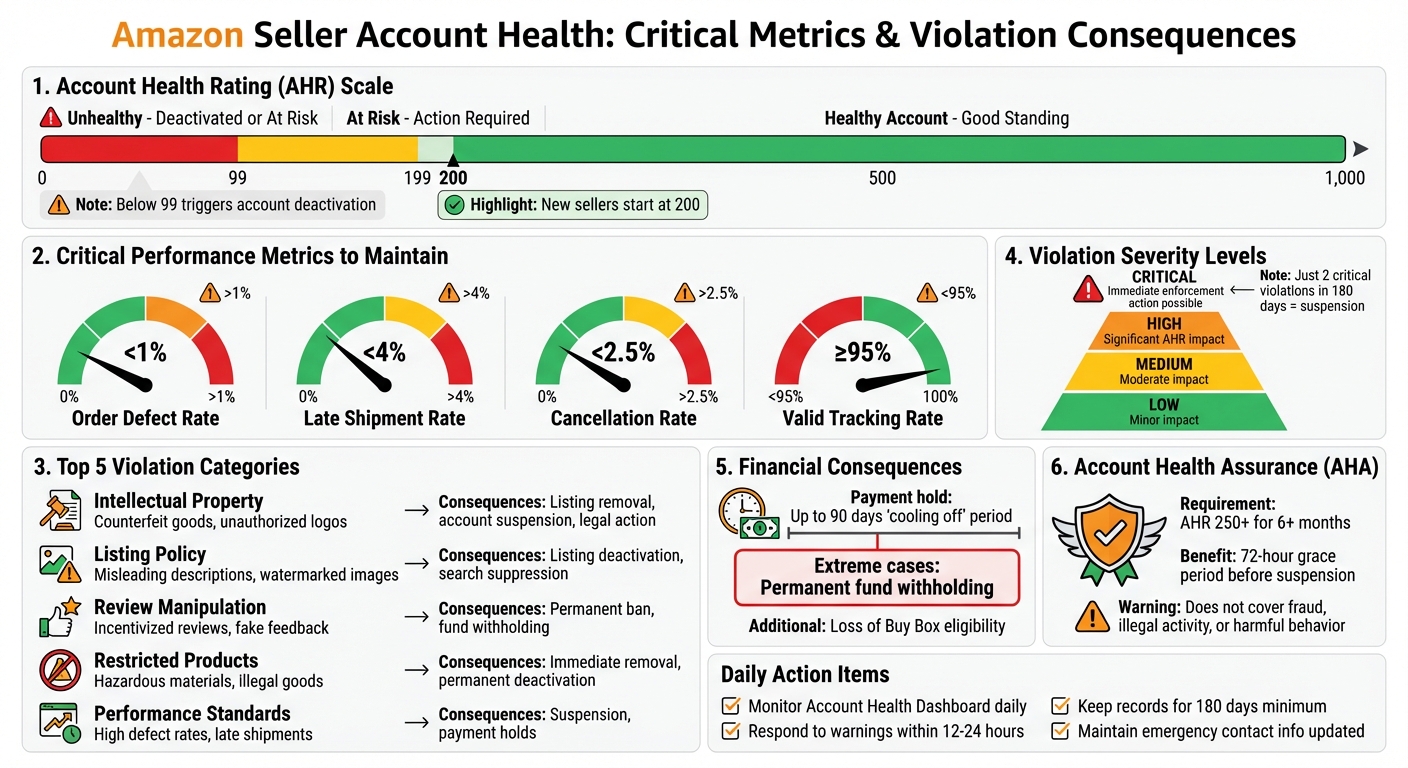
Violating Amazon’s policies can lead to account suspension, withheld payments for up to 90 days, or permanent loss of selling privileges. Amazon uses the Account Health Rating (AHR) to monitor compliance, with a score from 0 to 1,000. A score below 99 or multiple violations can trigger account deactivation.
Key metrics to maintain:
- Order Defect Rate: Below 1%
- Late Shipment Rate: Under 4%
- Cancellation Rate: Below 2.5%
Common violations include:
- Intellectual Property (IP) Issues: Unauthorized use of trademarks, counterfeit claims.
- Listing Errors: Misleading descriptions, restricted keywords, or watermarked images.
- Review Manipulation: Incentivizing reviews or altering feedback.
- Restricted Products: Selling hazardous or prohibited items.
- Performance Standards: Missing metrics like valid tracking or timely shipments.
To avoid issues:
- Monitor the Account Health Dashboard daily.
- Respond to warnings within 12–24 hours.
- Keep organized records (invoices, Letters of Authorization, safety certifications).
- Submit detailed appeals for violations, focusing on the root cause, corrective actions, and preventive measures.
Consistent monitoring and proper documentation are essential to safeguarding your Amazon seller account.
Amazon Seller Account Health Metrics and Violation Consequences
How to Appeal Amazon Policy Violations Step-by-Step Guide to Reinstating Your Account | 417K Reviews
What Are Amazon Policy Violations?
Policy violations are a critical issue for any seller on Amazon, as they can harm the marketplace's integrity. These violations might include selling counterfeit products, manipulating reviews, or providing false product details[3][4]. Amazon takes these breaches seriously, and the penalties can be severe.
Definition and Types of Policy Violations
A policy violation occurs when a seller fails to comply with Amazon's marketplace standards. These violations are displayed on the Account Health Dashboard[2]. To safeguard your account, it’s essential to understand the various categories of violations.
Intellectual Property (IP) violations happen when trademarks, copyrights, or patents are used without authorization. This includes selling counterfeit products. Amazon is clear on its stance:
"Even if a seller is infringing IP without knowledge, we will still take action and the seller's account might receive a warning or be suspended"[6].
This means sellers must verify the authenticity of every product they list.
Product listing violations occur when product titles, categories, or images don’t meet Amazon’s guidelines. For example, using watermarked images or adding promotional text to photos is against the rules[3][5]. Restricted products cover items like hazardous materials, illegal goods, or specific health supplements that require prior approval[7][3]. Another serious offense is review manipulation, which includes offering incentives for reviews or asking customers to alter or remove negative feedback. Amazon enforces a strict zero-tolerance policy here[4]. Lastly, performance standard violations arise when sellers fail to meet key metrics, such as Order Defect Rate, Late Shipment Rate, or valid tracking[3].
| Violation Category | Common Examples | Potential Consequences |
|---|---|---|
| Intellectual Property | Counterfeit goods, unauthorized logos, patent issues | Listing removal, account suspension, legal action [6] |
| Listing Policy | Misleading descriptions, watermarked images | Listing deactivation, search suppression [3][5] |
| Review Manipulation | Offering refunds for reviews, fake reviews | Permanent ban, fund withholding, public disclosure [4] |
| Restricted Products | Hazardous materials, illegal goods, supplements | Immediate removal, permanent deactivation [7][3] |
| Performance | High defect rates, late shipments | Suspension of privileges, payment holds [2][3] |
Understanding these categories helps sellers recognize risks and take proactive steps to protect their accounts.
It’s also important to differentiate between policy warnings and policy violations. Warnings appear as red alerts on the dashboard and remain visible for up to 180 days. Addressing these warnings promptly can prevent further action[2]. Violations, however, require a successful appeal with a Plan of Action (POA) to be removed from your record[2].
What Happens When You Violate Amazon Policies
The consequences of policy violations vary in severity. Amazon categorizes violations into four levels - critical, high, medium, and low. Critical violations can lead to immediate enforcement actions, regardless of your overall account score[8].
New sellers start with an Account Health Rating (AHR) of 200[8]. If this score drops to 99 or below, the account is flagged as "Unhealthy" and may already be deactivated or at risk of deactivation[8]. For serious violations, such as counterfeit sales, just two instances within 180 days can result in account suspension[8].
Financial repercussions can include a "cooling off" hold on payments for up to 90 days[2]. In extreme cases, Amazon may permanently withhold funds[2]. Additional penalties might involve deactivation of specific product listings, loss of Featured Offer (Buy Box) eligibility, or suspension of the ability to list new items[1][2].
One safeguard is Account Health Assurance (AHA). Sellers with an AHR of 250 or higher for at least six months qualify for this program, which offers a 72-hour window to resolve critical issues before suspension[2]. However, this protection doesn’t cover all situations. As Amazon states:
"Regardless of your AHR score, Amazon may deactivate your account immediately if we suspect fraudulent, deceptive, illegal, or otherwise harmful activity"[8].
To avoid these consequences, monitor your Account Health Dashboard regularly. Check the "Policy Compliance" section daily to catch potential issues before they escalate[9][2]. For severe violations, such as counterfeit claims or safety concerns, respond within 12–24 hours to prevent immediate action[9]. Keep documentation - like invoices, Letters of Authorization, and lab reports - on hand to address complaints quickly[6][9].
Next, we’ll dive into spotting violations early to keep your account in good standing.
How to Spot Policy Violations Early
Catching policy violations early can save you from the headache of dealing with a suspended account. Even small missteps can snowball into bigger problems, so staying vigilant is key. Amazon provides tools to monitor your account’s health in near real-time, allowing you to take action before issues spiral out of control. A proactive approach, particularly with the Account Health Dashboard, can make all the difference.
How to Use the Account Health Dashboard
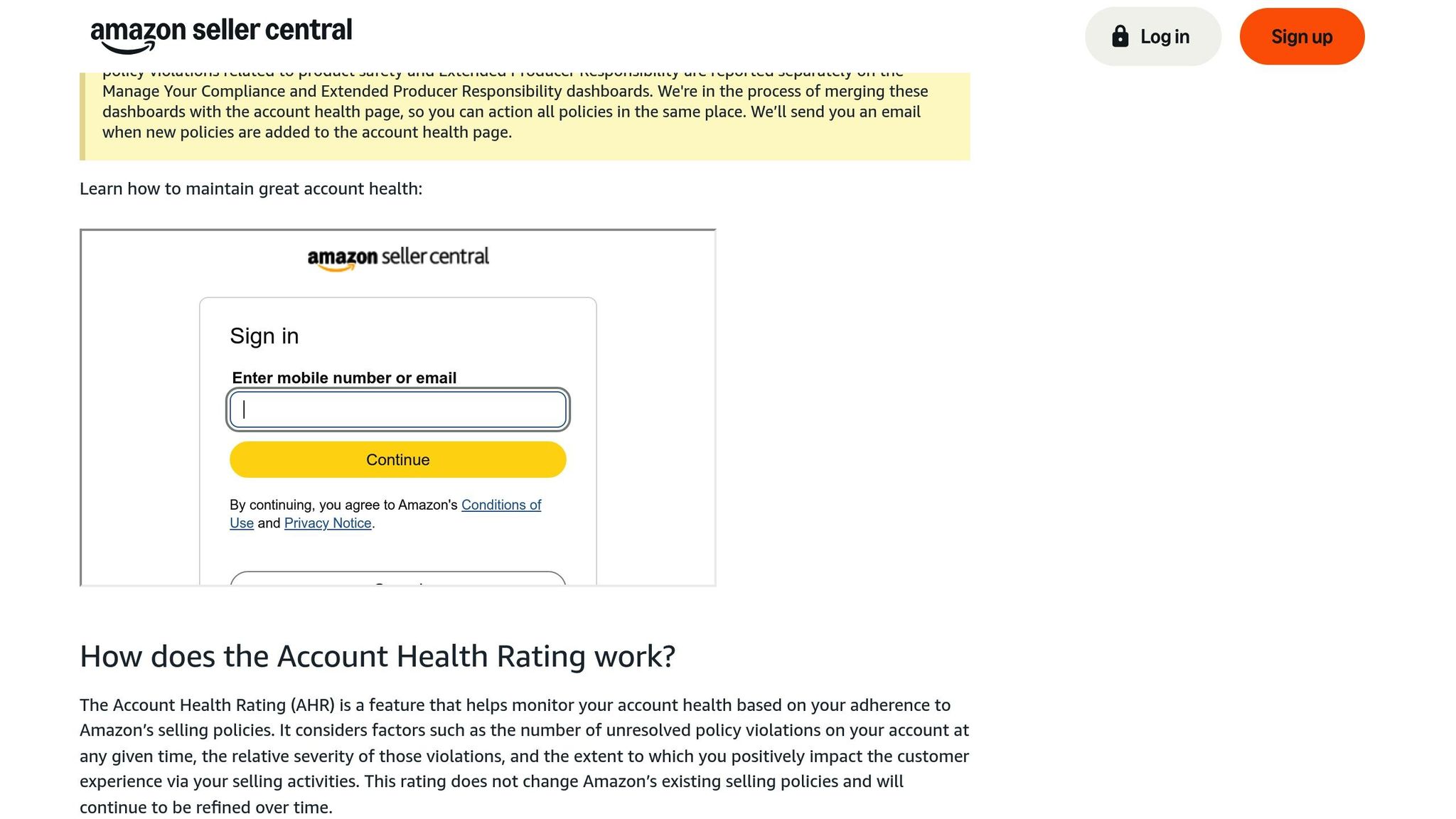
The Account Health Dashboard is your go-to tool for tracking compliance. It gives you an Account Health Rating (AHR) - a color-coded score ranging from 0 to 1,000 based on your account's activity over the past 180 days. Here’s how the ratings break down:
- Green (200–1,000): Your account is in good standing.
- Yellow (100–199): Your account is at risk; action is needed.
- Red (0–99): Your account is either unhealthy or already deactivated.
Make it a habit to check the dashboard daily. Look for red exclamation points or sudden drops in your score - these are red flags. Violations are categorized by severity: Critical, High, Medium, and Low. Critical violations are particularly dangerous and can result in immediate deactivation, even if your overall score appears fine.
To prioritize issues, use the "Account Health Rating Impact" filter to sort violations by severity. For restricted violations, click the "Review policy" link to see which policy you’ve breached and access Amazon’s guidelines. If the situation is urgent, use the "Call Me Now" button to speak directly with an Account Health specialist. Also, ensure your Emergency Notifications phone number is up to date in Seller Central so Amazon can contact you if needed.
Boost your AHR by fulfilling orders (you earn 4 points for every 200 orders over 180 days) and resolving violations promptly through appeals. Maintaining an AHR of 250 or higher for six months qualifies you for Account Health Assurance, which provides a 72-hour grace period to address critical issues before suspension.
The dashboard isn’t just about fixing problems - it also helps you spot early warning signs, which we’ll explore next.
Common Warning Signs to Watch For
Beyond the metrics on the dashboard, watch for Performance Notifications - Amazon’s official alerts about specific problems. Ignoring these can quickly lead to suspension. These notifications explain what went wrong and why it’s important to address the issue. For severe cases, aim to respond within 12–24 hours.
To avoid triggering these notifications, keep these metrics in check:
- Order Defect Rate: Below 1%
- Late Shipment Rate: Under 4%
- Cancellation Rate: Below 2.5%
- Valid Tracking Rate: At or above 95%
It’s crucial to understand the difference between Policy Warnings and Violations. Warnings are temporary alerts, while violations require a corrective appeal. Sometimes warnings are tucked under a "View All" link at the bottom of the violation boxes, so don’t miss them.
For suspected intellectual property (IP) complaints, a simple listing edit often resolves the issue. However, received complaints may require you to provide proof of authorization. Be especially cautious with repeat violations - point deductions double if the same violation occurs again within 180 days. Just two critical violations, like counterfeit sales, can result in account suspension.
Most Common Policy Violations and How to Fix Them
This section dives into three frequent policy violations and outlines the steps you can take to address them effectively. By leveraging insights from your Account Health Dashboard, you can identify these issues and act quickly to resolve them.
Inauthentic or Counterfeit Product Claims
When notified of an inauthentic or counterfeit claim, you have 72 hours to respond to avoid account deactivation [13]. These claims often arise from sourcing or documentation issues. Interestingly, 80% of counterfeit flags result from listing mismatches, not actual counterfeit products [13]. For instance, genuine items may be incorrectly listed under the wrong ASIN or brand.
To resolve these claims, Amazon requires specific documents:
- Wholesale invoices from the past 365 days
- Supplier contact details (phone, address, and website)
- A Letter of Authorization (LOA) from the brand owner, if applicable [20,21,24]
Ensure that the quantities on your invoices align with your sales volume during the same period [20,24].
"The burden of proof falls entirely on the seller."
– Amazon Sellers Lawyer [12]
Submit your appeal through the Account Health Dashboard using PDF or image formats like .jpg or .png [16]. Highlight key details on your invoices, such as ASINs, supplier names, and quantities [23,24]. Sellers who provide valid documentation alongside a clear corrective action plan have three times higher reinstatement rates [13].
Your Plan of Action (POA) should include:
- Root cause identification: For example, sourcing errors, listing mismatches, or missing paperwork.
- Immediate corrective actions: Steps like removing the listing, contacting the supplier, or verifying authenticity.
- Preventive measures: Regular account health checks and stricter supplier vetting.
Avoid using retail receipts or pro-forma invoices, as Amazon does not accept these as proof of authenticity [16].
Listing Policy Violations
Listing violations occur when product pages fail to meet Amazon’s guidelines, such as using restricted keywords, mislabeling product conditions, or bundling items improperly [7]. These issues often stem from restricted claims, incorrect descriptions, or non-compliant bundles.
In many cases, a simple edit to the listing can resolve the issue. However, if you receive an official violation notice, you'll need to submit a POA that explains the error and outlines your corrective actions. Aim to address these issues promptly - ideally within 24 hours - to maintain performance metrics within acceptable limits.
Intellectual Property Complaints
Intellectual property (IP) complaints are another common challenge and typically fall into three categories: trademark (brand names or logos), copyright (images or text), and patent (design or functionality) [25,26]. In 2024, Amazon's automated systems intercepted 99% of suspected IP infringements before they were even reported [14]. Still, any complaint should be taken seriously.
"Amazon takes claims of IP infringement seriously. Even if a seller is infringing IP without knowledge, we will still take action and the seller's account might receive a warning or be suspended."
– Amazon Intellectual Property Policy [6]
To address these complaints:
- Verify the claim: Review your sourcing documents and compare your listing to the complaint [25,26].
- Contact the complainant: Use the email provided in your Account Health Dashboard to request a retraction. If they agree, they must email notice-dispute@amazon.com with the case reference number [25,8].
-
Submit appropriate documentation:
- For copyright issues, file a DMCA counter-notice with a statement under penalty of perjury and consent to federal court jurisdiction [6].
- For patent claims, provide a court order demonstrating non-infringement or a detailed explanation of why the claim is incorrect [6].
- For trademark issues, secure a Letter of Authorization (LOA) from the brand owner, signed or stamped, and sent from an email linked to the brand’s domain [17]. Wholesale invoices alone usually won’t resolve these cases.
When listing compatible products, use clear formatting like:
"[Your Brand] [Product Name] compatible with [Main Brand] [Main Product Name]" [18].
| Notice Type | Required Documentation |
|---|---|
| Trademark/Counterfeit (Product) | Invoice or Order ID proving authenticity via the Account Health Dashboard |
| Trademark/Counterfeit (Detail Page) | Modify the page to remove infringing terms or provide a Letter of Authorization/Licensing Agreement |
| Copyright Infringement | DMCA counter-notice with a statement under penalty of perjury |
| Patent Infringement | Court order demonstrating non-infringement or specific reasons for error |
sbb-itb-81460ea
How to File an Appeal: Step-by-Step Process
If Amazon suspends your account or removes a listing, you’ll need to submit a Plan of Action (POA) through the Account Health Dashboard. Amazon typically responds within 24–48 hours, though intellectual property (IP) cases may take longer [23][25]. Your appeal must show that you understand the issue, have taken corrective action, and have measures in place to prevent it from happening again.
Finding the Root Cause of Your Violation
Begin by carefully reviewing the suspension or performance notification from Amazon. Match the language in the notice with Amazon’s official policy pages to identify which rule was broken [26]. Then, check the "Policy Compliance" section in your Account Health Dashboard to see if there were earlier warnings [2].
The root cause goes beyond what happened - it’s about why your business processes failed. For example, if you received an inauthentic claim, the issue might stem from not verifying your supplier’s credentials before purchasing inventory. Similarly, a listing violation could point to a lack of thorough review of Amazon’s product listing guidelines before posting [26]. Dig into your internal records and workflows to pinpoint where things went wrong [15].
"Identify the specific reasons that led to the issue. Provide a detailed analysis of how the problem occurred, whether it was related to intellectual property complaints, performance metrics, or other policy violations."
– Amazon Plan of Action (POA) [21]
Take responsibility for internal failures rather than blaming external factors [21].
Once the root cause is clear, you can move on to outlining your corrective and preventive actions.
Writing Your Corrective and Preventive Actions
Your next step is to provide a detailed plan of action. Split your POA into two sections: corrective actions (the immediate steps you’ve already taken) and preventive measures (long-term solutions to avoid future violations). For corrective actions, list specific steps such as removing problematic ASINs, issuing refunds to affected buyers, or ending relationships with unverified suppliers [20][28]. Include exact dates and timeframes to show when these actions were completed [10].
Preventive measures focus on addressing systemic problems. These could include creating new Standard Operating Procedures (SOPs), retraining your team on Amazon’s Seller Code of Conduct, or using automated tools to catch listing issues before they’re published [27][28]. For instance, if quality control was an issue, explain how you’ve added a 3-step inspection process at your warehouse or implemented secondary checks before sending products to FBA [24][20].
"Amazon prioritizes execution over intention, so this part of the POA should describe concrete operational steps rather than vague commitments."
– ESQGo, PC [27]
Structure your appeal with clear headings and bullet points. While simpler cases may require just 1–2 pages, more complex violations might need 5–6 pages of detailed documentation [19][22][24]. Attach evidence like invoices, contracts, or screenshots, and highlight key details such as ASINs, supplier names, or quantities to help Amazon’s team review your case [15]. Avoid generic templates or AI-generated content - Amazon’s Seller Performance teams can identify and reject appeals that lack depth or personalization [20][22][24].
Submit your appeal through the Account Health page in Seller Central by clicking "Appeal" next to the violation [19][15]. Keep your tone professional and factual - avoid emotional language or legal threats [19][22][24].
How to Prevent Future Policy Violations
Avoiding policy violations on Amazon requires a proactive approach. Amazon's enforcement system now emphasizes monitoring and prevention over penalties, meaning sellers who stay informed and maintain proper documentation can steer clear of most issues. It's no secret that Amazon operates in a fast-paced environment where change is constant [2].
To build on corrective actions and prevent future violations, focus on staying informed and keeping detailed records.
Staying Up to Date with Amazon Policies
Make it a habit to check your Account Health Dashboard daily. This practice allows you to identify potential issues while they're still warnings instead of full-blown violations. Warnings remain visible for 180 days [2], giving you time to address them. Pay close attention to the "Policy Compliance" section, prioritizing items marked as "Critical" or "High" severity since they greatly affect your Account Health Rating (AHR) [8].
Review the "Account Health News" weekly to stay updated on listing requirements and enforcement priorities [8]. For instance, the January 21, 2025, title update introduced a 200-character limit, which led to a 15% increase in click-through rates for listings that complied [32]. Sellers who adapted early avoided listing suppressions.
Ensure your "Emergency Notifications" phone number is up to date in Seller Central under "Notifications preferences" [8]. If you qualify for Account Health Assurance (AHA) - which requires an AHR of 250+ for at least six months [2] - Amazon will use this number to notify you of critical issues, giving you a 72-hour window to resolve them before account suspension.
Leverage Seller University for in-depth training on specific policies [1]. Participate in Seller Forums to see how others interpret recent changes and enforcement trends [29][31]. As AMZ Sellers Attorney emphasizes:
"Policy awareness = fewer defects, happier customers, and healthier accounts" [30].
These steps help you stay compliant and set a solid foundation for effective record-keeping.
Keeping Proper Documentation and Records
Pair proactive monitoring with meticulous documentation. Amazon increasingly relies on seller-provided records to verify compliance [9]. Your documents serve as your first line of defense against automated flags. Keep detailed invoices that include product names, quantities, and supplier contact details [9]. Organize these files by ASIN and expiration date for quick access when needed.
For products requiring safety certifications, maintain lab test reports and regulatory compliance certificates (e.g., UL, CE, or FDA approvals) [9]. If you're selling in gated categories, secure Letters of Authorization (LOA) from brand owners ahead of time [9]. These records can help resolve intellectual property complaints swiftly. The Seller Candy Team advises:
"Check where your products come from, confirm they are genuine, and keep all your purchase records, such as orders and receipts. You'll need these if you have to show proof to Amazon" [9].
Hold onto compliance and purchase records for at least 180 days [9]. Additionally, create a product change log to document supplier switches, packaging updates, or ingredient modifications [32]. This log ensures your records remain accurate for each SKU, even as your business evolves. It also allows for quicker resolution of automated flags, safeguarding your AHR. Proper documentation not only protects your account health but also reinforces the corrective measures discussed earlier, forming a strong defense against policy violations.
Conclusion
Taking a proactive stance is crucial - regular monitoring, timely appeals, and thorough documentation are the backbone of staying compliant. Policy warnings will appear on your Account Health Dashboard for up to 180 days, but stopping the actions that caused them will clear the warnings. However, violations remain visible until you successfully appeal and resolve them [2][9]. Keeping an eye on your account daily can help you avoid serious issues like account deactivation or payment holds, which can last up to 90 days [2].
If you face a violation, your appeal must include three essential elements: identifying the root cause, outlining immediate fixes, and presenting long-term solutions to prevent future issues. Provide evidence that demonstrates your understanding of the mistake and the steps you've taken to prevent it from happening again. As AmazonAppealLetter.com explains:
"Amazon needs to believe you; your job is to convince them" [11].
Beyond addressing violations, early detection paired with preventive measures is key. Strive to maintain an Account Health Rating (AHR) of 250+ and monitor key metrics to avoid suspension [1][2]. Meeting these benchmarks ensures your business operates without interruptions.
It’s also vital to keep supplier invoices, safety certifications, and Letters of Authorization on hand for at least 180 days [9]. Amazon relies on these records to verify compliance, and organizing them by ASIN can help resolve automated flags more efficiently. Proper documentation supports the corrective actions you take and reinforces your compliance efforts. Additionally, never engage in review manipulation - Amazon strictly enforces this policy [4]. Use official tools like the "Request a Review" button in Seller Central to stay within guidelines.
Successful sellers make policy compliance a daily habit. Start your day by reviewing your dashboard, and stay informed through resources like Account Health News and Seller University [1][8]. These practices are the foundation of a thriving and uninterrupted business.
FAQs
What should I do first after a policy violation notice?
When you get a policy violation notice, the first step is to check your Seller Central Account Health page. This will show you which policies were violated and the specific ASINs involved. From there, collect any necessary evidence - this could include invoices, product certifications, or other documentation that supports your case.
Next, focus on resolving the issue. This might mean fixing the problematic listings or removing them entirely. Once you've addressed the issue, create a Plan of Action (POA). Your POA should include three key parts:
- The root cause of the violation
- The corrective actions you've taken
- The steps you'll implement to avoid similar issues in the future
A clear and thorough POA can make all the difference in resolving the situation effectively.
How do I prove my products are authentic to Amazon?
To confirm the authenticity of your products, you’ll need to provide invoices from suppliers that are either authorized or can be verified. These invoices should be no older than 365 days and must include key details such as SKUs, quantities, supplier contact information, and purchase dates. It's essential that the information aligns perfectly with the products you're listing. Double-check for accuracy to avoid any inconsistencies. If Amazon requests this documentation, make sure to respond within 72 hours to prevent any potential issues with your account.
When should I contact Account Health Support?
If you're dealing with challenges like policy violations, performance issues, or potential account deactivation, Amazon's Account Health Support is your go-to resource. This specialized team assists Professional Sellers in tackling Account Health-related matters, such as handling violation notices or managing appeals. To stay on top of things, regularly check your Account Health page and act quickly to resolve any flagged issues. Whether it's completing appeal questionnaires or submitting detailed plans of action, addressing concerns promptly is key to staying compliant with Amazon's policies.
