

Yes, you need a trademark to enroll in Amazon Brand Registry. Amazon requires either an active registered trademark or a pending application from an approved intellectual property office, like the USPTO. This step ensures you are recognized as the legal owner of your brand and unlocks tools to protect your brand and grow your sales on Amazon.
Key Points:
- Trademarks Accepted: Text-based (word) trademarks and design trademarks with text, letters, or numbers.
- Eligibility: Trademarks must be registered on the Principal Register or have a pending USPTO serial number.
- Benefits of Enrollment: Access to features like A+ Content, Brand Analytics, custom Amazon Stores, and counterfeit protection.
- Without a Trademark: You risk losing access to critical tools and may face challenges like trademark extortion or counterfeit issues.
Amazon allows you to enroll with a pending trademark application, so you don’t have to wait for full registration to start benefiting from the program. Ensure your brand name matches your trademark record exactly, and your products display the brand name permanently during production.
New for 2026:
- Sellers using manufacturer UPCs for FBA must enroll in Brand Registry.
- Pending trademarks are now accepted for faster enrollment.
- A single global account system simplifies management across marketplaces.
Having a trademark is a must for protecting your brand and accessing Amazon’s tools. Start the process early to secure your brand and take advantage of these features.
Should I register a trademark with Brand Registry? | Amazon Selling Insights
sbb-itb-81460ea
Do You Need a Trademark for Amazon Brand Registry?
Yes, you’ll need a valid trademark - either active or pending - to enroll in Amazon Brand Registry. Amazon requires this trademark to be issued by an approved intellectual property office, like the USPTO. Even if your trademark application is still pending, you can provide the serial number to start accessing Brand Registry benefits right away[4].
Amazon accepts two types of trademarks: text-based (word) trademarks and design trademarks. However, purely graphical symbols without text won’t qualify[6][8]. It’s also crucial that your brand name on your product or packaging matches the trademark exactly - though capitalization differences are allowed. This ensures that ownership is verified and that Amazon’s protective features can function effectively.
Why Amazon Requires Trademarks
Amazon uses trademarks to confirm that you’re the authentic owner of your brand. By linking your intellectual property rights to your seller account, Amazon relies on the legal vetting done by organizations like the USPTO[4]. This verification is foundational for the Brand Registry’s features, including counterfeit prevention and advanced marketing tools.
Trademarks also power Amazon’s automated systems. For example, in 2024, Amazon’s machine learning tools blocked over 99% of suspected counterfeit listings before brands even needed to report them[3].
"Amazon Brand Registry is Amazon's in-house system for tying a specific brand to a specific rights owner on the platform." – Lawyer-Chicago[4]
What Happens Without a Trademark
Without a trademark, you won’t be able to use Amazon’s key protection and marketing tools. This means you’ll miss out on features like Report a Violation, Project Zero, Transparency, A+ Content, Brand Stores, Brand Analytics, and Amazon Vine[3][4][5]. Losing access to these tools can make it harder to compete.
You’ll also face greater risks, like trademark extortion. Bad actors might fraudulently register trademarks already in use by other sellers, leading to the de-listing of legitimate products[7]. Since Brand Registry’s introduction, trademark applications from small businesses have nearly doubled, creating significant backlogs at offices like the USPTO[7].
Which Trademarks Qualify for Amazon Brand Registry
Amazon accepts two types of trademarks for its Brand Registry: text-based marks (word marks) and image-based marks (design marks) that include words, letters, or numbers. To qualify, these trademarks must either be fully registered and active or pending with a valid USPTO serial number.
Logos that are purely graphic without any text are not accepted. Additionally, the trademark must appear on the USPTO's Principal Register. Marks listed on the Supplemental Register do not meet Amazon's requirements.
Your brand name must be permanently attached to your products or packaging - this could mean being printed, engraved, sewn, or laser-etched during production. Amazon does not allow stickers, removable labels, stamps, or tags.
"Stickers, labels, stamps, and tags are not considered permanent since they can be easily added or removed after production." – Lisienne Intumu, Program Manager, Amazon
The trademark text must exactly match your brand name on Amazon, including spaces and symbols. However, differences in capitalization are acceptable. Below, we’ll break down the differences between word marks and design marks and explain why they matter.
Word Marks vs. Design Marks
Word marks (also known as standard character marks) are trademarks that protect a brand name in plain text, regardless of how it’s styled. For example, if you register "Stellar Gear" as a word mark, you can use it in bold, italic, script, or any other format, and it will still be protected.
Design marks, on the other hand, are trademarks that include specific fonts, colors, or graphic elements along with text. To qualify for Amazon Brand Registry, design marks must include words, letters, or numbers - logos that consist solely of graphics won’t be accepted.
Trademark attorneys often suggest starting with a word mark because it offers broader legal protection and simplifies the process of matching your brand name on Amazon. Once your visual branding is finalized, you can add a design mark later. Word marks are also more adaptable if your brand evolves over time.
US Trademark Requirements
For US-based sellers, trademarks must come from the United States Patent and Trademark Office (USPTO) and must be registered on the Principal Register. This is a key requirement for Amazon Brand Registry. Trademarks on the Supplemental Register, which are typically for descriptive marks that lack distinctiveness, are not eligible and often lead to application denials.
Your trademark can be either active/registered or pending. If it’s pending, you’ll need the serial number from your USPTO application. The good news is that Amazon now allows Brand Registry access while your trademark application is under review, so you don’t have to wait for final registration.
Additionally, your product photos must show the brand name permanently affixed during production. Digitally edited or computer-generated images are not accepted.
To speed up the process, Amazon offers its IP Accelerator program, which helps brands gain access to the Brand Registry while their trademark is still pending. Over 16,000 brands have already taken advantage of this service.
How to Get a Trademark for Amazon Brand Registry
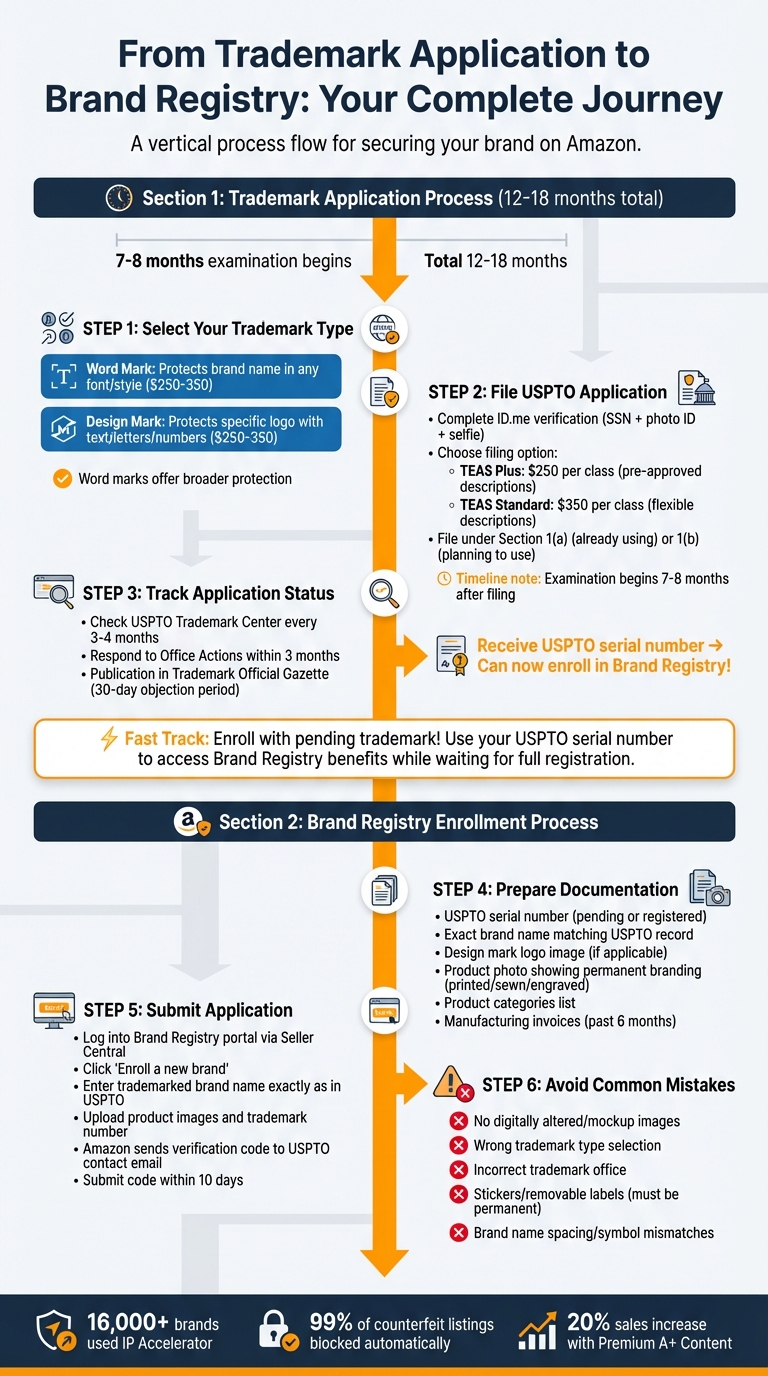
How to Get a Trademark and Enroll in Amazon Brand Registry: Complete Process
Securing a USPTO trademark involves three main steps: selecting your trademark type, filing your application, and tracking its progress. While the entire process typically takes 12–18 months [12], Amazon allows you to enroll in Brand Registry as soon as you receive your USPTO serial number for a pending trademark [4]. This means you can get started with Brand Registry tools even before the trademark process is fully complete.
Before filing, use the USPTO's Trademark Electronic Search System to confirm that your brand name is unique within your product category [10]. This step helps avoid conflicts that could delay or derail your application.
Step 1: Select Your Trademark Type
You’ll need to decide between two types of trademarks: word marks and design marks.
- Word marks protect your brand name in any font, size, or color, offering flexibility for Amazon sellers [9][10]. They are a good choice if you expect your logo to change over time [4].
- Design marks protect a specific logo design. However, Amazon requires that design marks include words, letters, or numbers - logos that are purely graphic symbols won’t qualify [4][1].
Step 2: File Your USPTO Application
Once you’ve chosen your trademark type, file your application through the USPTO. Before you begin, complete identity verification via ID.me, which involves providing your Social Security Number, a photo ID, and a selfie for biometric confirmation [10]. After verification, you can submit your application via the USPTO Trademark Center.
When filing, you’ll have two fee options:
- TEAS Plus: $250 per class, requires selecting from pre-approved descriptions of goods and services.
- TEAS Standard: $350 per class, allows more flexibility in describing your goods and services [10].
Most sellers file under Section 1(a) if they’re already using the mark in commerce or Section 1(b) if they plan to launch soon [11]. The application process enters the examination phase about 7–8 months after filing [10]. If the examiner approves your application, it will be published in the Trademark Official Gazette, giving third parties 30 days to file objections [9].
Step 3: Track Your Application Status
Check the status of your application every 3–4 months using the USPTO Trademark Center [9]. If you receive an Office Action (a notice of issues with your application), you’ll need to respond within 3 months to keep the process moving [9].
Make sure your contact information with the USPTO is always up to date. Missing deadlines can result in your application being abandoned, and you may need to pay additional fees to reinstate it.
Once you have your USPTO serial number, you can enroll in Amazon Brand Registry. Amazon will send a verification code to the public contact listed on your application, which you’ll use to complete the registration process [4][1]. Following these steps ensures you can take full advantage of Amazon Brand Registry’s tools to protect your brand.
How to Enroll in Amazon Brand Registry
Once you’ve secured your USPTO serial number, it’s time to enroll in Amazon’s Brand Registry. This step is essential for protecting your brand and accessing tools that can help manage your presence on Amazon. To start, head over to Amazon’s Brand Registry portal with your USPTO serial number in hand. Be cautious during the application process - small errors, like spacing issues or temporary labels, can lead to rejection.
Prepare Your Documentation
Before diving into the enrollment process, make sure you’ve got all the necessary documents ready. Here’s what you’ll need:
- Your trademark registration or pending USPTO serial number.
- The exact brand name as it appears on your USPTO record.
- A clear image of your design mark logo.
- At least one unaltered photo of your product or packaging that shows your brand name or logo permanently affixed. This could be through methods like printing, sewing, laser etching, or engraving. Note: Stickers, stamps, or hang tags won’t be accepted.
Additionally, create a list of product categories where your brand will be listed. If you’re not the trademark owner, you’ll need an authorization letter or licensee agreement from the legal owner. It’s also a good idea to have recent manufacturing or supply invoices from the past six months on hand, as Amazon may request these to confirm your relationship with the manufacturer.
Once you’ve gathered all the necessary documents, you’re ready to submit your application through Seller Central.
Submit Your Application Through Seller Central

Log in to the Brand Registry portal using your Seller or Vendor Central credentials. This ensures your selling tools and brand tools remain connected. On the home page, click the “Enroll a new brand” button to begin the application process.
You’ll need to enter your trademarked brand name exactly as it appears in your USPTO record. Then, upload the required product images, provide your trademark number, and select the appropriate trademark office. After submitting your application, Amazon will send a verification code to the public contact or correspondent email listed on your USPTO record (this is often your trademark attorney’s email). You’ll have 10 days to retrieve the code and submit it through the case log. Missing this deadline will result in the application being closed, meaning you’ll need to start over.
Avoid Common Enrollment Mistakes
To ensure a smooth application process, watch out for these common errors that could delay or derail your enrollment:
- Using digitally altered images: Avoid submitting mockups or photoshopped images. Amazon requires genuine, unaltered photos taken with a standard camera. Altered images can lead to denial and potentially flag your account for additional scrutiny.
- Selecting the wrong trademark type: Double-check that the type of trademark you select matches your USPTO record exactly. Any mismatch can lead to immediate rejection.
- Choosing the incorrect trademark office: If your trademark isn’t registered with USPTO but you select it anyway, your application will be disapproved. Make sure the trademark office aligns with where your trademark is officially filed.
- Incorrect contact information: Ensure the contact details listed for your trademark correspondent are accurate. This is critical because they’ll receive the verification code required to complete your enrollment.
2026 Amazon Brand Registry Updates
Amazon has introduced several updates to its Brand Registry program for 2026, focusing on streamlining processes and tightening requirements.
Starting in spring 2026, sellers using manufacturer UPCs for FBA must enroll in Amazon Brand Registry. Sellers who are not enrolled will be required to switch to Amazon barcodes (FNSKUs), making registration a must for those relying on manufacturer UPCs [13].
To simplify enrollment, Amazon now accepts pending trademark applications from supported government IP offices. This means sellers can use an application number instead of waiting for full trademark registration, speeding up the process for new and existing sellers [13][1].
Another notable change is the shift to a single global Brand Registry account system. Instead of managing separate accounts for different marketplaces, sellers can now add trademarks from other countries to their existing account after the initial approval. This update simplifies operations for those selling across multiple regions [13].
Amazon has also tightened its documentation requirements. Sellers must now provide higher-resolution images of logos and packaging, along with recent invoices from sourcing or manufacturing that clearly display their brand name. Additionally, Amazon enforces stricter branding alignment - your brand name must match your trademark record exactly, including spaces, symbols, and capitalization. Even minor differences, like "BrandName" versus "Brand Name", can result in denial [13][5].
Lastly, the IP Accelerator program has seen changes. According to 2026 guidance, filing directly with the USPTO is now just as fast and potentially more cost-effective than using IP Accelerator. While the program still connects sellers with vetted legal professionals, it no longer provides the enrollment speed advantage it once did [13].
Conclusion
To join Amazon Brand Registry, having a trademark is non-negotiable. Whether it’s a registered trademark or a pending application with the USPTO or another approved IP office, this step unlocks Amazon’s tools for brand protection and growth. Without it, features like A+ Content, Brand Analytics, and enforcement tools to combat counterfeiters remain out of reach.
The good news? Amazon now allows enrollment with a pending trademark application. This means you can file with the USPTO and start using benefits like Premium A+ Content while your application is still being processed. And that’s no small perk - Premium A+ Content has been shown to increase sales by as much as 20% [2].
A trademark doesn’t just provide marketing exclusivity and legal protections - it also activates automated systems that block over 99% of infringing listings [3]. This creates a strong foundation for your brand’s protection and smooth enrollment.
Enrollment is free, and the benefits start immediately. Just make sure your brand name matches your trademark record, your branding is permanently visible on your products, and your trademark correspondent can send Amazon’s verification code within 10 days.
FAQs
How long does Brand Registry approval take with a pending trademark?
Amazon Brand Registry approval with a pending trademark usually takes 2–3 weeks. However, this timeline isn't set in stone - it can vary based on the review process and other influencing factors. Occasionally, it might take longer than expected.
What if my brand name on Amazon doesn’t match my trademark exactly?
If your Amazon brand name doesn’t perfectly align with your registered trademark, your application for the Amazon Brand Registry might get rejected. Amazon carefully checks that your trademark matches the branding displayed on their platform. To avoid complications, make sure your trademark and brand name are an exact match.
Can I use Brand Registry if I’m not the trademark owner?
No, you can't use Amazon Brand Registry unless you own a trademark. To enroll, you need a registered or pending trademark. This requirement helps confirm your ownership and safeguards your intellectual property on Amazon's platform.
